



Color Discrepancy Between Photoshop and InDesign RGB Elements: Transparency Blend Space Issue
I am struggling with a lingering visual difference between RGB elements in InDesign vs Photohop.
Here is the download link if you are interested :
Both RGB and CMYK.zip
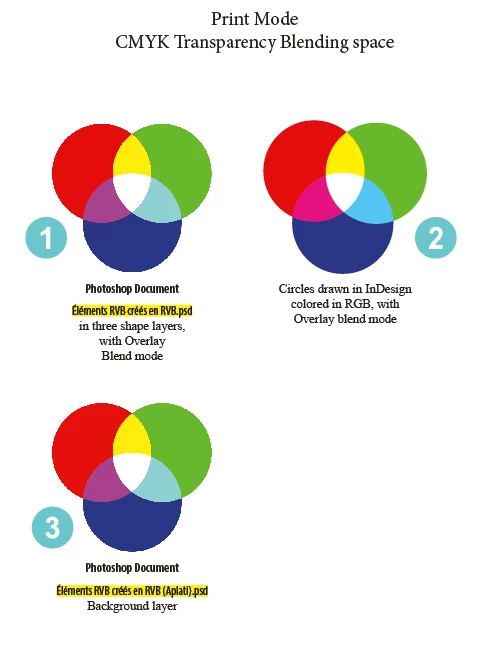
And here are two screen captures that document the visual difference.
First the "Print mode" version :
And now, the "Web mode" version :
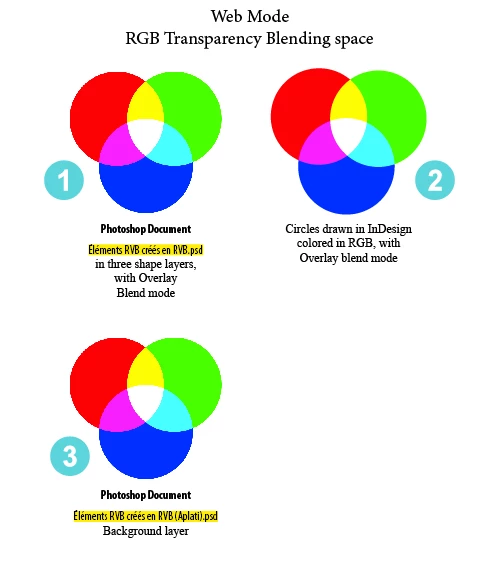
To me, InDesign "correctly" renders the colors on screen when Transparency Blend Space is set to RGB.
But, for the life of me, I can't understand why InDesign can't corretly render the colors when Transparency Blend space is set to CMYK?
It's as though, the RGB elements created in InDesign were rendered differently than those elements employing the same RGB color space and blending mode in Photoshop?
I tried pushing the analysis further, by exporting to PDF : when the PDF is exported with no color conversion, the colors continue to appear "mismatched" in the PDF. But when the PDF is exported to RGB, the colors appear correct.
I hate to bring this problem up again but it was bugging me before and it is still bugging me now.
I fail to see the logic behind InDesign processing.
Any help is appreciated and thank you in advance for your kind patience.
<Title renamed by MOD>


 AdChoices