Known Participant
Oct 10, 2021 7:40 AM UTC
Answered

color live preview

Hi, is it possible to have the color preview in InDesign, like in photoshop.


When I want to select a color for my text, I can only choose a color in the color wheel, and then click apply to see the result and estimate whether I like it in context or not.


In photoshop, I can see the result in the screen while I'm moving the mouse around the color wheel, which is way more efficient because I can see all variations and stop on something I like instantly.


I've seen this option in some color wheels in InDesign but most of the time this is not an option, is that normal ?

Is there a way to have instant live preview for all color wheels ?


Cheers.

 

This topic is closed to new replies. Start a new post to keep the conversation going.
rob day
rob dayCorrect answer
Community Expert
Oct 10, 2021 1:30 PM UTC

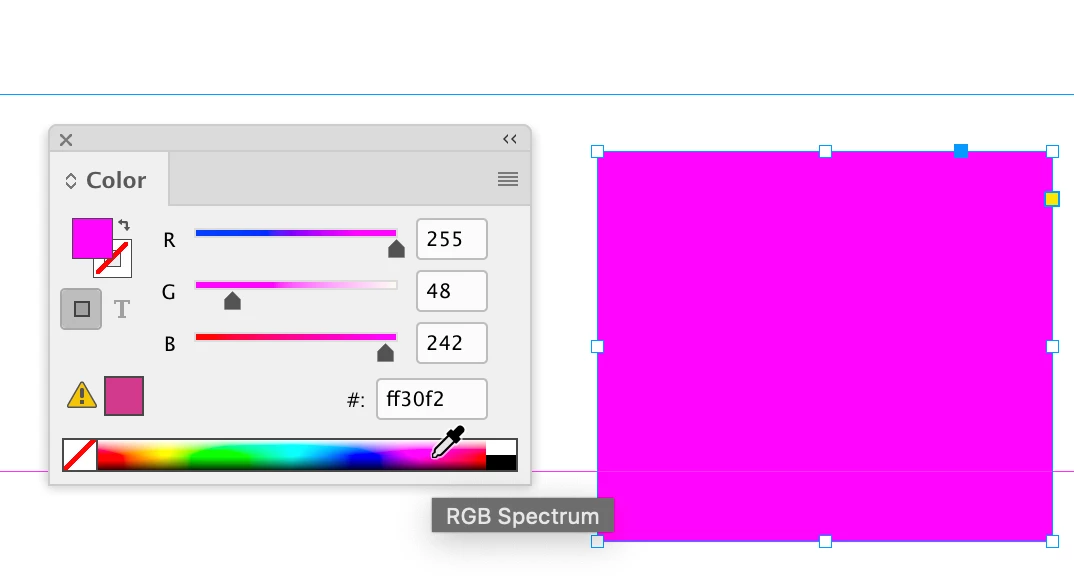
You can’t do it with the Color Picker, but the Color Panel set to RGB, Lab, or CMYK mode will show live changes to a selection’s fill or stroke. You can also use Swatch Options to make a live global color change with color sliders when Preview is checked.


3 replies

Geоrge
Legend
Oct 10, 2021 9:16 AM UTC

You can use a trick with split window


https://creativepro.com/parts-document/


Translate
Remember, never say you can't do something in InDesign, it's always just a question of finding the right workaround to get the job done. © David Blatner
Known Participant
Oct 10, 2021 11:53 AM UTC

Thanks, but I don't see how the split window feature is related to my problem. I probably didn't explain correctly my problem.


Here is a screenshot:


where we can see a text in green on the page. To change the color I open the color picker, but as I'm dragging the mouse inside the color picker I don't see the text color change, and that's my problem.

This means I'm forced to click ok to see the color change.


In photoshop, I would be able to see those color changes while dragging the mouse inside the color picker, which is a much more efficient workflow.


Hopefully I did a better job at describing my problem.

Cheers.


Translate
rob day
Community Expert
rob dayCommunity ExpertCorrect answer
Community Expert
Oct 10, 2021 1:30 PM UTC

You can’t do it with the Color Picker, but the Color Panel set to RGB, Lab, or CMYK mode will show live changes to a selection’s fill or stroke. You can also use Swatch Options to make a live global color change with color sliders when Preview is checked.


Translate