


Participating Frequently
October 29, 2019
Answered

Color management within a document

  • October 29, 2019
  • 3 replies
  • 735 views

Hi! I'm not exactly what you'd call new to InDesign, but I never really learned the ins and outs of color management. I work mostly as a digital designer, mainly in RGB. I am working on a document in InDesign that is ultimately destined to be a PDF to be viewed on-screen. I am finding that my colors vary from page to page within a document.


For example, I when am using this RGB color:
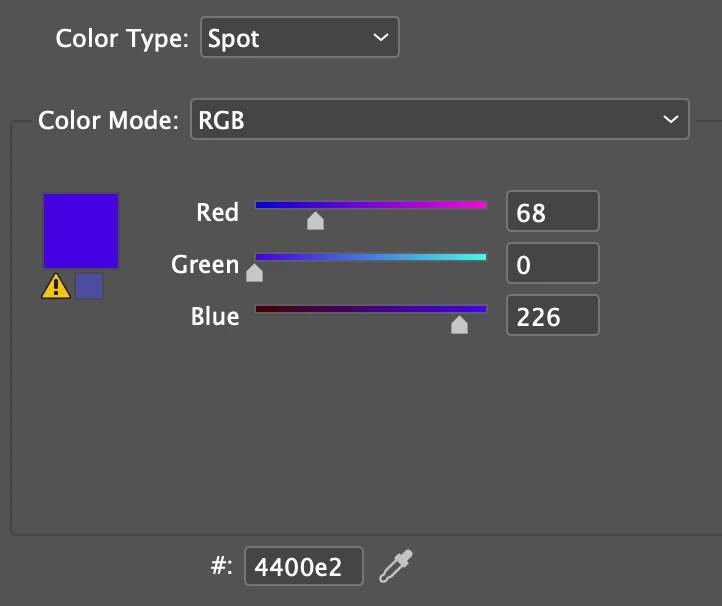
It actually appears differently on different pages. For example:


These are the same color but one appears as CMYK and the other RGB.


What should I change to make these appear a consistent color across the document?


Thanks in advance!

    This topic has been closed for replies.
    Correct answer Test Screen Name

    Make sure that your docyment’s transparency blend space is RGB. 

    3 replies

    rob day
    Community Expert
    Community Expert
    October 30, 2019

    I am working on a document in InDesign that is ultimately destined to be a PDF to be viewed on-screen.


    Also set the document’s assigned RGB profile to sRGB (Edit>Assign profiles...), and when you export the PDF also set the Output tab’s destination to sRGB. If you are exporting an interactive PDF all color is automatically converted to sRGB.

    dmnycAuthor
    Participating Frequently
    October 30, 2019

    Thanks - I will check that as well.

    Randy Hagan
    Community Expert
    Community Expert
    October 30, 2019

    Test_Screen_Name isn't steering you wrong.


    If making the color appear consistently onscreen is your priority, using one color model is necessary. If making your color build in appear the same way as your picked RGB color swatch is the priority, you want to use that RGB color build.


    Just realize that the RGB color space can show all kinds of shades which can't be printed in CMYK four-color process printing. So the differences in the color you see onscreen in your examples is telling you something. Which is: If you print it, it's probably not going to match the deep blue RGB color build you specified onscreen.

    Test Screen NameCorrect answer
    Legend
    October 29, 2019

    Make sure that your docyment’s transparency blend space is RGB. 

    dmnycAuthor
    Participating Frequently
    October 30, 2019

    Thanks! I had never seen that option before.