Participant
July 30, 2018
Answered

Color picker is missing

  • July 30, 2018
  • 3 replies
  • 10097 views

Since today the color picker is not shown in my tool bar on the left (inDesign). How can I add the color picker again to tool bar?

Thank you

    This topic has been closed for replies.
    Correct answer Barb Binder

    If you double click the fill or stroke color in InDesign, the color picker will appear (just like double-clicking the foreground and background color chips in Photoshop):
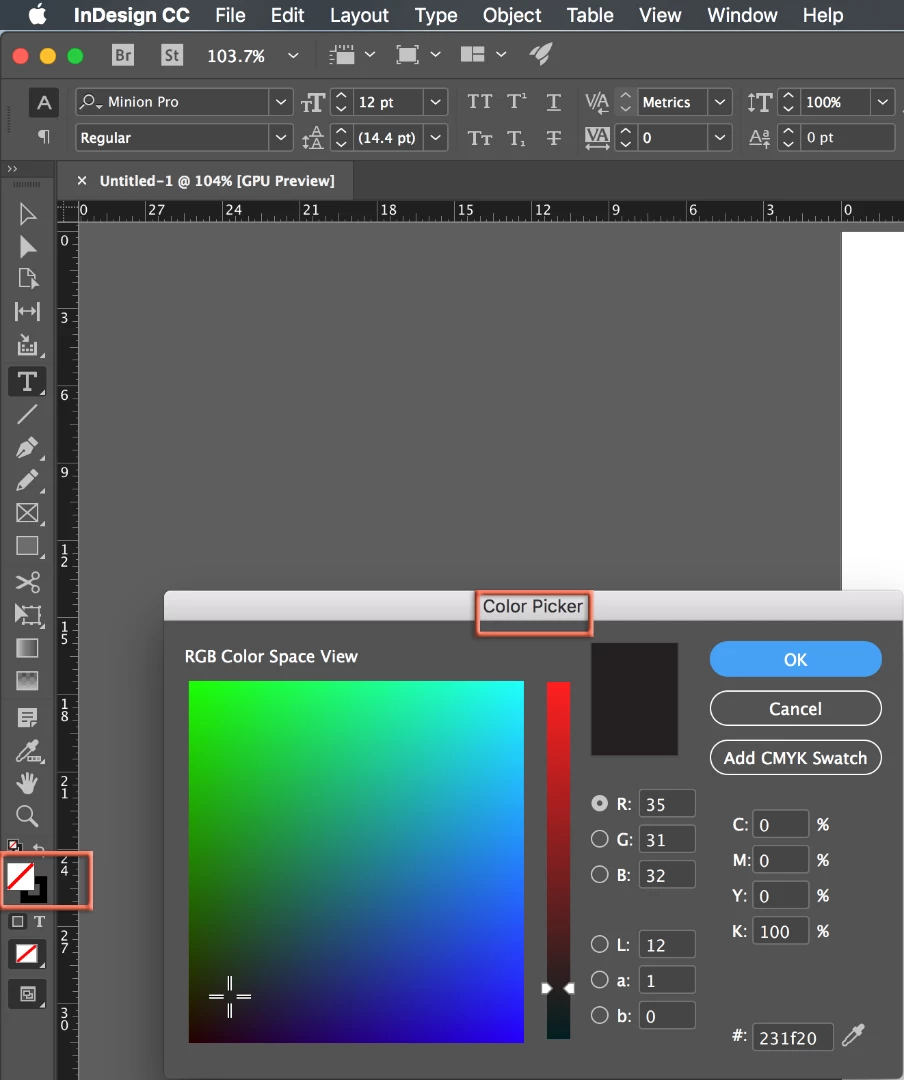
    That said, I'm also guessing that you mean the Eyedropper tool or Color Theme tool. If so, press and hold on whatever tool is showing two up from the Hand tool to see the hidden tools. Or type I (for Eyedropper) or Shift+I (for the Color Theme tool).

    ~Barb

    3 replies

    Barb Binder
    Community Expert
    Barb BinderCommunity ExpertCorrect answer
    Community Expert
    July 30, 2018

    If you double click the fill or stroke color in InDesign, the color picker will appear (just like double-clicking the foreground and background color chips in Photoshop):

    That said, I'm also guessing that you mean the Eyedropper tool or Color Theme tool. If so, press and hold on whatever tool is showing two up from the Hand tool to see the hidden tools. Or type I (for Eyedropper) or Shift+I (for the Color Theme tool).

    ~Barb

    ~Barb at Rocky Mountain Training
    Derek Cross
    Community Expert
    Community Expert
    July 30, 2018

    Are you sure the Color Picker tool is not being "hidden" underneath another tool, such as the Measure Tool?

    Jongware
    Community Expert
    Community Expert
    July 30, 2018

    You mean the Eye dropper, right? The Color Picker is something else.

    If it does not appear as usual (*), it may be time to Troubleshooting 101: Replace, or "trash" your InDesign preferences [2009 Outdated & Locked]

    (*) Of course you know, click-and-hold the mouse button.

    Participant
    January 6, 2020

    Yes! I needed this. Thank you!