newsbulletin
Participant
September 20, 2019
Answered

Color Picker Space View
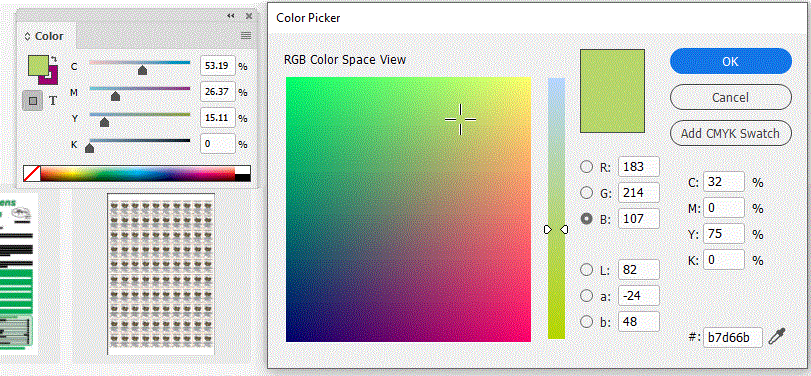
  • September 20, 2019
  • 3 replies
  • 1195 views

Need Help. I'm using Indesign CC and it is up to date. I'm on Windows 10. Somehow I manged to change the color picker space view to RGB, when it's been set to CMYK for the past ten years. I called Adobe Tech support and they could not help. I've tried closing my document, and creating a new one, but the color picker space view is still set to RGB Space View and not CMYK Space View. Agh!! HELP!

    This topic has been closed for replies.
    Correct answer mary beth f

    Hi, Were you able to solve this issue? The same thing is happening to me in InDesign and it is driving my absolutely nuts. The Color Picker in InDesign has been displayed in CMYK for years!! and now all of a sudden it shows in RGB. Everyone keeps telling me how to add a CMYK swatch, but that is not the problem. The problem is that I want to see the Color Picker displayed in CMYK because I am picking a CMYK color. I hope you figured this out and can shed some light on a solution. Thanks!


    3 replies

    rob day
    Community Expert
    Community Expert
    January 31, 2020

    Nothing has changed. Here is the Color picker from CS6.

    There has never been an HSB view, which Photoshop and Illustrator have


    The mode of the color you are picking depends on the cursor insertion, not the radio button selection. Here you can see I have my cursor in the M field and the Add... button changes to Add CMYK Swatch.


    Participating Frequently
    September 20, 2019

    Change the colormode of the colorpicker when no document is open to create the default behavior 

    newsbulletin
    Participant
    September 20, 2019
    Ok, I tried it. and when I open the color picker, there Space view still says RGB.
    mary beth fCorrect answer
    Participant
    January 31, 2020

    Hi, Were you able to solve this issue? The same thing is happening to me in InDesign and it is driving my absolutely nuts. The Color Picker in InDesign has been displayed in CMYK for years!! and now all of a sudden it shows in RGB. Everyone keeps telling me how to add a CMYK swatch, but that is not the problem. The problem is that I want to see the Color Picker displayed in CMYK because I am picking a CMYK color. I hope you figured this out and can shed some light on a solution. Thanks!


    Participating Frequently
    September 20, 2019
    newsbulletin
    Participant
    September 20, 2019
    When I open the color panel, I can chose between LAB,RGB, or CMYK. If I choose either RGB or LAB, and then open the color picker field view, It changes accordingly. But when I chose the CMYK from the color panel, and then open the color picker field view, it stays in RGB field view. I want to be able to change the color picker field view from RGB to CMYK. This change has occurred for all documents, so I think it’s an issue in the preferences or presets. I’ve been using Indesign with CMYK color picker field view for the past 10 years. I think I accidently clicked something to change this, but cannot remember how to undo what I did. Thanks for the help.