
dmsduco
Inspiring
February 10, 2017
Answered

Color profile changes when translating via IDML

  • February 10, 2017
  • 3 replies
  • 3266 views

For translating InDesign documents, we deliver an IDML to our translation agency and they return a translated IDML.

The problem: the CMYK color profile always changes.

(in our case from ‘ISO Coated v2 300% (ECI)’ to ‘U.S. Web Coated (SWOP) v2’)

I think it’s either the translation software that doesn’t preserve the embedded color profile, or our source file that doesn’t contain the correct color information to begin with. In case of the latter, is there any way to detect this?

The agency is willing to find a solution, but we need to be sure the source files are ok.

If anyone would like to test this, here is a test IDML that should have the following color profiles assigned to it:

Thanks!

This topic has been closed for replies.
Correct answer rob day
Your current Color Settings' CM Policies are saved with the document on creation, so changing the policies in Color Settings wouldn't affect existing documents.

That I didn’t know! I wish InDesign (in general) would made it more clear which settings are tied to document and which are tied to the computer.

The only way to change an existing document's policy, is via scripting or by checking Ask When Opening in Color Settings before you open the doc.

Unfortunately the checkbox doesn’t work with IDML files. For example: assign a different CMYK profile than the working space to a document. Save as INDD and export as IDML.

Open the INDD: InDesign warns for profile mismatch.

Open the IDML: InDesign does not throw the warning...

I think your only option in a workflow like this is to provide the profile to the agency and make sure it is in their systems, or reassign (not convert) the ISO Coated profile when the translation comes back. The reassignment could be easily scripted.

For now I’ll deliver the profile to the translation company and hope it works. The proposed script is maybe something for the future. Thanks for all the help!


That I didn’t know! I wish InDesign (in general) would made it more clear which settings are tied to document and which are tied to the computer.

I think there is a bit of a misconception about how Color Settings works, probably driven by the conventional wisdom that color problems can be solved by sync'ing your Color Settings—a change in Color Settings would only affect future documents (or existing documents where there are no profile(s) assigned).

Open the IDML: InDesign does not throw the warning...

I think you are right I had never checked an IDML.

If you are using OSX try this AppleScript which lets you change profiles and policies for an existing doc without jumping thru the Ask When hoops:

http://www.zenodesign.com/forum/ChangeDocumentPolicies.zip

3 replies

dmsduco
dmsducoAuthor
Inspiring
February 11, 2017

Thanks for the comments! Here is some more info:

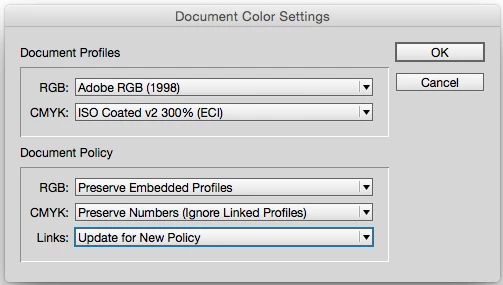
1. I was not aware the Assign profiles showed the actual document colour profiles. Actually I always check Source Space section in the Convert to Profile... panel. On my screen the CMYK profile name was cut off which is why I took a screen capture of the Colour Settings panel (which happens to have the same profiles in my case). Sorry about that confusion!

2. I don't have access to the designmap.xml of the translated IDML right now. I will check this on monday.

3. Allthough ECI seems to mark the ISO Coated v2 300% (ECI) profile as obsolete, it's still the recommended CMYK working space according to GWG (which is what I still follow here in Belgium). That's probably another discussion.

4. Even if we deliver an INDD, the translation agency always returns an IDML. I'm not sure if the IDML passes through their InDesign at all but I can ask them. A translated INDD is possible only as an extra (paid) DTP service.

5. Indeed for native CMYK objects the swapped profiles aren't problematic. But for RGB photos (which we prefer), color shifts occur when the CMYK profile is changed and the document is exported to PDFX-1a.

6. For anyone who reads the document profiles in InDesign, what is the CMYK Colour Management Policy set to? This probably influences what InDesign shows as used profiles document profile, no?

In my case (design environment): Preserve Numbers (Ignore Linked Profiles)

I think in a translation environment it should be: Preserve Embedded Profiles

rob day
Community Expert
Community Expert
February 11, 2017

3. Allthough ECI seems to mark the ISO Coated v2 300% (ECI) profile as obsolete, it's still the recommended CMYK working space according to GWG (which is what I still follow here in Belgium). That's probably another discussion.

Jeffrey's idea that the older ISO Coated v2 300% profile is causing the problem was a good guess but not right. I can replicate your problem with any profile by saving out an IDML, removing the profile from my system, restarting ID, and opening the IDML.

I think your only option in a workflow like this is to provide the profile to the agency and make sure it is in their systems, or reassign (not convert) the ISO Coated profile when the translation comes back. The reassignment could be easily scripted.

6. For anyone who reads the document profiles in InDesign, what is the CMYK Colour Management Policy set to? This probably influences what InDesign shows as used profiles document profile, no?

Your current Color Settings' CM Policies are saved with the document on creation, so changing the policies in Color Settings wouldn't affect existing documents.

For CMYK:

Off creates a document with no profile assigned and when the document is opened in the future whatever profile happens to be set as the Working CMYK space in Color Settings is used as document CMYK. Not usually a good idea, but if ISO Coated v2 is your house profile and it never gets changed in your Color Settings you could consider it. In that case your docs would go to the translation service with no profile and when they come back to you, your Color Settings' CMYK Working space would be used for the export to PDF/X-1a.

Preserve Numbers (Ignore Linked profiles) creates a document with the working space assigned, and where all placed CMYK objects have their embedded profiles ignored and get reassigned document CMYK. It's the default for a number of presets because in general CMYK-to-CMYK conversions do more harm than good.

Preserve Embedded Profiles creates a document with the working space assigned, and honors any placed CMYK object's embedded profile. This can force a CMYK-to-CMYK conversion of placed objects if there is an export to a conflicting CMYK destination (i.e., placing US SWOP in an ISO Coated doc and exporting to PDF/X-1a).

Convert to Working Space creates a document with the working space assigned, and in the future if the current Color Settings policy is still Convert to Working Space and the working CMYK space conflicts with the document's assigned CMYK profile, the native ID colors and swatches will get converted into the working space and the working space will get assigned to the document.

The only way to change an existing document's policy, is via scripting or by checking Ask When Opening in Color Settings before you open the doc.

Community Expert
February 12, 2017

Rob Day wrote

I think your only option in a workflow like this is to provide the profile to the agency and make sure it is in their systems, or reassign (not convert) the ISO Coated profile when the translation comes back. The reassignment could be easily scripted.

Hi Rob,

I see another way:


We could use a label with the document ( or a page item in the document, could be also a Note object, something that survives the translation process ) that could—at least—transport the name of the used csv file in the moment the IDML is exported.

When the translated IDML is back fom the translation service, the name could be extracted, the opened IDML should be closed, the appropriate csv should be loaded to the color settings and the IDML opened again and the right color settings will be used.

1. With ExtendScript the labeling can be done with the methods insertLabel( "KeyString" , "ValueString" ) and extracting the information with extractLabel( "KeyString" ).


2. On the UI side—without scripting—the labeling can be done by the user with InDesign's Script Label functionality on e.g. a selected text frame or a selected table. Not on the document itself.

Regards,

Uwe

Community Expert
February 10, 2017

The IDML file only has as a RGB profile assigned: Adobe RGB (1998), and no assigned CMYK profile. I tried a test of creating a document, assigning RGB and CMYK profiles, saving as IDML. Then opening IDML to see if the assigned profiles made the trip, and they did.

What application and panel are we seeing in your screen capture?

rob day
Community Expert
Community Expert
February 10, 2017

Opening the IDML into 2014CC the profile assignment are correct. Your screen capture is showing the Color Settings Working Spaces, which aren't necessarily the document assignments. This is what i get:

Community Expert
February 10, 2017

Rob, I opened IDML in CC2105 and CS6, and neither version showed an assigned CYMK profile.

rob day
Community Expert
Community Expert
February 10, 2017

Rob, I opened IDML in CC2105 and CS6, and neither version showed an assigned CYMK profile.

So in your CS6 Assign Profiles the CMYK Profile shows as Discard (use current working space)?

I'm seeing ISO Coated V2300% in CS6 also. Here's my Assign Profiles dialog in CS6 for the provided IDML

And the document's Proof Setup also is showing Document CMYK as the assigned ISO Coated in both CS6 and CC2014