Participant
December 10, 2019
Answered

COLOR TRANSITION CONANDRUM

  • December 10, 2019
  • 3 replies
  • 494 views

Hey everyone, I know this is probably super basic but I don't use editorial software a lot, any help would be appreciated. 

I made some color frames that I need to transition gradually through the rainbow colors but apparently Indesign doesn't have a hue slider as photoshop does so I'm having a hard time making a nice and clean transition between the colors just because I need to deal with 4 sliders (CMYK) instead of just one Hue slider and its too many variables. 


any tips on how to make those transitions more accurately?
 

This topic has been closed for replies.
Correct answer rob day

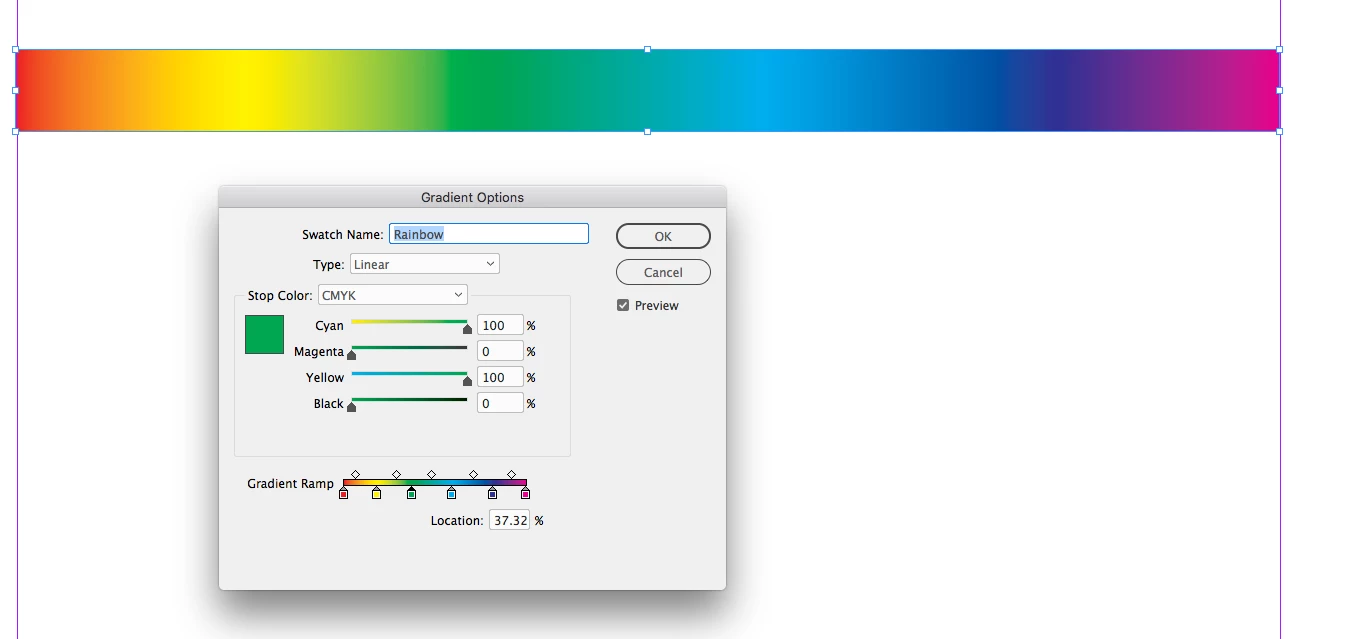
Hue is representd by the primary and secondary ink colors to the CMYK model, so if you want a literal rainbow for print output, set the stops up as the CMYK primary and secondary colors—0|100|100|0 (red), 0|0|100|0 (yellow), 100|0|100|0 (green), 100|0|0|0 (cyan), 100|100|0|0 (blue), 0|100|0|0 (magenta):


You can do the same with RGB—255|0|0 (red), 255|255|0 (yellow), 0|255|0 (green) etc..., but that will produce out-of-gamut color that is not printable,


3 replies

rob day
Community Expert
rob dayCommunity ExpertCorrect answer
Community Expert
December 10, 2019

Hue is representd by the primary and secondary ink colors to the CMYK model, so if you want a literal rainbow for print output, set the stops up as the CMYK primary and secondary colors—0|100|100|0 (red), 0|0|100|0 (yellow), 100|0|100|0 (green), 100|0|0|0 (cyan), 100|100|0|0 (blue), 0|100|0|0 (magenta):


You can do the same with RGB—255|0|0 (red), 255|255|0 (yellow), 0|255|0 (green) etc..., but that will produce out-of-gamut color that is not printable,


Jongware
Community Expert
Community Expert
December 10, 2019

Oh of course. (Slaps own head.) It also avoids any RGB->CMYK conversion artefacts -- per definition, there is no conversion of any kind here.


But you should end with the same color as you started with, as Hue is a circular model:


This has 7 stops from 0..100% so they are 16.67% apart. CMY values per position (none have any Black):

red at 0%: 0 100 100

yellow at 16.67%: 0 0 100

green at 33.33%: 100 0 100

cyan at 50%: 100 0 0

blue at 66.67%: 100 100 0

magenta at 83.33%: 0 100 0

red again at 100%: 0 100 100

Participant
December 17, 2019

Thank you so much, I didnt get it at first but after following your instructions now it makes perfect sense, it’s just super counter intiuitive until you actually do it. 

Jongware
Community Expert
Community Expert
December 10, 2019

It can be scripted. But it's easier to create your colors in Illustrator or Photoshop and then copy the RGB values.

Community Expert
December 10, 2019

You'll be delighted to know this feature is in production https://indesign.uservoice.com/forums/601021-adobe-indesign-feature-requests/suggestions/20363155-please-the-most-powerful-design-app-in-the-wo


You can add your voice to the conversation - but confirmation that a HSB slider is in production.