

RQ8301
Participating Frequently
February 2, 2026
Question

Colors on Pages in InDesign Not Consistent Across Book

  • February 2, 2026
  • 3 replies
  • 128 views

I am experiencing an issue in InDesign where the elements on my pages across my documents in a book are not consistent in color. When I copy them over from one page to another, the color changes. 

Anyone encounter something like this before? 

As seen below, the dark blue color is what I would like to use and the lighter blue is what the same block is pasted as in another document in my book:

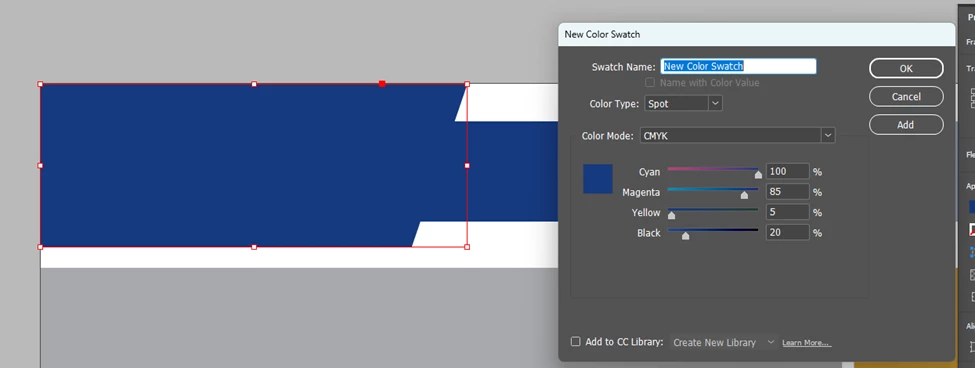
correct, original color
new, lighter color that copies over 

3 replies

rob day
Community Expert
Community Expert
February 2, 2026

Hi ​@RQ8301 , Is there a reason you are defining you color swatch as Spot? Will the book be printed on an offset press running extra spot plates? If not define your New Color Swatch Color Type as Process and make sure all the Book’s documents have the same color profile assignments (check Edit>Assign Profiles…  not Color Settings...)


RQ8301
RQ8301Author
Participating Frequently
February 3, 2026

the document will be printed. I never knew the difference between them. Should I change to spot?

rob day
Community Expert
Community Expert
February 3, 2026

Should I change to spot?


Your Color Swatch dialog is showing Spot, but it sounds like your print output will be 4-color process (CMYK). Set the Color Type to Process and make sure the color has the same Color Mode and definition in all the book documents.

Mike Witherell
Community Expert
Community Expert
February 2, 2026

Hi RQ,

What does each document report when you click on File > Document Setup > Intent?

Also, have you checked Preferences > Clipboard Handling and maybe turn off both of the PDF switches so that InDesign copies and pastes native object and doesn’t have to fiddle with the Swatch color?

Mike Witherell
RQ8301
RQ8301Author
Participating Frequently
February 2, 2026

Hi Mike,


I checked those tips and neither made a difference for me. However, I think I may have found a workaround by just redownloading the swatches. However, now I am seeing a discrepancy between the colors on the parent pages vs the document pages (see below): 

parent page (more transparent)
document page (less transparent)

Any thoughts here on what is going on?

leo.r
Community Expert
Community Expert
February 2, 2026

Check your document’s Transparency Blend Space. It looks like you’re copying RGB colors into a CMYK documents.


RQ8301
RQ8301Author
Participating Frequently
February 2, 2026

Both documents are CMYK

leo.r
Community Expert
Community Expert
February 2, 2026

Yes, by now I realized it’s not due to Transparency Blend Space.


But your RGB color turns into CMYK.


Is it possible you have the New Color Swatch swatch defined as RGB in one document, but CMYK in another?