Participant
February 18, 2020
Question

Colour Script highlight

  • February 18, 2020
  • 3 replies
  • 349 views


Hello,

we'd like to add some function to the script to change the colour depending on the text displayed. Is it possible? How can we do it? Pink if Resort, Yellow if Main.
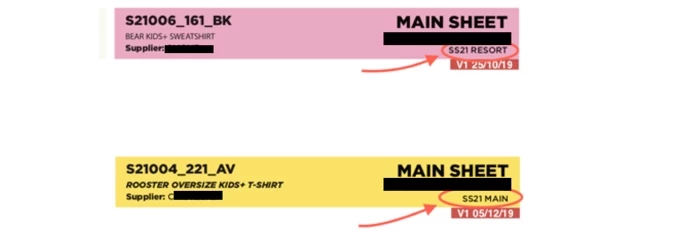


This topic has been closed for replies.

3 replies

Community Expert
February 19, 2020

Hi Josep4,

you gave us not enough info about how actually your elements are constructed.

Without a sample document it's just a guessing game. Provide a sample and we can assist.

Put in on Dropbox or a similar service and post the download link.


Thanks;
Uwe Laubender

( ACP )

Legend
February 19, 2020

Hello,


This is the method that your'e loooking for:  "ConditionIndicatorMethod.USE_HIGHLIGHT"

https://www.indesignjs.de/extendscriptAPI/indesign-latest/index.html#ConditionIndicatorMethod.html


Regards,

Mike

brian_p_dts
Community Expert
Community Expert
February 18, 2020

Some sample code. Not sure how your script is currently finding the text frames it needs to but:


if (textFrame.contents.indexOf("Main") >= 0) {

    textFrame.fillColor = documentReference.colors.itemByName("Pink");

}


Do the same for Resort.