Thorondor
Participating Frequently
December 6, 2022
Answered

Column break inside table is impossible to remove

  • December 6, 2022
  • 4 replies
  • 3299 views

I insert column break inside the table and later if I do not wantit, it is impossible to find and delete.
I have to insert new rows and copy the rows back in there.

Correct answer Sorontar

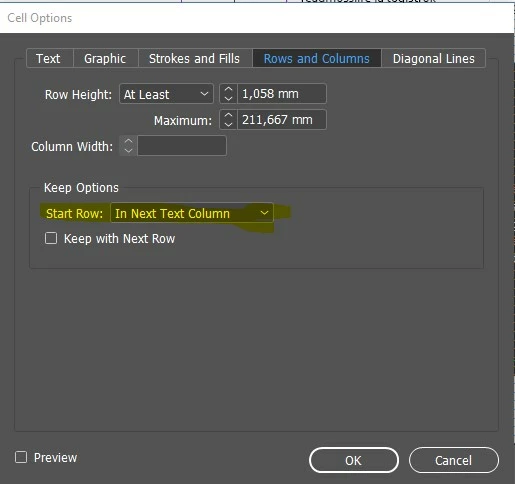
Solution: After adding column break at the end of the cell and if you want to remove it later. There is no column break character visible like usually with text. Instead next cell gets Cell Option for starting in the next column, like Barb showed us.
4 replies

Barb Binder
Community Expert
Community Expert
December 7, 2022

Ah, I see. You want the table to start on page a1, skip a2 and jump to a3?


I would remove whatever breaks you added manually, and tell the first row at the top of page a2 to start on the Next Odd Page.


~Barb

~Barb at Rocky Mountain Training
SorontarCorrect answer
Inspiring
December 14, 2022

Solution: After adding column break at the end of the cell and if you want to remove it later. There is no column break character visible like usually with text. Instead next cell gets Cell Option for starting in the next column, like Barb showed us.

Mike Witherell
Community Expert
Community Expert
December 6, 2022

And make sure you are not in Preview mode when trying to see hidden characters. The Preview mode would override the view of hidden characters.

Mike Witherell
Barb Binder
Community Expert
Community Expert
December 6, 2022

Hi @Thorondor:


So perhaps it isn't actually a column break character. We will need more information from you (or the chance to take a look at the file if you can't put it into words) to help. 


~Barb


~Barb at Rocky Mountain Training
Thorondor
ThorondorAuthor
Participating Frequently
December 7, 2022

INDD file is here. I cleaned it up from project information, so it will look ugly, but it is enough for an example.
This Table 1 is all same table, and problem is that I do not want it to jump to page 3. I used to break it up with column break  (I could have used page break I guess) and now ther is no character to delete that puts table together again.
https://we.tl/t-bO2LRc13uT


Thanks in advance!


Thorondor
ThorondorAuthor
Participating Frequently
December 7, 2022

I has something to do with the first row on the page 3. Deleting it puts table together again.

Barb Binder
Community Expert
Community Expert
December 6, 2022

Enable Type > Show Hidden Characters. A column break looks like a tiny v. Highlight and delete it. 


Alternatives include clicking in the cell with the column break and choosing Edit > Edit in Story Editor and erasing the words Column Break. Or using Find/Change to search for a column break and replace with nothing.


~Barb

~Barb at Rocky Mountain Training
Thorondor
ThorondorAuthor
Participating Frequently
December 6, 2022

I had hidden characters enabled and I even tried to use search for column break, but nothing.