
delaneyb28887902
Participant
January 4, 2017
Answered

Combine and Collate Multiple InDesign Documents

  • January 4, 2017
  • 2 replies
  • 1237 views

I have 5 documents, each is 36 pages long.  I want to combine them into 1 document, collated.  For example the combined document pages look like this:

Doc1 Page1

Doc2 Page 1

Doc3 Page 1

Doc4 Page 1

Doc5 Page 1 (then back to Doc1)

Doc1 Page 2

Doc2 Page 2

Doc3 Page 3

Doc4 Page 4

Doc5 Page 5

Etc.
    This topic has been closed for replies.
    Correct answer cinziamarotta

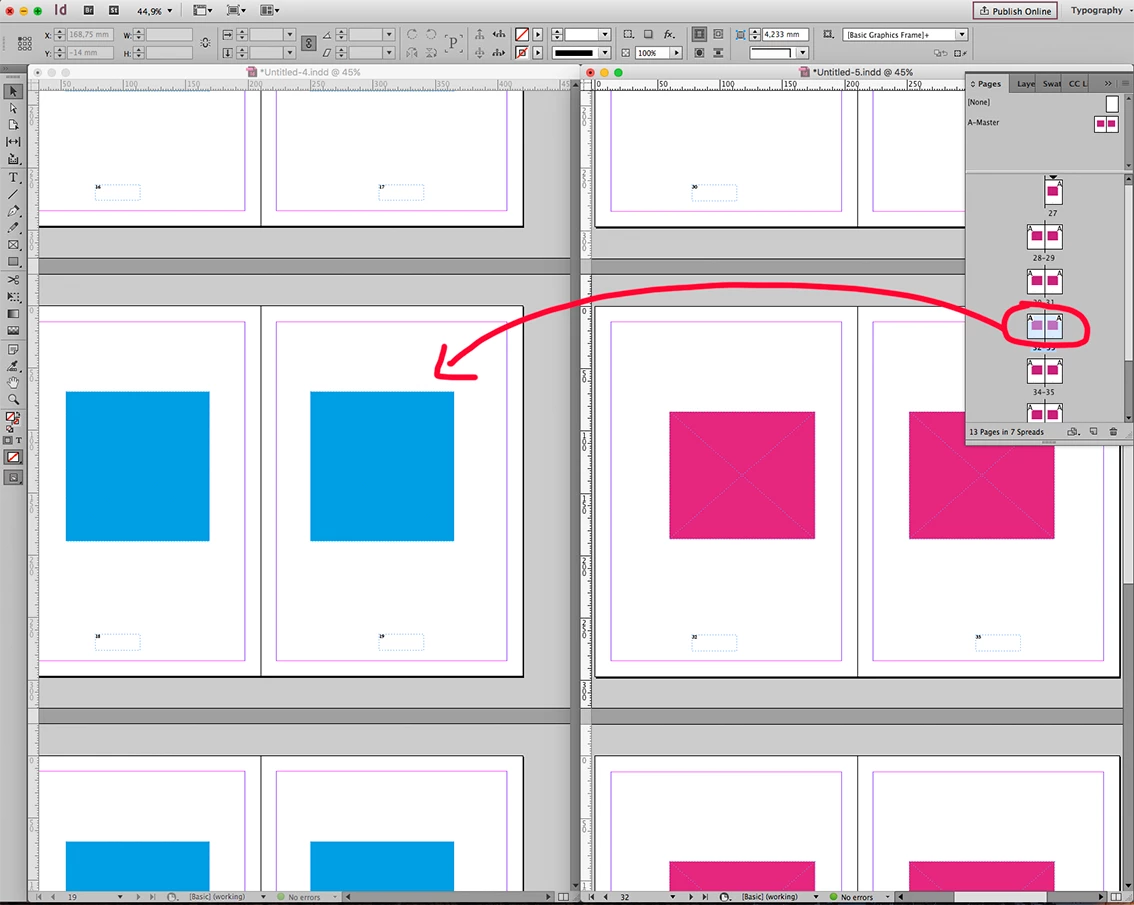
    Open the documents, arrange tile (menu WINDOW > ARRANGE > TILE) so you can see both of them. Drug the pages from pages panel from the first document into a destination document. Then repeat the step for each document using the same destination document.

    2 replies

    cinziamarotta
    cinziamarottaCorrect answer
    Participating Frequently
    January 4, 2017

    Open the documents, arrange tile (menu WINDOW > ARRANGE > TILE) so you can see both of them. Drug the pages from pages panel from the first document into a destination document. Then repeat the step for each document using the same destination document.

    Legend
    January 4, 2017

    If it weren't for the page numbers being redone, I'd suggest the Book function. Maybe go to the originals and change the automatic page numbers to manual and it might be worth it.