Inspiring
April 15, 2025
Answered

Comment Importer correctement une équation de Word dans Indesign

  • April 15, 2025
  • 2 replies
  • 685 views

Bonjour, j’ai un manuscrit comportant plusieurs équations mathématiques saisies dans Word.

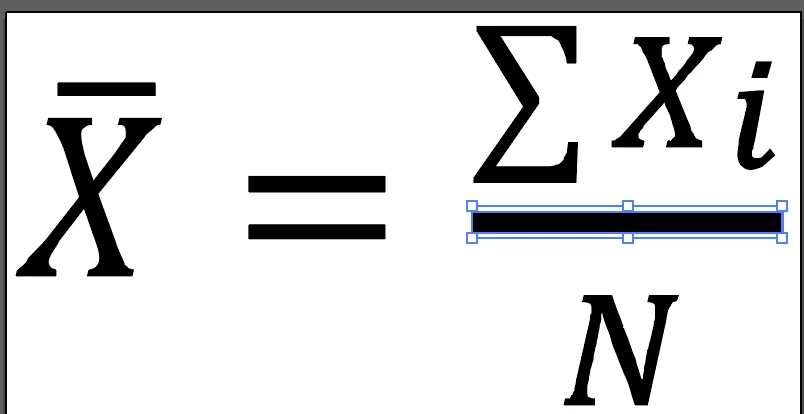
J’ai réussi à les importer en «eps incorporé» après avoir sauvegarder le Word en .doc. Mais ce n’est vraiment pas assez «clean» pour l’impression. Voir capture. J’ai essayé l’importation dans Indesign 2020 et 2025.

Je pensais qu’avec la nouvelle fenêtre «expression mathématique» je pourrais y arriver.

Quelqu’un sait comment récupérer toutes ces équations?



Correct answer chantalp29791971
quote
I found a way. I copy the embedded EPS into Illustrator so my equation becomes vector and I can reimport it as a linked visual. The author will return a new equation to me if necessary if it needs to be modified. It's not ideal, but it works.

By @chantalp29791971


EPS is a vector? 


Illustrator opens my eps, the equation becomes a drawing that I save as .ai.

2 replies

Robert at ID-Tasker
Legend
April 15, 2025

@chantalp29791971


Manually - you'll need to select equation in WORD, copy it to clipboard - as MathML - then open dialog in InDesign Object -> Insert MathML.


Automatic - using my ID-Tasker tool - paid version - but I can either convert your WORD file for you for free or give you access to my tool for free for a few days - but you'll have to work on Windows. 


https://community.adobe.com/t5/indesign-discussions/indesign-math-graphics-a-better-way/m-p/15150551#M610818


There is still a slight problem with a baseline shift - but with my ID-Tasker tool isn't a big deal. 


Inspiring
April 15, 2025
Thank you. I'm working on a Mac. I just installed Math Type and I'm trying to convert everything. I have 125. It's not working yet, because I'm learning how to use this tool.
Robert at ID-Tasker
Legend
April 15, 2025

@chantalp29791971


Unfortunately, MathType still won't give you NATIVE MathML equations in InDesign.


You'll still have just EPS files - linked or embedded. 


Abhishek Rao
Community Manager
Community Manager
April 15, 2025

Hi @chantalp29791971,


Thanks for sharing the details! Since you’re working with InDesign 2025, I’d recommend giving the new Insert MathML feature a try. It might be exactly what you need to get those equations looking clean and professional for print.

You can go through the details and steps in this help article: https://adobe.ly/3GcMKGg


I hope this helps. 

Abhishek 

Inspiring
April 15, 2025

Thank you. I had already read this article. The author has already entered these 125 equations and I want them back.