BEGINNER_X
Legend
November 17, 2020
Answered

Compare file Name between InDD & PDF - APPLESCRIPT

  • November 17, 2020
  • 2 replies
  • 768 views

Hi All,


How do we find out the different or unique file names between ".indd" and ".pdf" extensions. 


My request is need to popup if any file name different between InDesign and PDF.


Thanks

SS

This topic has been closed for replies.
Correct answer rob day

This isn’t returning any files because the selected folder has 2 folders and no files:

set inddFiles to (files of folder this_folder whose name extension is "indd") --Collect inddFiles


To get the sub folder files you want to use: 

every file of entire contents


Try this:


set IDNames to {}
tell application "Finder"
	set this_folder to (choose folder with prompt "Choose the Source Folder") as string
	
	set IDList to (every file of entire contents of folder this_folder whose name extension is "indd") as alias list
	set PDFList to (every file of entire contents of folder this_folder whose name extension is "pdf") as alias list
	
	--a list of the InDesign files with no extension
	repeat with f in IDList
		copy my getName(f) to end of IDNames
	end repeat
	
	--check the PDFList
	repeat with x in PDFList
		set n to my getName(x)
		if n is not in IDNames then
			display dialog n & " is not in the INDD folder"
		end if
	end repeat
end tell

--returns the file name with no extension
on getName(f)
	tell application "Finder"
		set n to name of f
		set e to name extension of f
		set c to (count of e) + 2
		return text 1 thru -c of n
	end tell
end getName


Or this version to get a list of the ID files that are not in the PDF folder:


set PDFNames to {}
set missingPDFs to {}
set m to ""
tell application "Finder"
	set this_folder to (choose folder with prompt "Choose the Soure Folder") as string
	
	set IDList to (every file of entire contents of folder this_folder whose name extension is "indd") as alias list
	set PDFList to (every file of entire contents of folder this_folder whose name extension is "pdf") as alias list
	
	--a list of the InDesign files with no extension
	repeat with f in PDFList
		copy my getName(f) to end of PDFNames
	end repeat
	
	--check the PDFList
	repeat with x in IDList
		set n to my getName(x)
		if n is not in PDFNames then
			copy n to end of missingPDFs
			set m to m & n & return
		end if
	end repeat
	display dialog "These files are not in the PDF folder:" & return & m
	
end tell

--returns the file name with no extension
on getName(f)
	tell application "Finder"
		set n to name of f --gets the name of the file including its extension
		set e to name extension of f --gets the file’s extension
		set c to (count of e) + 2
		return text 1 thru -c of n
	end tell
end getName

 

2 replies

rob day
Community Expert
Community Expert
November 17, 2020

The Finder returns a file’s name and extension when you get the name property. This gets the name with no extension:


set the f to (choose file with prompt "Choose a file.")
set theName to my getName(f)

--returns the file name with no extension
on getName(f)
	tell application "Finder"
		set n to name of f --gets the name of the file including its extension
		set e to name extension of f --gets the file’s extension
		set c to (count of e) + 2
		return text 1 thru -c of n
	end tell
end getName
BEGINNER_X
Legend
January 14, 2021

HI All/Rob,


Extremely Sorry for the delay in reply... Above code is helpful to clear the extension.


But my request is,

1. Tool should collect all InDesign and PDF files names without extension

2. Compare and throw error, if the name not match between the two file names


I tried my best as a Applescript beginner, but I'm not able to reach the destination (see my comments in the code ).


Your help is immensely appreciated!


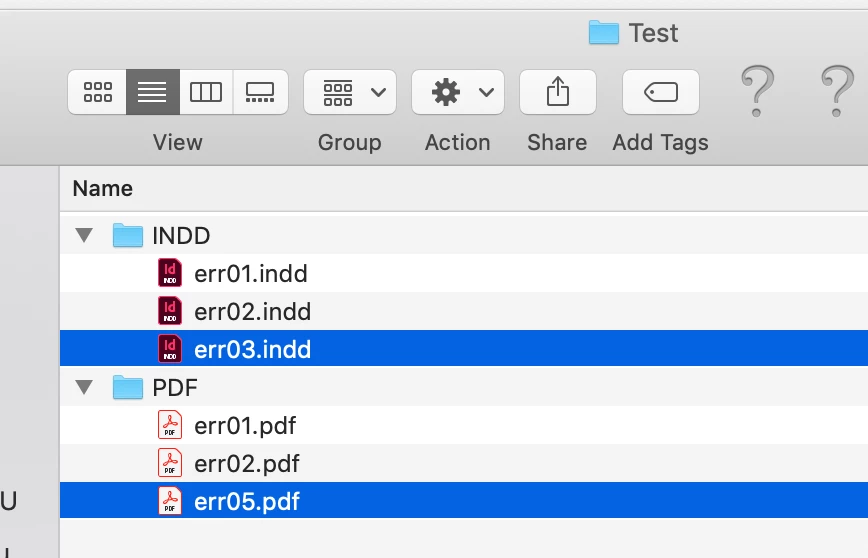
I am looking for the tool that highlighting or alert the following files "err03.indd" & "err05.pdf".


Attachment is below:


Trying Coding is below:


--Array Declarations
set myINDDList to {}
set myPDFList to {}

tell application "Finder"
	set this_folder to (choose folder with prompt "Choose the Soure Folder") as string
	set inddFiles to (files of folder this_folder whose name extension is "indd") --Collect inddFiles
	set inddCount to length of inddFiles
	
	set pdfFiles to (files of folder this_folder whose name extension is "pdf") --Collect pdfFiles
	set pdfCount to length of pdfFiles
end tell

--InDesign File Name Split
repeat with f in inddFiles
	set myFilePath to f as string
	set myName to name of f
	set theInddName to myName as text
	set inddN_split to remove_extension(theInddName)
	set myINDDList to myINDDList & {inddN_split} ----------------------List of names for Compare1
end repeat

--PDF File Name Split
repeat with f in pdfFiles
	set myFilePath to f as string
	set myName to name of f
	
	set thePDFName to myName as text
	set pdfN_split to remove_extension(thePDFName)
	set myPDFList to myPDFList & {pdfN_split} ----------------------List of names for Compare2
end repeat


--display dialog myINDDList as string
--class of myINDDList


set listofMtnLion to myINDDList
set listofMtnLionHistory to myPDFList


set Uniquelist to difference(listofMtnLion, listofMtnLionHistory) -------HELP - Parameters not pass Correctly

-- Return a list of the items in setA which aren't in setB.
on difference(setA, setB)
	set astid to text item delimiters
	set text item delimiters to return & return
	set setA to return & setA & return
	set text item delimiters to return & linefeed & return
	set setB to return & setB & return
	set text item delimiters to linefeed
	set text item delimiters to setB's text items
	set setA to setA's text items
	set text item delimiters to ""
	set setA to setA as text
	if ((count setA) > 0) then
		set text item delimiters to return & return
		set setA to text items of text 2 thru -2 of setA
	else
		set setA to {}
	end if
	set text item delimiters to astid
	
	return setA
end difference


on remove_extension(this_name)
	if this_name contains "." then
		set this_name to (the reverse of every character of this_name) as string
		set x to the offset of "." in this_name
		set this_name to (text (x + 1) thru -1 of this_name)
		set this_name to (the reverse of every character of this_name) as string
	end if
	return this_name
end remove_extension


.

Thanks

SS


rob day
Community Expert
rob dayCommunity ExpertCorrect answer
Community Expert
January 14, 2021

This isn’t returning any files because the selected folder has 2 folders and no files:

set inddFiles to (files of folder this_folder whose name extension is "indd") --Collect inddFiles


To get the sub folder files you want to use: 

every file of entire contents


Try this:


set IDNames to {}
tell application "Finder"
	set this_folder to (choose folder with prompt "Choose the Source Folder") as string
	
	set IDList to (every file of entire contents of folder this_folder whose name extension is "indd") as alias list
	set PDFList to (every file of entire contents of folder this_folder whose name extension is "pdf") as alias list
	
	--a list of the InDesign files with no extension
	repeat with f in IDList
		copy my getName(f) to end of IDNames
	end repeat
	
	--check the PDFList
	repeat with x in PDFList
		set n to my getName(x)
		if n is not in IDNames then
			display dialog n & " is not in the INDD folder"
		end if
	end repeat
end tell

--returns the file name with no extension
on getName(f)
	tell application "Finder"
		set n to name of f
		set e to name extension of f
		set c to (count of e) + 2
		return text 1 thru -c of n
	end tell
end getName


Or this version to get a list of the ID files that are not in the PDF folder:


set PDFNames to {}
set missingPDFs to {}
set m to ""
tell application "Finder"
	set this_folder to (choose folder with prompt "Choose the Soure Folder") as string
	
	set IDList to (every file of entire contents of folder this_folder whose name extension is "indd") as alias list
	set PDFList to (every file of entire contents of folder this_folder whose name extension is "pdf") as alias list
	
	--a list of the InDesign files with no extension
	repeat with f in PDFList
		copy my getName(f) to end of PDFNames
	end repeat
	
	--check the PDFList
	repeat with x in IDList
		set n to my getName(x)
		if n is not in PDFNames then
			copy n to end of missingPDFs
			set m to m & n & return
		end if
	end repeat
	display dialog "These files are not in the PDF folder:" & return & m
	
end tell

--returns the file name with no extension
on getName(f)
	tell application "Finder"
		set n to name of f --gets the name of the file including its extension
		set e to name extension of f --gets the file’s extension
		set c to (count of e) + 2
		return text 1 thru -c of n
	end tell
end getName


Sunil Yadav
Legend
November 17, 2020

Try this Javascript :

var inddFolder = "C:/Users/r.sunil/Desktop/TestNames/Indd";
var pdfFolder = "C:/Users/r.sunil/Desktop/TestNames/PDF";
var allInddFiles = Folder(inddFolder).getFiles ("*.indd");
var allPdfFiles = Folder(pdfFolder).getFiles ("*.pdf");
var inddNames = [];
var pdfNames = [];
for(var i = 0; i < allPdfFiles.length; i++){
    pdfNames.push(allPdfFiles[i].name);
    }
pdfNames = pdfNames.sort();
for(var i = 0; i < allInddFiles.length; i++){
    inddNames.push(allInddFiles[i].name);
    }
inddNames = inddNames.sort();
for(var i = 0; i < inddNames.length; i++){
    var match = false;
    for(var j = 0; j < pdfNames.length; j++){
        if(inddNames[i].replace(/\.indd/g,'').toLowerCase() == pdfNames[j].replace(/\.pdf/g,'').toLowerCase()){
            match = true;
            pdfNames.splice (j, 1);
            break;
            }
        }
    if(match){
        inddNames.splice (i, 1);
        i--;
        }
    }
if(inddNames.length > 0){
    var textMsg = "This is list of InDesign Files with no match : \r"+inddNames.toString().replace(/%20/g,' ').replace(/,|/g,'\n\t');
    }
else{
    var textMsg = "All Indd Files matched."
    }
if(pdfNames.length > 0){
    textMsg = textMsg+"\nThis is list of PDF Files with no match : \r"+pdfNames.toString().replace(/%20/g,' ').replace(/,/g,'\n\t')
    }
else{
    textMsg = textMsg+"\nAll Pdf Files matched."
    }
alert(textMsg);

Best

Sunil