
Magnetik85
Known Participant
February 3, 2023
Answered

Concatenation not showing

  • February 3, 2023
  • 3 replies
  • 1294 views

I am working on a document that contains several sections and each of them contains 4 pages numbered from 1 to 4.


I would like to be able to name the pages of my document so that they are named as follows:

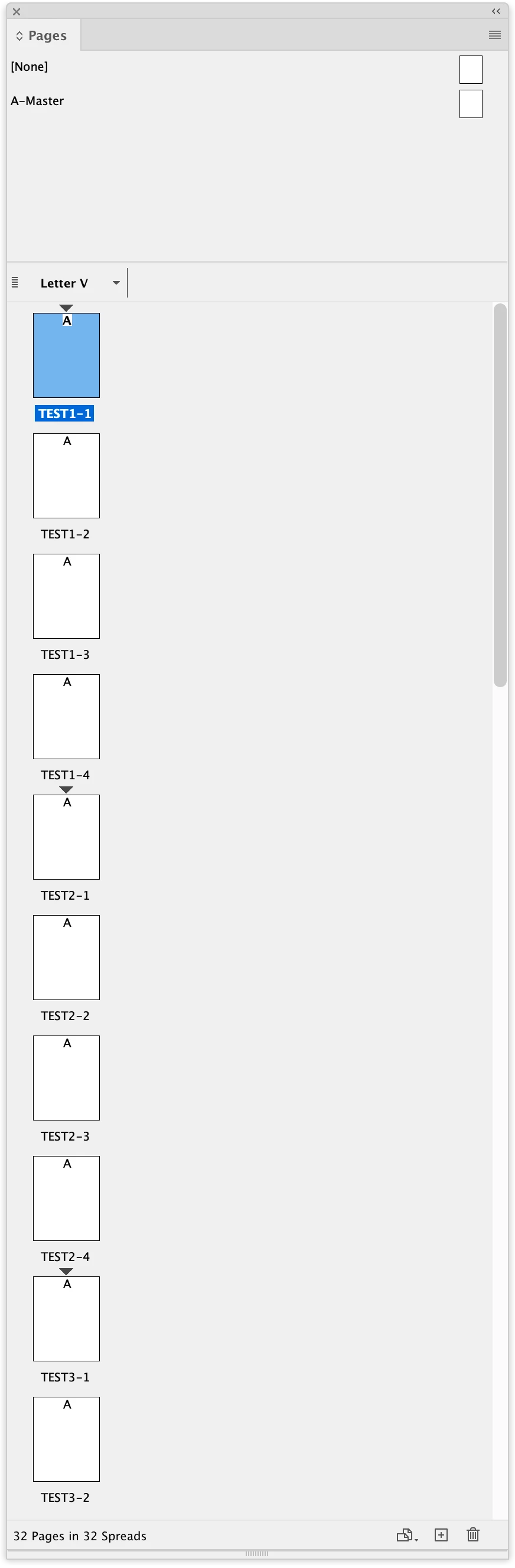
TEST1-1, TEST1-2, TEST1-3, TEST1-4 for the first section

then TEST2-1, TEST2-2, TEST2-3, TEST2-4 for the second section and so on.


I managed to create the code in question for creating my sections and renaming my pages from 1 to 4 for each section but it does not put the "-" sign for me after the number of my sections.


Can you help me to find a solution so that the concatenation is done well.


here is my current code:


var doc = app.activeDocument;
var months = ["TEST"];
var daysInMonth = 4;
var sectionStart = 0;
var pageCounter = 1;
var sectionCounter = 1;

while (sectionStart < doc.pages.length) {
  var sectionEnd = sectionStart + daysInMonth;
  var section = doc.sections.add(doc.pages.item(sectionStart), doc.pages.item(Math.min(sectionEnd - 1, doc.pages.length - 1)));
  section.name = months + sectionCounter;
  section.continueNumbering = false;
  section.pageNumberStart = 1;
  sectionStart = sectionEnd;

  for (var j = sectionStart - daysInMonth; j < sectionEnd && j < doc.pages.length; j++) {
    doc.pages.item(j).label = section.name+"-"+pageCounter;

    pageCounter++;
}
  pageCounter = 1;
  sectionCounter++;
}


Thank you in advance for your assistance
This topic has been closed for replies.
Correct answer rob day

Also, not sure if this helps, but I find the modulus operator helps in cases like this–you can get every 4th item via i%n == 0:


var pgs = app.activeDocument.pages
var months = ["TEST"];
var daysInMonth = 4;
var pageCounter = 1;
var sectionCounter = 0;
var section;
for (var i = 0; i < pgs.length; i++){
    //the modulus operator gets every 4th item
    if(i%daysInMonth==0){
        sectionCounter ++
        pageCounter = 1
        section = app.activeDocument.sections.add(pgs[i]);
        section.continueNumbering = false;
        section.pageNumberStart = 1;
        section.includeSectionPrefix = true;
        section.sectionPrefix = months + sectionCounter + "-"
    }else {
        pageCounter++
    }
};   


Gives me this:


3 replies

rob day
Community Expert
rob dayCommunity ExpertCorrect answer
Community Expert
February 3, 2023

Also, not sure if this helps, but I find the modulus operator helps in cases like this–you can get every 4th item via i%n == 0:


var pgs = app.activeDocument.pages
var months = ["TEST"];
var daysInMonth = 4;
var pageCounter = 1;
var sectionCounter = 0;
var section;
for (var i = 0; i < pgs.length; i++){
    //the modulus operator gets every 4th item
    if(i%daysInMonth==0){
        sectionCounter ++
        pageCounter = 1
        section = app.activeDocument.sections.add(pgs[i]);
        section.continueNumbering = false;
        section.pageNumberStart = 1;
        section.includeSectionPrefix = true;
        section.sectionPrefix = months + sectionCounter + "-"
    }else {
        pageCounter++
    }
};   


Gives me this:


Magnetik85
Known Participant
February 3, 2023

Great @rob day ,

That's exactly what I needed.
Thank you very much for your help.


I created a new discussion that you may have seen but given your expertise, I would have liked to have your opinion if it is possible to create this type of script:


https://community.adobe.com/t5/indesign -discussions/automate-menu-creation-in-several-sections/td-p/13551412


Thanks again

FRIdNGE
February 3, 2023

Same result with the (2 different syntax proposed) script versions and Rob's version!


(^/)

FRIdNGE
February 3, 2023

Change:


section.name = months + sectionCounter + "-";
doc.pages.item(j).label = section.name + pageCounter;
 
(^/)  The Jedi
Magnetik85
Known Participant
February 3, 2023

Unfortunately your suggestion no longer allows me to create sections every 4 pages

FRIdNGE
February 3, 2023
section.name = months + sectionCounter;
var mySection = section.name + "-";

doc.pages.item(j).label = mySection + pageCounter;
 
(^/)
rob day
Community Expert
Community Expert
February 3, 2023

Hi @Magnetik85 , It seems to be working for me—if I check the first page’s label after running your script I get "TEST1-1"


$.writeln(app.activeDocument.pages[0].label)
//returns TEST1-1


Magnetik85
Known Participant
February 3, 2023

Hi @rob day

It's weird since it doesn't work for me.

I recreated a blank document with 16 pages and ran the script above and I have the same problem. (see screenshot)

I tested the code that you also proposed to me but it does not work and I have the following error message: