
Participant
November 25, 2025
Question

Constantly having to change fonts in INDD files

  • November 25, 2025
  • 2 replies
  • 169 views

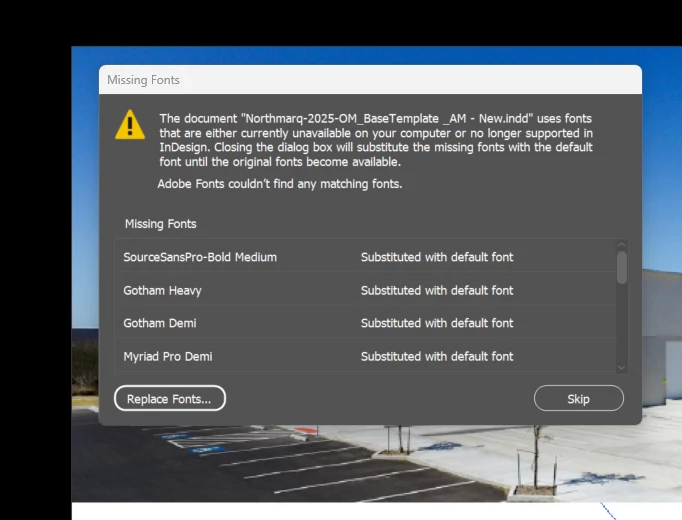
I have most of my fonts set to Futura PT. However, every time I open documents at work, the fonts convert to Gotham and Myriad. So I change it back to Futura and save it. That said, when I open the document again, it changes the fonts again. It drives me crazy. How do I just keep it to the Futura font? I don't use Paragraph/Character styles since these documents have multiple different sizes and weights of Futura, so it doesn't really benefit me to use set sizes/weights in something like a Paragraph style. That said, I believe its related to what is causing this issue. Please advise!


2 replies

jmlevy
Community Expert
Community Expert
November 25, 2025

The message you are posting does not mean that fonts are converted but that these fonts are not installed on your work computer and used in your file. Check if there is no empty text frames using these fonts.

Anubhav M
Community Manager
Community Manager
November 25, 2025

Hello @alanna_5408,

Thanks for reaching out. Could you share more details, such as the exact version of the OS/InDesign installed and whether this issue occurs with all files or only with files using a specific font, so we can better assist you?

Looking forward to hearing from you.

Anubhav

Participant
November 25, 2025

I'm using both the 2026 and 2025 versions, but it has been happening for a while (regardless of which version I use). It occurs in almost every file. Usually converting to old fonts we used to use (gotham, myriad) and not the new fonts I want (futura, bely). I believe so many styles/fonts have been grandfathered into these files at this point.