Participant
Dec 11, 2020 4:16 PM UTC
Answered

Contact Sheets in InDesign

I make contact sheets of photographs regulary. Doing them in Indesign is preferred method as they sometimes get added to other layouts so need to be very editable. The Photoshop output is just kind of a pain since it is one big jpg file. 


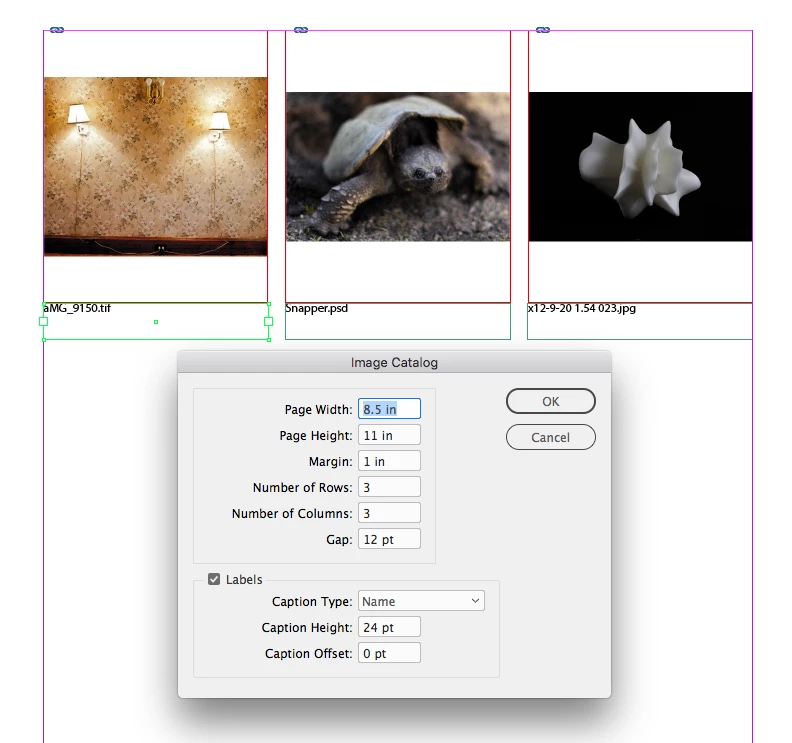
I discovered the script ImageCatalog in the scripts folder and it does a great job of automating this process including editable file names under the images.


Strangely the images are not in alphabetical order. Any one know why this would be? I dont see anything in the dialouge box. This almost negates the automation as now I have to drag everyting into alpha order. Mulitple page contact sheets become really become a pain.


Maybe there is another way to do automated editable contact sheets?  

rob day
rob dayCorrect answer
Community Expert
Dec 12, 2020 3:24 PM UTC

I’ve written a variation on the catalog script, that you are welcome to try—I added a sorting function similar to Brian’s example so the sorting is alphabetical.


This version lets you set a page size and assigns paragraph and object styles to the labels and images, which make it easier to format the catalog after running the script. I only use it in house on OSX, so I’m not sure if you will run into any bugs.


https://shared-assets.adobe.com/link/ade2b284-c8f0-4828-5974-bdce11b7e190


16 replies

Participant
Jun 24, 2023 12:41 PM UTC

Worked like a charm - thanks for sharing!


Translate
rob day
Community Expert
rob dayCommunity ExpertCorrect answer
Community Expert
Dec 12, 2020 3:24 PM UTC

I’ve written a variation on the catalog script, that you are welcome to try—I added a sorting function similar to Brian’s example so the sorting is alphabetical.


This version lets you set a page size and assigns paragraph and object styles to the labels and images, which make it easier to format the catalog after running the script. I only use it in house on OSX, so I’m not sure if you will run into any bugs.


https://shared-assets.adobe.com/link/ade2b284-c8f0-4828-5974-bdce11b7e190


Translate
JShambhuAuthor
Participant
Dec 18, 2020 8:50 PM UTC

This is cool and works like a charm. Thanks for sending

Translate
Community Expert
Dec 11, 2020 5:04 PM UTC
JShambhuAuthor
Participant
Dec 11, 2020 6:41 PM UTC

I dont think this works for what I am doing currently but I am bookmarking this video as I could have used it on a more data driven project. So thanks for that!


How do I use the catalog script? Can it be tweaked to put things in alphabetical order? 

Thanks in advance

Translate
brian_p_dts
Community Expert
Community Expert
Dec 12, 2020 5:46 AM UTC

I'm not intimately familiar with the catalog script, but I assume there's a getFiles function call for choosing the folder with the images in it? If so, you could sort that array before processing the rest of the script: 


var fileArr = chosenFolder.getFiles();
sortNames(fileArr);
//process fileArr

var sortNames = function(arr) {
    arr.sort(function (a, b) {
      return a.name.localeCompare(b.name);
    });
};


Translate
Scott Citron
Legend
Dec 11, 2020 5:00 PM UTC

I'd just make my own contact sheet template. Here's a good tutorial by Adobe's Patti Sokol.

https://vimeo.com/395793572

Translate
JShambhuAuthor
Participant
Dec 11, 2020 6:35 PM UTC

Ahhh. I forgot about the Caption drop down. Thanks


Translate