

Chris  P.  Bacon
Inspiring
October 15, 2022
Question

Content aware extend of SVGs without scaling?
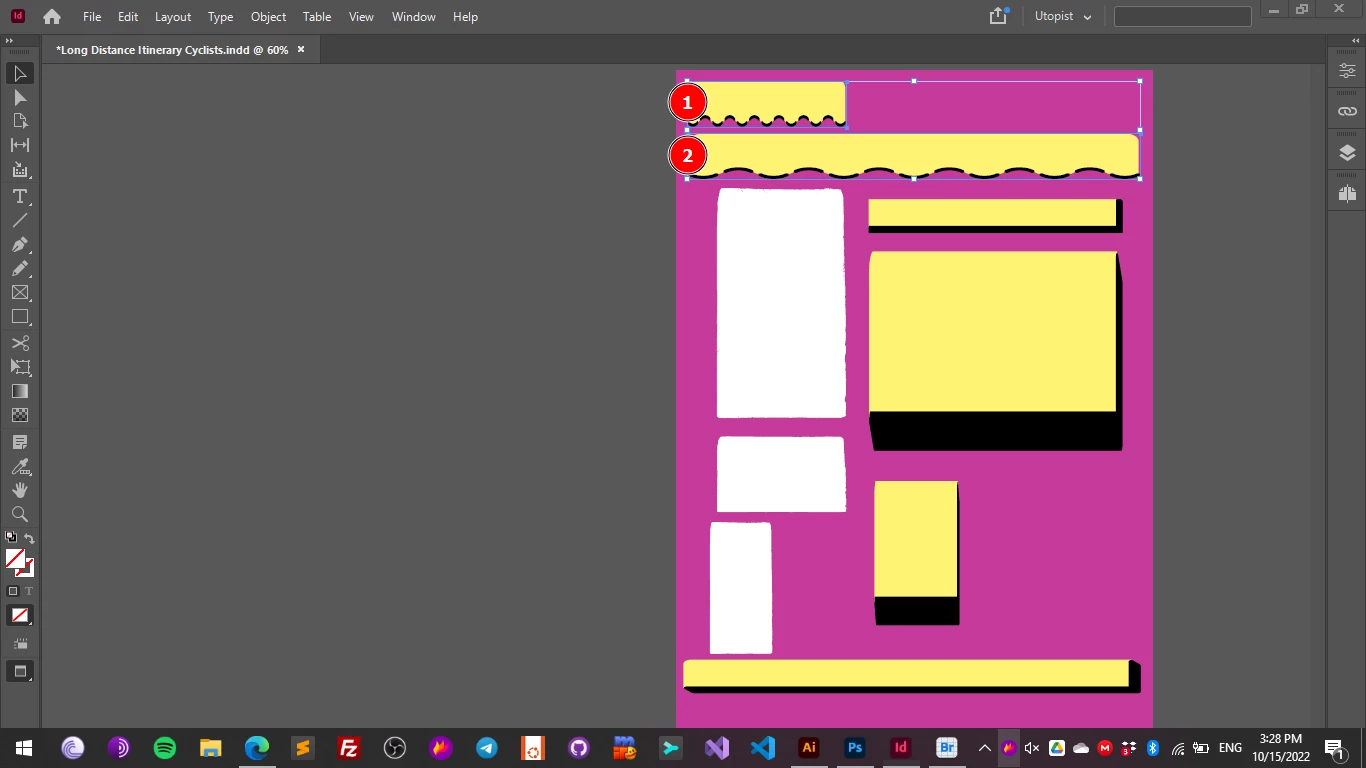
  • October 15, 2022
  • 5 replies
  • 296 views

Is there a way to prevent InDesign from horizontally scaling the paths of SVGs when you do content aware extend horizontally?

I extend the box to the right, then I set the fitting to content aware, it's not exactly the same result as auto fitting.

But, it works like an accordion, squeezing and scaling the wavy bottom.

I expected a Photoshop like content aware extend, where the wavy bottom is not getting scaled and stretched horizontally.

Content aware scale, horizontally, without changing the hight would mean that the wave should have the same "frequency", just like when you do content aware scale in Photoshop.

The goal would be to be able to extend SVG shapes in InDesign (where I am composing my layout) in one direction only without, with content aware - that should replicate the exact same pattern - without stretching.

Here is the file. (Need to be perfectly fitted in the frame, first).


This topic has been closed for replies.

5 replies

rob day
Community Expert
Community Expert
October 15, 2022

If you expect a placed object to fit exactly to a container frame with no horizontal or vertical distortion, the  frame has to have the same aspect ratio as the placed object. Your sample’s aspect ratio is 7.3457:1 so if I place it in a 7.3457" x 1" frame and choose Fit Content Proportionally, the link will fit with no distortion.

Chris  P.  Bacon
Inspiring
October 15, 2022

I do get that, but what I want is PhotoShop-like content-aware extend, in one direction at a time, that replicates patterns instead of stretching them, for SVGs.

Because the PhotoShop content-aware extend feaure doesn't require the same aspect ratio for raster images.

Photoshop can extend desert sand and clouds, much more complex patterns than a simple brush, seamlessly, in one direction.

But when I tried to extend this:

I did not get the content aware extend option.

But it works great with natural patterns like clouds, sand or man-made pattern like wall art, in PhotoShop.

So I wonder if the feature exists for SVG patterns or rasterized SVG layers that after extension could be converted back to SVG.

It didn't work for me in PhotoShop.

Chris  P.  Bacon
Inspiring
October 15, 2022

It would be nice if brush patterns wouldn't get distorted when you are fitting your text column background SVGs to your layout in InDesign:


Chris  P.  Bacon
Inspiring
October 15, 2022

This is more an Illustrator question,

but because I have to extend my SVG shapes to fit my text and document layout, the fitting needs to be done in InDesign.

Even when I use SVG text boxes with brushed edges (i use them as text column backgrounds), I have to scale them to fit my column, but I don't want their brushed edges to be stretched. 

With real content aware scale the brushed edges should be replicated, not scaled.

Just like photoshop is replicating the clouds or sand, or other patterns and not stretching it: in its content aware scale feature.


Chris  P.  Bacon
Inspiring
October 15, 2022

I can see that content aware scale is interpreted as "stretching" in some cases:

But even in Photoshop, for me is not stretching, because you don't stretch the pattern or the clouds, you replicate them, when you use content aware scale.

That's what I want to achieve with SVG shapes (if possible) preferably in InDesign, and not in Illustrator, because I am fitting my shapes to the layout in InDesign.


Chris  P.  Bacon
Inspiring
October 15, 2022

Rasterizing the SVG layer in Photoshop (so that I can select it) and extending it also squeezes the wave, so it's not like the raster content aware extend for photos.

The goal here would be to be able to extend an svg shape without scaling the pattern, like the raster content aware extend.