
Known Participant
February 3, 2023
Question

Content Collettor - How can I change only the second Line to a short font?

  • February 3, 2023
  • 5 replies
  • 477 views

 I'm using content colletor to use the same text along a document. 

That name will change in various formats. One of them I want to every

time drop a line , the font will be smaller , like the second yellow text.


I map a character style and a paragraph style...but I don't know how 

can I use a different size of font automatically on the second line
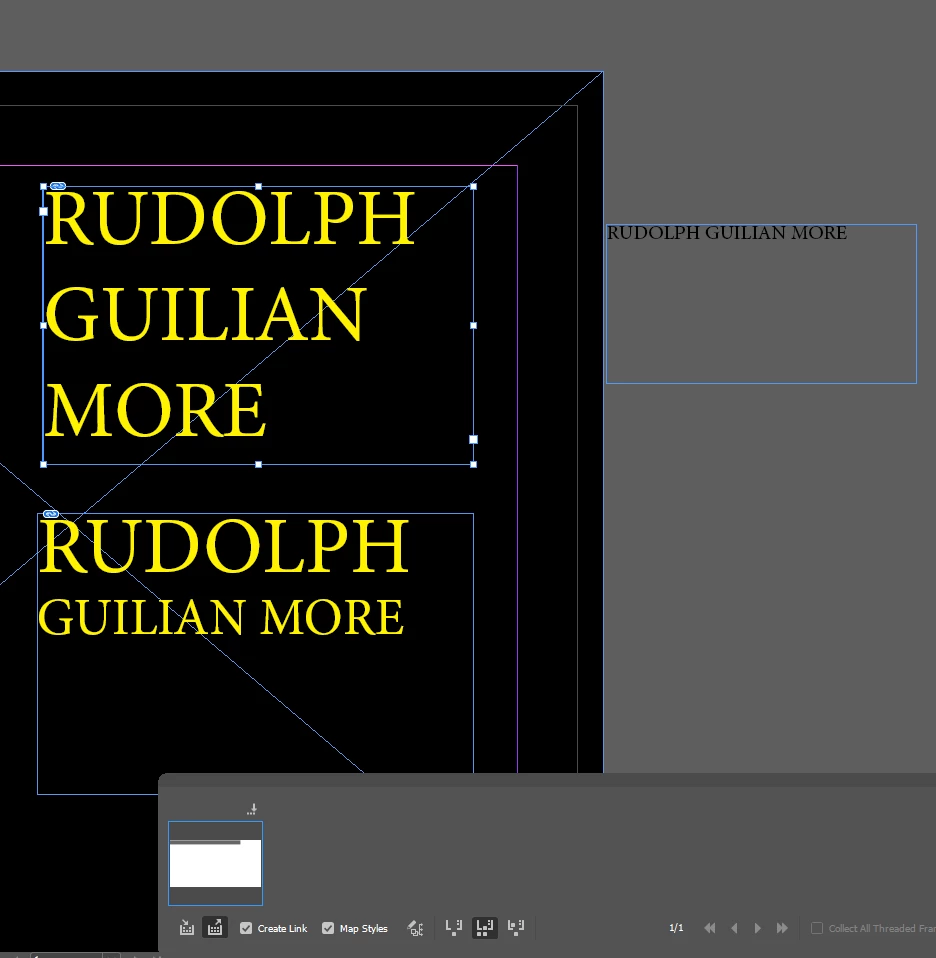
 

This topic is closed to new replies. Start a new post to keep the conversation going.

5 replies

Steve Werner
Community Expert
Community Expert
February 3, 2023

You're not showing the Hidden Characters in the text. If you have a paragraph return after the first line ('RUDOLPH") you can edit your paragraph style to add a Next Style which calls up a different paragraph style with a smaller size in the next line, it appears it should work.

Robert at ID-Tasker
Legend
February 3, 2023

Or Nested Style after first space? 


Known Participant
February 4, 2023

Thanks  I tried that , my only problem is the "third line and after" . I use a nested style

to force line break , and the next line on default has a baseline shift to far. So I use "baseline shift " on the character style to 17. But when I have a 3 line, is to far .I don't know to well nested styles