Participating Frequently
September 30, 2024
Question

Content Not Displaying Correctly in Normal View After InDesign Crash

  • September 30, 2024
  • 1 reply
  • 863 views

Hello!


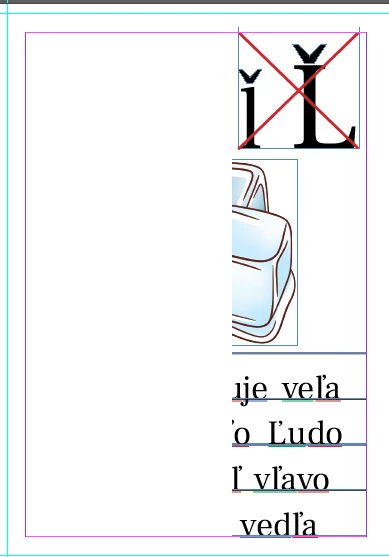
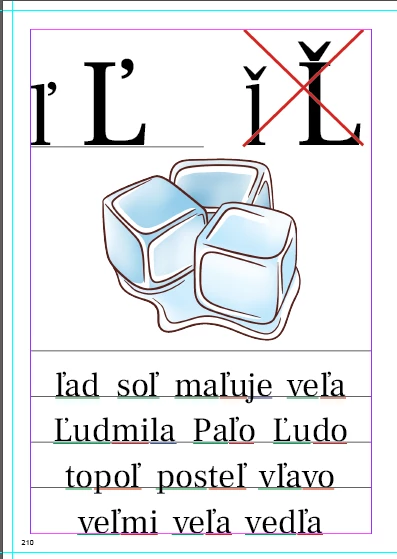
After sudden crash of Indesign, the content on some pages is not showned properly or at all, though the content is there. When I switch the view to Overprint preview mode, the content is showned properly.

The same happens (the content is ok) when I export the file into pdf.


It really is anoying as I need to work in normal view mode, not in Overprint preview mode.


Did anybody encountered same problem? If so, is there any solution?


Thanks a lot.


Left in Overprint preview / right in Normal mode:
Miro M.


<Title renamed by MOD>

This topic has been closed for replies.

1 reply

Abhishek Rao
Community Manager
Community Manager
September 30, 2024

Hi @Miro Markovič40103584,


I’m sorry to hear about the issues you're experiencing after the crash. I understand how frustrating it can be when content doesn't display correctly in normal view.

Could you please provide the version of InDesign you are using and the details of your operating system? Additionally, is this issue happening with just one file or multiple files? It would also help to know what you were doing in the file when the crash occurred and if this has happened multiple times.

Is the file permanently showing incomplete data, or does it revert to normal view after some time? Have you tried saving the file as an IDML and reopening it? If not, I recommend giving that a try.

Lastly, have you shared the crash report? This could provide valuable insights into the problem. You can find details on how to submit crash reports here.


Thank you for your patience, and I’m here to help!


Best,
Abhishek Rao

Participating Frequently
September 30, 2024

Dear Abhishek,

thank you for your care. I'm using following version:

Following Windows:


Yes, it happened several times with this file. As I'm saving versions in between I always returned back. But with the current version of the file I couldn't go back to my previous version as I've noticed the problem too late. The document has more than 400 pages.

When that happened (crash of InDesign) I normally was working - typing text into frames, moving them, adding pictures and moving, resized them and moving them. Nothing super special.

What I've observed is that I usually hybernate Windows leaving everything opened (saved of course prior to turning pc into hybernate). When for several days I didn't restart the computer, InDesign was getting slower and slower and then crashes started to occur.

If I remember correctly I didn't send crash report.

The content couldn't be permanently visible (at least today after five hours it still is not showing). Though when I move some object over the "disappeared content" it pops up, but then again it's not visible.

When I place some object over it - let's say empty rectangle the content appears and stays visible. But this I of course doesn't want as I don't want to have objects above it. When I move that object to back (using Arrange function Send to back) then the incorrectly showned original content is not visible again.

The idml saving helped to make visible the content, but at the other hand moved over pages things I had on the sides - see the screeshot at left top corner:


So that's not the solution either.


If you need some more information, please let me know.


Thank you.


Miro M.


Abhishek Rao
Community Manager
Community Manager
September 30, 2024

Hi @Miro Markovič40103584,


Thank you for the additional details. Given that your document has over 400 pages, it's possible that the large size is contributing to the performance issues, especially after long periods of working without restarting your system. InDesign can become slow or unstable with such a heavy file.

One suggestion would be to break the document down into smaller sections while working, and then later merge the pages back together. This can help reduce the load on InDesign and minimize crashes. Once you're finished with your edits, you can combine the sections into a single document again.

Also, would you be able to share a package of the document, including all linked files and fonts, so we can test the issue on our end? You can package the document by going to File > Package in InDesign and then share the zipped file with us. 

Reference: Create and send assignment packages in InDesign (https://adobe.ly/3Br1X3V)


Let me know if you need assistance with this, and thanks again for your patience!


Best,
Abhishek Rao