Inspiring
March 16, 2017
Question

continuous footnotes

  • March 16, 2017
  • 1 reply
  • 515 views

Hello

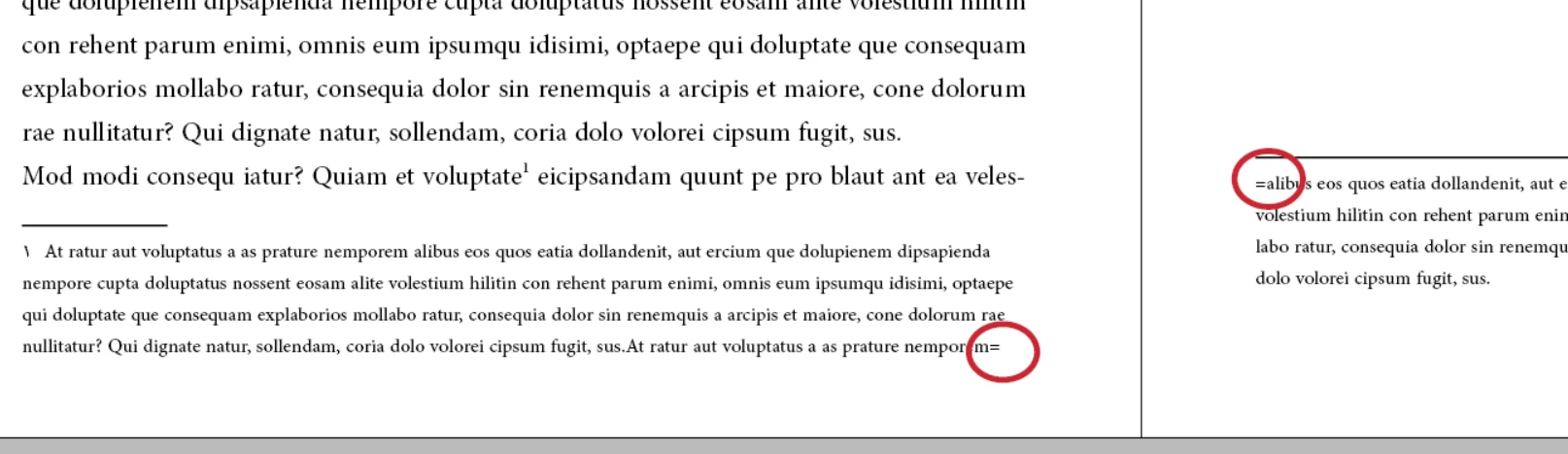
How can we add equal sign ( = ) at end of the first page of a continuous footnotes and at the beginning of the second page of continuous footnotes .

and how can we automate this .

Example :

Can you help me please .
This topic has been closed for replies.

1 reply

Inspiring
March 17, 2017

Community Expert
March 18, 2017

Hi thaerol,

should this be a substitute for a hyphen?

Then it's questional at all to do it.

It would imply to inject two characters and break one word into two single words with new meaning.
Hm. Or you add text frames holding the double hyphen with a text wrap and a fill color like [ Paper ] to cover the hyphen and leave the text of the footnote alone.

Best would be to never allow hyphention between columns to avoid those situations.

You can control this with the hyphenation settings of your applied paragraph style.

Regards,
Uwe

Community Expert
March 18, 2017

BTW:

Obi-wan already tried a scripting solution in the InDesign forum:

continuous footnotes

Regards,
Uwe