
Inspiring
July 29, 2020
Answered

Continuous (multi-page) tables added to InDesign article panel are not presented as part of the read

  • July 29, 2020
  • 2 replies
  • 727 views

Good afternoon, the title says it all. If you have a long table that spans across several pages and add it to an article in the article panel, it does not show up as part of the reading flow in the PDF. Instead, it behaves just like an object that is not in the article panel, or marked as an artefact. (With no grey box around it and no reading order number label).


Any advice greatly appreciated. My Indesign version is 15.0.1x64


Kind regards

Kasra
This topic has been closed for replies.
Correct answer Bevi Chagnon - PubCom.com

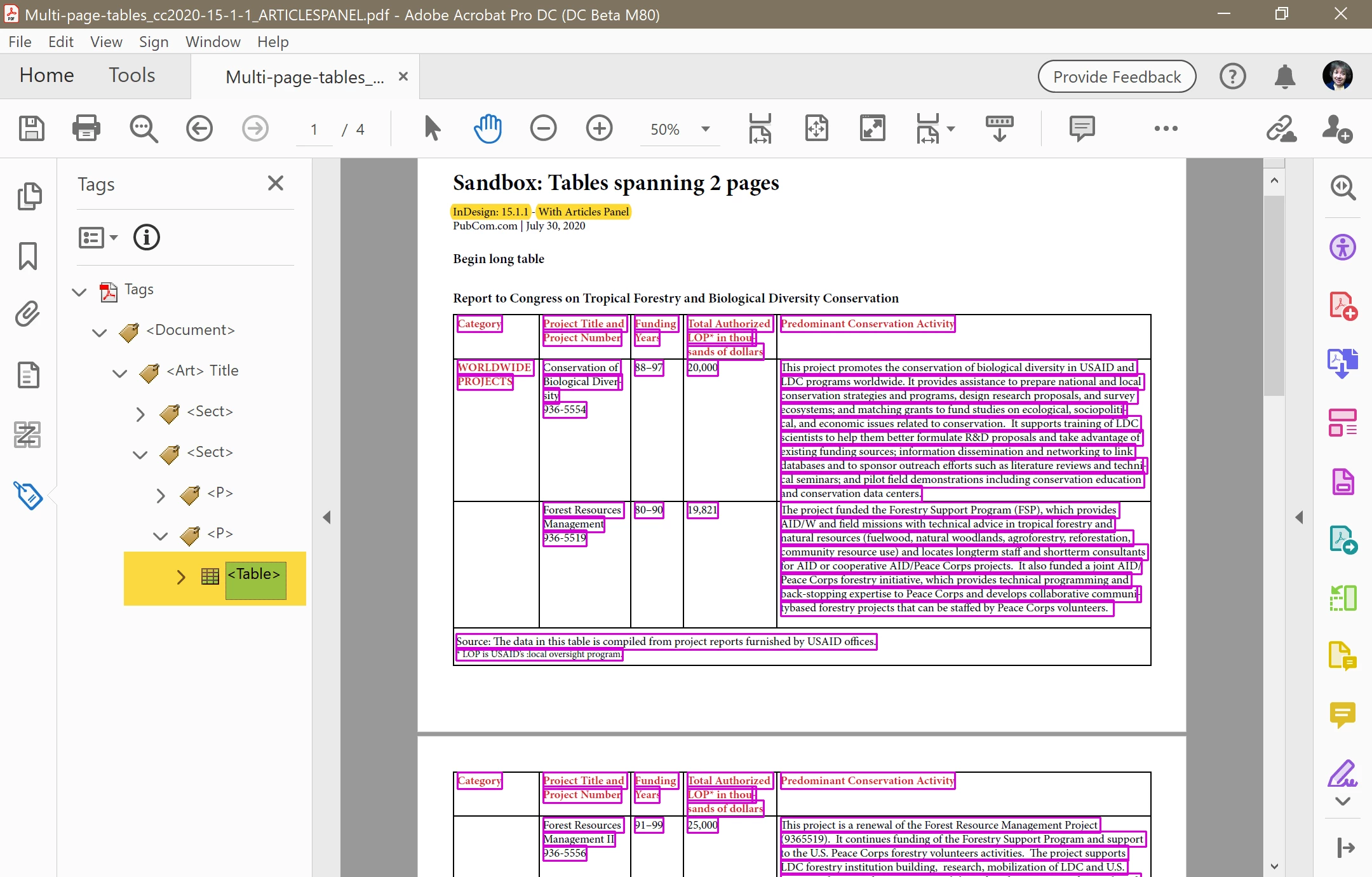
I did tests in both InDesign 15.0.1 (2020) and 14.0.3 (2019), and in both versions I created a multi-page table with headers and footers. In both versions I made tests using the Articles panel, and without using the Articles panel.


They all came out fine.

This screen capture is from 15.0.1 using the Articles panel.


It definitely is not artifacted and has the complete set of table tags for each table element (TH, TD, TR, etc.).


Are you able to put your INDD file into a dropbox or other repository so we can examine it?  We're "forensic" specialiists for accessible InDesign + PDFs and might be able to spot what's causing the missing tags problem. Don't need the graphics or fonts, just the INDD.


2 replies

Bevi Chagnon - PubCom.com
Legend
July 29, 2020

When you add items to the Articles panel, you must also check the option Use for Reading Order in Tagged PDF. It's in the Options menu on the Articles panel.


|    Bevi Chagnon   |  Designer, Trainer, & Technologist for Accessible Documents ||    PubCom |    Classes & Books for Accessible InDesign, PDFs & MS Office |
53948736Author
Inspiring
July 30, 2020

Thanks for the advice. However, unfortunately that is not the case. That option is checked and the rest of the object in the article panel are included in the PDF reading flow, except multi-page (continuous) tables.


Kind regards,

Kasra


Bevi Chagnon - PubCom.com
Legend
July 30, 2020

I did tests in both InDesign 15.0.1 (2020) and 14.0.3 (2019), and in both versions I created a multi-page table with headers and footers. In both versions I made tests using the Articles panel, and without using the Articles panel.


They all came out fine.

This screen capture is from 15.0.1 using the Articles panel.


It definitely is not artifacted and has the complete set of table tags for each table element (TH, TD, TR, etc.).


Are you able to put your INDD file into a dropbox or other repository so we can examine it?  We're "forensic" specialiists for accessible InDesign + PDFs and might be able to spot what's causing the missing tags problem. Don't need the graphics or fonts, just the INDD.


|    Bevi Chagnon   |  Designer, Trainer, & Technologist for Accessible Documents ||    PubCom |    Classes & Books for Accessible InDesign, PDFs & MS Office |
Steve Werner
Community Expert
Community Expert
July 29, 2020

Why are you using the Article panel? What kind of output are you creating?

53948736Author
Inspiring
July 29, 2020

Hi Steve,

Thanks for the message. I need to create accessible PDFs, and as part of that –in addition to tagging all content- I add all the content into article panel and also control the reading order of elements using layers. This way I don’t need to spend much time post-processing in acrobat for accessibility.


Kind regards,

Kasra

Steve Werner
Community Expert
Community Expert
July 29, 2020

There are a couple accessibility experts who visit the forum. Hopefully, they will see your post and give you advice.