

Roger Breton
Legend
June 18, 2025
Question

Convert CIE Lch to CIE Lab

  • June 18, 2025
  • 1 reply
  • 255 views

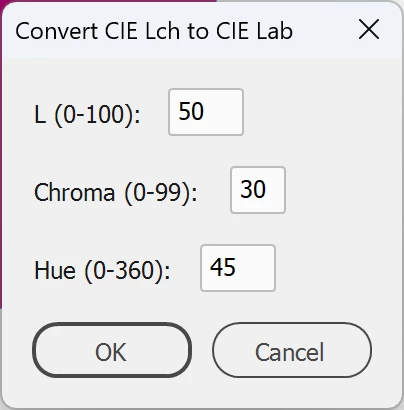
With the help of Grok, I wrote a small script to convert CIE Lch to CIE Lab and store the result in the Swatches palette.  Adobe has never wanted to support CIE Lch in any of their applications. Yet, I find it invaluable, especially for teaching color concepts.


The code is available here :
Convert CIE Lch to CIE Lab (with Debug code 2025 06 18).zip


I left the debug information in the file in case it helps anyone.
You don't have to remove it to execute the script.


1 reply

m1b
Community Expert
Community Expert
June 19, 2025

Thanks for sharing @Roger Breton!


Some minor notes: It's fine to leave debugging code in—sometimes it's very helpful!—but it's best to comment it out with // so that it doesn't actually try to run. Also most of your "debugging" code (writelns) were surely helpful during *initial development* but will never be needed again, so those could be discarded if you wanted.


Also, would you mind editing your post to include the actual script, since it isn't long in the listing? You can use the </> button in the forum editor, which formats the code like this:

... code here ...


That will make it so much easier for people to access your script, even if your one drive account goes stale, and also doesn't involve deciding whether it's safe to open a zip file from someone on the internet. 🙂


Anyway, thanks again—great contribution!

- Mark

Roger Breton
Legend
June 19, 2025

</>

// LchColorPicker.jsx
// Create a dialog for CIE Lch color input and conversion to Lab

try {
    // Get the active document
    var doc = app.activeDocument;
    $.writeln("Active document accessed successfully.");

    // Function to convert Lch to Lab
    function lchToLab(l, c, h) {
        var h_rad = (h * Math.PI) / 180;
        var a = c * Math.cos(h_rad);
        var b = c * Math.sin(h_rad);
        return [l, a, b];
    }

    // Function to validate input values
    function validateInputs(l, c, h) {
        if (isNaN(l) || l < 0 || l > 100) {
            alert("L value must be between 0 and 100.");
            return false;
        }
        if (isNaN(c) || c < 0) {
            alert("Chroma value must be non-negative.");
            return false;
        }
        if (isNaN(h) || h < 0 || h > 360) {
            alert("Hue value must be between 0 and 360 degrees.");
            return false;
        }
        return true;
    }

    // Create dialog window
    var dialog = new Window("dialog", "Convert CIE Lch to CIE Lab");
    dialog.orientation = "column";
    dialog.alignChildren = "left";
    $.writeln("Dialog created.");

    // Add input fields for L, c, h
    var lGroup = dialog.add("group");
    lGroup.add("statictext", undefined, "L (0-100): ");
    var lInput = lGroup.add("edittext", undefined, "50");
    lInput.characters = 3;

    var cGroup = dialog.add("group");
    cGroup.add("statictext", undefined, "Chroma (0-99): ");
    var cInput = cGroup.add("edittext", undefined, "30");
    cInput.characters = 2;

    var hGroup = dialog.add("group");
    hGroup.add("statictext", undefined, "Hue (0-360): ");
    var hInput = hGroup.add("edittext", undefined, "45");
    hInput.characters = 3;

    // Add buttons
    var buttonGroup = dialog.add("group");
    var okButton = buttonGroup.add("button", undefined, "OK", {name: "ok"});
    var cancelButton = buttonGroup.add("button", undefined, "Cancel", {name: "cancel"});
    $.writeln("Dialog components added.");

    // Variables to store input values and dialog result
    var inputValues = null;
    var dialogResult = 0;

    // OK button functionality
    okButton.onClick = function() {
        try {
            var l = parseFloat(lInput.text);
            var c = parseFloat(cInput.text);
            var h = parseFloat(hInput.text);
            $.writeln("OK clicked. L: " + l + ", c: " + c + ", h: " + h);

            if (!validateInputs(l, c, h)) {
                return;
            }

            inputValues = { l: l, c: c, h: h };
            $.writeln("Input values stored: L=" + l + ", c=" + c + ", h=" + h);
            dialogResult = 1; // Explicitly set OK result
            dialog.close(1); // Pass 1 to close
            $.writeln("Dialog close called with result 1.");
        } catch (e) {
            $.writeln("Error in OK button: " + e);
            alert("Error in OK button: " + e);
        }
    };

    // Cancel button functionality
    cancelButton.onClick = function() {
        $.writeln("Cancel clicked.");
        dialogResult = 2;
        dialog.close(2);
        $.writeln("Dialog close called with result 2.");
    };

    // Show the dialog
    $.writeln("Showing dialog...");
    var result = dialog.show();
    $.writeln("Dialog.show returned: " + result + ", dialogResult: " + dialogResult);

    if (dialogResult == 1 && inputValues != null) {
        $.writeln("Processing color with L: " + inputValues.l + ", c: " + inputValues.c + ", h: " + inputValues.h);

        var l = inputValues.l;
        var c = inputValues.c;
        var h = inputValues.h;
        var labValues = lchToLab(l, c, h);
        var labL = labValues[0];
        var labA = labValues[1];
        var labB = labValues[2];

        // Create new Lab color
        var newColor = doc.colors.add({
            name: "Lch_L" + l.toFixed(0) + "_c" + c.toFixed(0) + "_h" + h.toFixed(0),
            model: ColorModel.PROCESS,
            space: ColorSpace.LAB,
            colorValue: [labL, labA, labB]
        });
        $.writeln("Color created: " + newColor.name);

        // Apply color to selected item if applicable
        if (doc.selection.length > 0) {
            var selectedItem = doc.selection[0];
            if (selectedItem.fillColor != undefined) {
                selectedItem.fillColor = newColor;
                $.writeln("Color applied to selected item.");
            } else {
                $.writeln("Selected item does not support fill color.");
            }
        } else {
            $.writeln("No item selected.");
        }

        // Show confirmation
        alert("Color added to Swatches palette:\n" +
              "L: " + labL.toFixed(2) + "\n" +
              "a: " + labA.toFixed(2) + "\n" +
              "b: " + labB.toFixed(2));
    } else {
        $.writeln("Dialog cancelled or no valid input (dialogResult: " + dialogResult + ").");
    }
} catch (e) {
    alert("Script error: " + e + "\nLine: " + e.line);
    $.writeln("Error: " + e + ", Line: " + e.line);
}