Inspiring
June 22, 2021
Answered

Convert Endnotes to static endnotes

  • June 22, 2021
  • 2 replies
  • 3285 views

Hello

I have a client that wants to add endnotes to the copy out of sequence. Ie. adding endnote 64 and 65 before endnote 12 and changing the order of endnotes ect. They don't want the endnotes to reorder. In order to do this, I have used the script: https://creativepro.com/files/kahrel/indesign/footnote_endnote_conversion_cc2018.html

It works well to change the dynamic endnotes static except I have endnotes in tables and this script strips them out of the tables! Does anyone have a work around for this? I looked to see about creating a new file with Indesign 2017 - but I don't think I have access to that version of InDesign anymore.

I'm really stumped as to how I can fix this! Any suggestions welcome. Thank you!
This topic has been closed for replies.
Correct answer Sandra261672125wm4

Peter so kindly helped me with this exact problem...the script works like a dream! 

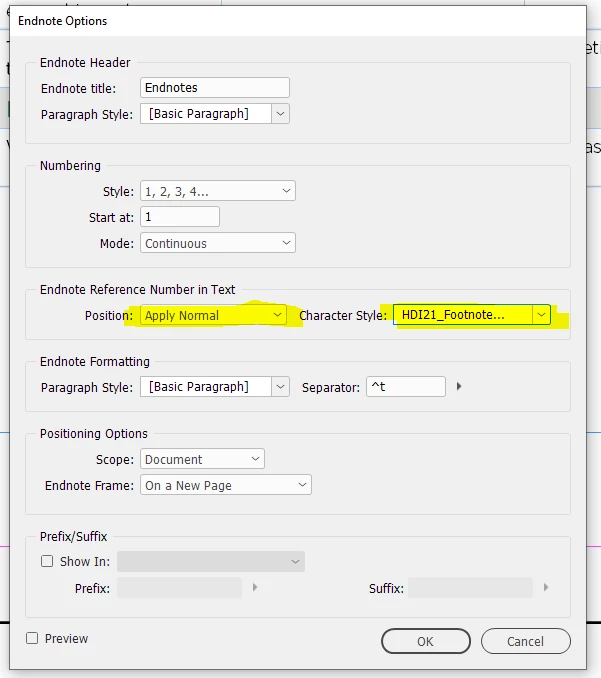
You need to apply the endnote number style in the Endnote Options window (Type > Document Endnote Options). That'll fix it.


Thanks for a fantastic script Peter!!


2 replies

Peter Kahrel
Community Expert
Community Expert
June 24, 2021

The script now handles table notes.

Inspiring
June 24, 2021

Hi Peter!


This is terrific. Thank you very much! 😄

Community Expert
June 22, 2021

Hi Erica,

InDesign CC 2017 will not help. It does not support endnotes at all.

If you open an IDML exchange file from InDesign 2021 that contains endnotes with the old InDesign CC 2017, all endnotes and also the endnote text frames will be removed by the process. Best ask Peter Kahrel to update the script.


Regards,
Uwe Laubender

( ACP )