

Wayne!
Participating Frequently
May 10, 2024
Question

Conveyor Help!! Duplicating set a set up of pages?

  • May 10, 2024
  • 5 replies
  • 504 views

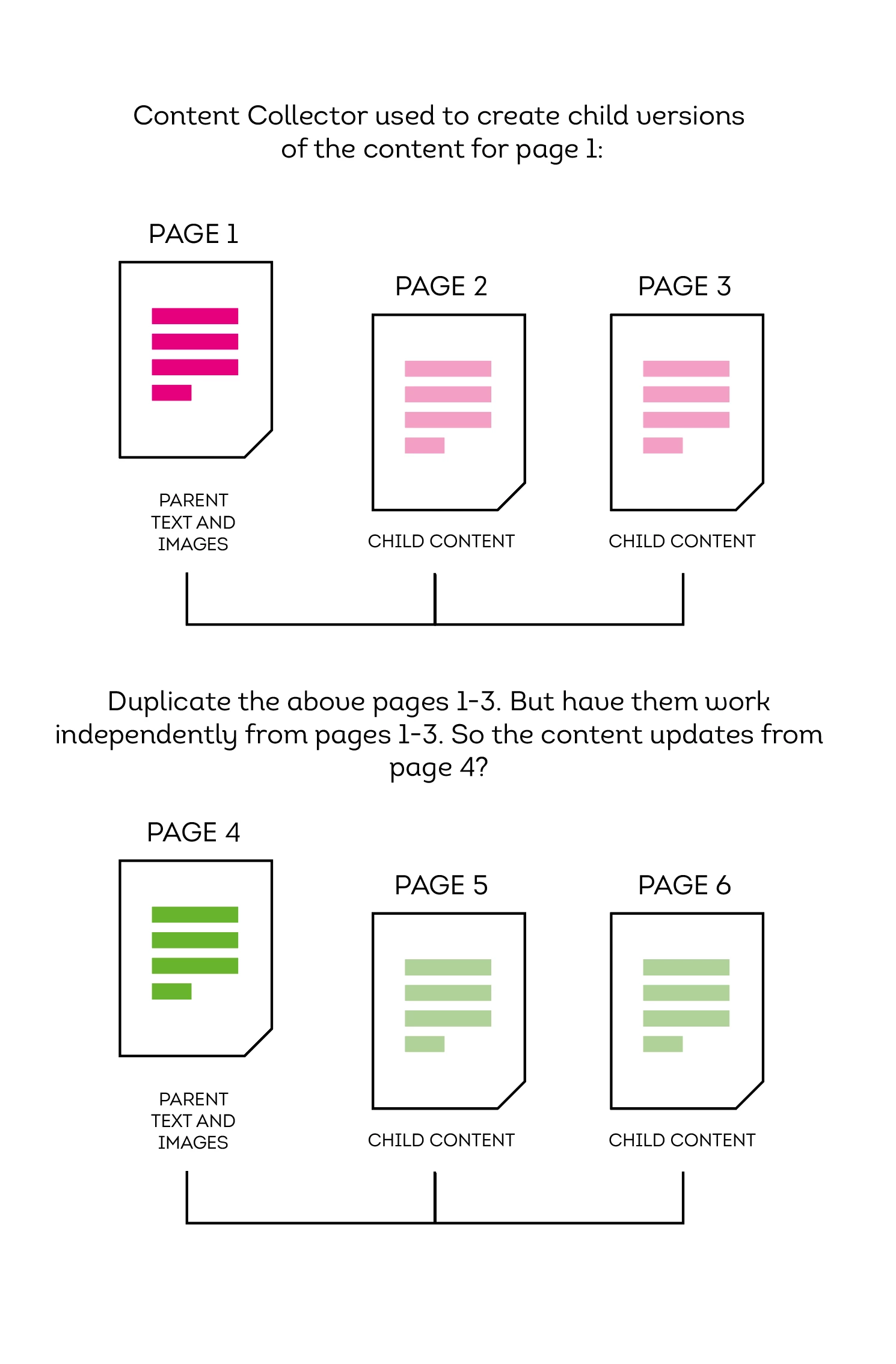
Is there a way to duplicate a set up of Coneyor Collected pages? ie page 1 items update pages 2 and 3. Copy these pages but have them work independently, so page 4 updates pages 5 and 6? I'm at a loss! Hopefully the image below explains it better - I'm now wondering if the Conveyor route was the best option?


This topic has been closed for replies.

5 replies

Barb Binder
Community Expert
Community Expert
May 10, 2024

Worth a shot, @brian_p_dts , but I couldn't make that work, either. 


~Barb


~Barb at Rocky Mountain Training
brian_p_dts
Community Expert
Community Expert
May 10, 2024

I wonder if Alternate Layouts would work for this. 

https://helpx.adobe.com/indesign/using/alternate-layouts-liquid-layouts.html

Barb Binder
Community Expert
Community Expert
May 10, 2024

Hi @Wayne! 


Love the diagram. Do you realize how many back-and-forth posts you avoided trying to explain the actual question? 😊


I recreated the diagram, and recorded a video that illustrates the issue. When you duplicate the spreads, the duplicated child items remain linked to the original parent, not the duplicated parent. I don't see anyway to update the duplicated child items to assign a new parent. I think your best bet would be to duplicate just the new parent and then generate its child items from there. 


I'm not quite following Robert's suggestion but if you are, let us know if that works for you.


~Barb


~Barb at Rocky Mountain Training
Robert at ID-Tasker
Legend
May 10, 2024

@Wayne!


If you create your "source" page as a Master Page / Spread - you can then apply it to "child" pages and override and edit contents.


Unless I'm missing something? 


Wayne!
Wayne!Author
Participating Frequently
May 10, 2024

Hi Robert - I did think about master pages - but because the pages are different sizes and I need to move elements around and I thought that the text and images would not propergate from the master page? Or is there a way to move thing about but still keep all the text and images from the master page? 

Robert at ID-Tasker
Legend
May 10, 2024
quote

Hi Robert - I did think about master pages - but because the pages are different sizes and I need to move elements around and I thought that the text and images would not propergate from the master page? Or is there a way to move thing about but still keep all the text and images from the master page? 


By @Wayne!


How much "linked to the source" your elements should be? 


How much different childrens would be? 


Can you show us a REAL example? "Blank" pages are not enough for me, sorry. 


Steve Werner
Community Expert
Community Expert
May 10, 2024

That's not the way the Content Collector tool works. 


Duplicating a content collected set of files cannot create new independent set of links.

Wayne!
Wayne!Author
Participating Frequently
May 10, 2024

Its a shame because i have set  them up how i want them to work in speperate documents but when i try and bring then together in one document it breaks? Not sure if it am missing a trick?