Marina E. Michaels
Known Participant
February 16, 2019
Answered

Cookbook conundrum: whole numbers with fractions

  • February 16, 2019
  • 6 replies
  • 3501 views

Hi everyone,

I'm working on a cookbook (using InDesign 2017), and I've got my fractions most of the way there. 1/2 cup, 3/4 cup, 1/8 teaspoon all become fractions beautifully.

I haven't been able to solve one problem: when I type 11/2 cups, the fraction is formatted as 11 over 2, when instead I want the 1 to be regular and the 1/2 to become a fraction. If I type a space between the two 1s, it works, but I don't want that space. Here's a screen capture of what I mean.
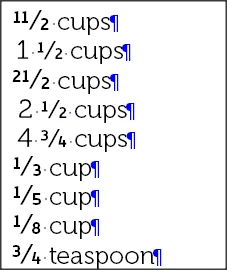
In InDesign, I have a paragraph format for the ingredients (named Ingredient), with OpenType Features > Fractions enabled.

I tried making a character style with -100 tracking to reduce the space, and used that character style in the Ingredient paragraph style (nested through one word), but it didn't work perfectly and also squished the space right after the fraction.
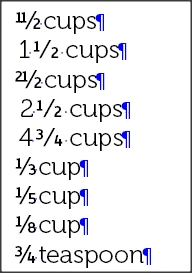
Can anyone help with this? Could this be solved using some GREP wizardry? I'm pretty sure I will never need double digits in the numerator.


Thanks!
This topic has been closed for replies.
Correct answer MW Design

Oops. I guess I only looked at the Cadman code. It does do arbitrary fractions.

But Kelvinch, which uses ligatures, does do common (and uncommon) fractions.

Like I mentioned, Cadman does do arbitrary fractions.

If Kelvinch would work for you, I can ask Paul to either insert his fraction code from Cadman into it or offer to do it myself. His license permits me (or whomever) to do it as long as the reserved font name changes so there wouldn't be an issue. It shouldn't take very long to do.

Most foundries do not have the code rolled-in for arbitrary fractions. At best, some have an expanded ligature offering like Kelvinch uses. Most have few fractions using the ligature option. I am sure there are other OpenSource fonts using arbitrary fraction coding. But I wouldn't know where to look on FontSquirrel or Google fonts to narrow them down.

Mike

6 replies

Marina E. Michaels
Known Participant
February 17, 2019

Hi Mike,

Here's the Ingredient style in Museo with a nested Kelvinch character style.

Marina E. Michaels
Known Participant
February 17, 2019

Wow, that looks perfect. After a little troubleshooting, I discovered I'd modified the Ingredient paragraph style with a nested character style, which was preventing Kelvinch from doing fractions. Here it is again, compared with Museo.

I would love it if you were to ask Paul to insert the Cadman fraction code into Kelvinch (or if you were to do it yourself).

I'm going to experiment with using a nested character style so I can have Kelvinch format the fractions, but keep the rest of the ingredient text in Museo. I think the two fonts will coordinate well.

Thank you so very much for taking the time to help me solve this problem!

MW Design
Inspiring
February 17, 2019

OK. I went and looked. The commercial, and perhaps updated, version of Museo Slab (and likely the sans) does have arbitrary fractions available.

The whole family is pretty reasonable at $99USD from Fontspring.

https://www.fontspring.com/fonts/exljbris/museo-slab

I didn't look at the version via Typekit (if you have a subscription, I don't have a current one).

Marina E. Michaels
Known Participant
February 17, 2019

Hmmm. I purchased the Museo family (Museo, Museo Sans, and Museo Slab) a few years ago. I'll have to track down where I purchased it to see if I can get an updated version. I don't want to have to buy it again, though I do love it. It's perfect for my cookbook--legible and friendly.

Marina E. Michaels
Known Participant
February 16, 2019

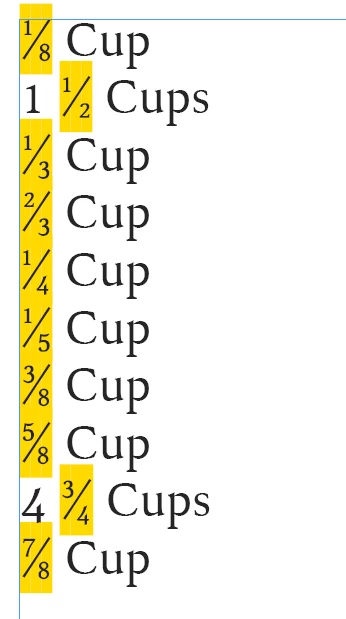
Thanks, Mike. That's so helpful, and I appreciate you taking the time to find some fonts. Alas, neither Kelvinch nor Cadman creates fractions for thirds and eighths, two very common measurements in cooking (1/5 isn't used in cooking; I just have it in there to test a font's ability to make fractions of anything). Here's Kelvinch, a very attractive font:

I'm continuing to look through the offerings at Adobe Fonts, MyFonts, and in my extensive font collection.

MW Design
MW DesignCorrect answer
Inspiring
February 17, 2019

Oops. I guess I only looked at the Cadman code. It does do arbitrary fractions.

But Kelvinch, which uses ligatures, does do common (and uncommon) fractions.

Like I mentioned, Cadman does do arbitrary fractions.

If Kelvinch would work for you, I can ask Paul to either insert his fraction code from Cadman into it or offer to do it myself. His license permits me (or whomever) to do it as long as the reserved font name changes so there wouldn't be an issue. It shouldn't take very long to do.

Most foundries do not have the code rolled-in for arbitrary fractions. At best, some have an expanded ligature offering like Kelvinch uses. Most have few fractions using the ligature option. I am sure there are other OpenSource fonts using arbitrary fraction coding. But I wouldn't know where to look on FontSquirrel or Google fonts to narrow them down.

Mike

Marina E. Michaels
Known Participant
February 17, 2019

Would you be willing to pass along my thanks to your friend? I love Kelvinch--especially the shapes of the letters a and e. And is there a way I can donate to him in thanks for his font?

Also, my apologies for all the replies to myself rather than you--I was answering from my forum inbox, and I didn't see a way to reply to your posts, only to my original one.

I am so very happy and relieved that you have solved my problem! I wasn't looking forward to having to do anything manual in this cookbook or the next one. How much into desserts are you? Would you like me to mail you a copy of this cookbook when I publish it? Here's a sample page showing the lovely fractions.

Marina E. Michaels
Known Participant
February 16, 2019

Problem partially solved. I was applying a GREP style using a Fractions character style--the character style was using a different font from the rest of the Ingredient font.

Once I changed the character style font to match the paragraph style font, the spacing was perfect.

Unfortunately, now not all the fractions work. Is that because of the font itself (Museo)?

I deleted the GREP style (but I'm keeping OpenType Features > Fractions enabled); that GREP style seems to just be an added complexity.

Update: it does seem to be the font. I've tested several fonts. Some will make proper fractions out of the 1/3 and 1/8, but then they won't make a proper 1 1/2.

I'll keep testing fonts, but if anyone can recommend a font that fully supports fractions, that would save me a lot of time.


Thanks!

MW Design
Inspiring
February 16, 2019

I usually use a non-breaking thin space between the whole number and fraction. But it depends upon the point size in the ingredient list. If the point size is larger than I normally use, then I'll insert a non-breaking hair space. I'm not a fan of zero space between whole numbers and the fraction.

Marina E. Michaels
Known Participant
February 16, 2019

Thanks, MW Design. What do you do to automatically insert that non-breaking space? Since this is a cookbook, it has many hundreds of fractions, and I don't want to insert it manually.

MW Design
Inspiring
February 16, 2019

Hi Marina,

To tell the truth, I usually either receive tagged text files that I manipulate via PERL regular expressions, or a Word file that I export to tagged text and do the same.

In ID, it can also be done via GREP find/replace.

I would not suggest a Replace All. It will still take a bit to find, then replace, then find, replace, etc. But it should work.

What the find expression does is look for the presence (pattern) of a digit then space then digit. It doesn't capture the first expression, only the space and digit. Then replaces the space for a thin space and the first digit. It could be further enhanced by not capturing the digit following the space.

Mike

TᴀW
Legend
February 16, 2019

Marina,

Select the first 1, and then disable OpenType Fractions on it.

Ariel

Marina E. Michaels
Known Participant
February 16, 2019

TAW, thanks for your answer. If I only had a few fractions, that would be fine. But since this is a cookbook (the first of two), I want the process automated. I don't want to have to manually fix hundreds of fractions.