
Mahesh_JW
Inspiring
March 13, 2014
Answered

copy file to folder in applescript inside javascript

  • March 13, 2014
  • 2 replies
  • 2496 views

Hi All,

I used the below code to copy file in folder specifically not to change the creation date.

So I used applescript inside javascript. But it throws the error

var myFolder = Folder.selectDialog("Choose the Folder");

var myFile = File.openDialog("Choose the File");

var myAppleScript = 'tell application "Finder"\r';

myAppleScript += 'copy file '+ myFile+ ' to folder ' + myFolder +'\r';

myAppleScript += 'end tell\r';

app.doScript(myAppleScript, ScriptLanguage.applescriptLanguage);
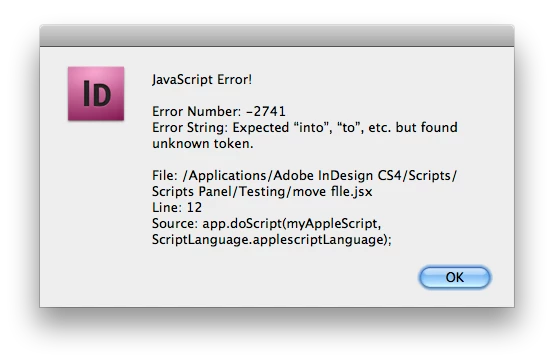
Please correct me....

Thanks

Mahesh

This topic has been closed for replies.
Correct answer Trevor:

1) Did you try to use my function?

2) I can't test your code because don't have access to a Mac at the moment.


Hi Kasyan,

I have tried your function on Maverics and it didn't work

So I rewrote it and this works

Regards

Trevor

function MoveFile(myFile, myFolder) {

    if (!myFile instanceof File || !myFolder instanceof Folder || !myFile.exists || !myFolder.exists) return false;

    var myMovedFile = new File(myFolder.absoluteURI + "/" + myFile.name);

    if (myMovedFile.exists) return false;

    if (File.fs == "Windows")  {

        var myVbScript = 'Set fs = CreateObject("Scripting.FileSystemObject")\r';

        myVbScript +=  'fs.MoveFile "' + myFile.fsName + '", "' + myFolder.fsName + '\\"';

        app.doScript(myVbScript, ScriptLanguage.visualBasic);

    }

    else if (File.fs == "Macintosh") {

        var myAppleScript =

        'tell application "Finder"\r' +

        'move POSIX file "' + myFile.fsName + '"  to POSIX file "' + myFolder.fsName + '" with replacing\r' +

        'end tell\r'

        app.doScript(myAppleScript, ScriptLanguage.applescriptLanguage);

    }

    if (myMovedFile.exists) {

        return true;

    }

    else {

        return false;

    }

}

2 replies

Kasyan Servetsky
Legend
March 16, 2014

A few years ago I wrote a Move File function for my Package for Archive script. It works bith for Mac (AS) and PC (VB).

Unlike AS or VB, JS has no move method for file object — a workaround is to first copy a file and then remove the original. But this approach has a shortcoming: files loose their original creation and modification dates, labels, etc. This function uses native AS or  VB Move command/method depending on the platform the script is run, thus preserving this information.

Mahesh_JW
Mahesh_JWAuthor
Inspiring
March 17, 2014

Hi All,

this is my actual code:

why i am going to apple script for copy the files is

1. do not modify the creation time and date

2. InputFolder contains minimum 50,000 files so in applescript its getting timeout problem

thats why i am using applescript inside javascript.  but it is throwing the error

var InputFolder;

var OutputFolder;

var RuleFile;

var InputFiles;

var Rules1 = [];

InputFolder = Folder.selectDialog("Choose the Input Folder");

RuleFile = File.openDialog("Choose CSV File ");

OutputFolder = Folder.selectDialog("Choose the Output Folder");

InputFiles = get_File(InputFolder,[],'.*');

GettingInputFromCSV(RuleFile);

for(var j=0;j<Rules1.length;j++){

    var csv_File_name = Rules1[0].toString();

    var matchFLG = false;


    for(var i=0;i<InputFiles.length;i++){

        var source_File = InputFiles;

        var inPath_File_name = InputFiles.name.toString();


        if(csv_File_name == inPath_File_name){

             matchFLG = true;

            var myAppleScript = "tell application \"Finder\"\r";

            myAppleScript +="copy file \(" + source_File + " as string\) to folder \(" + OutputFolder.fsName +" as string\)\r";

            myAppleScript += "end tell\r";

            app.doScript(myAppleScript, 1095978087);    //ScriptLanguage.APPLESCRIPT_LANGUAGE

            break;

        }

    }//for

     if(matchFLG == false){

        ReportStr += "\n" + csv_File_or_Folder_name + ",Not Available";

    }

}

if(ReportStr != ""){   

    var f = new File(OutputFolder+"Report.csv");

    f.open("w");

    f.write("CSV Input Name,Error\n");

    f.write(ReportStr);

    f.close();

}

alert("Process Completed");

function GettingInputFromCSV(fs){

    var LineCount = 0;

    var yRead = fs.open("r",undefined,undefined);


    //-------- heading

    var zRead = fs.readln();

    //-------- heading


    while(fs.eof == false){

        zRead =fs.readln();

        if(zRead.length != 0){

            Rules1[LineCount] = zRead.split(",");

            LineCount++;

        }

    }

    fs.close();

}

function get_File(dir,my_arr,extension){

    var f = Folder( dir ).getFiles();

    for( var ifil = 0; ifil < f.length; ifil++){

        var mystr=f[ifil]+"";

        var aa=mystr.match(/\/[.].*/)    //avoid hidden files and folders

        var bb=mystr.match(/[_]VUC69~7/)

        var cc=mystr.match(/DS[_]Store/)


        if( f[ifil] instanceof Folder){

            if((aa==null) && (cc==null)){

                get_File( f[ifil],my_arr,extension)

            }

        }


        if(aa==null && bb==null && cc==null){

            if(extension==".*"){

                my_arr.push(f[ifil])

            }

            else if( f[ifil].name.substr( -extension.length ) == extension ){

                my_arr.push(f[ifil])

            }

        }

    }//for

    return my_arr;

}

Kasyan Servetsky
Legend
March 17, 2014

1) Did you try to use my function?

2) I can't test your code because don't have access to a Mac at the moment.

zeRafio
Inspiring
March 14, 2014

Why declaring the variables in Java?

Do it in your Applescript, if i'ts possible.

set myFolder to (choose folder) as alias

set myFile to (choose file) as alias

tell application "Finder"

  duplicate myFile to myFolder

end tell