

Jumpenjax
Community Expert
Community Expert
June 18, 2024
Answered

Copy flow around photo

  • June 18, 2024
  • 3 replies
  • 1143 views

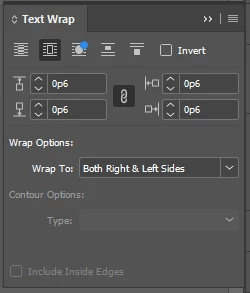
When placing type and adding photos the text wrap will only allow you to place the photo to the right. Is there something I am missing? I try to set the photo to the right and the copy flow stops at the top of picture and continues after the photo leaving a gap. No text wrap on the photo beyond the photo. Any ideas?
This topic has been closed for replies.
Correct answer Buc3

How do you have your Text Wrap parameters set up? What offsets are you using for the wrap?

Under Text Wrap, click either the "Wrap Around Bounding Box"  or "Wrap Around Object Shape" and then specify your offsets in the fields listed below. Then also double check the dropdown for "Wrap Options" and make sure it's set to "Both Right & Left Sides".


3 replies

jane-e
Community Expert
Community Expert
June 24, 2024

@Jumpenjax 


Can you share a screenshot or better describe your steps?

  • Did you group your text frame and graphics frame before adding text wrap to the group?
  • Or did you anchor the graphic inline with the text?


Jane


Jumpenjax
Community Expert
JumpenjaxCommunity ExpertAuthor
Community Expert
June 24, 2024

Thanks Jane-e, somehow the text wrap changed in my settings. Simple fix. Just need someone to point out the obvious to me. 🤦🏼‍♀️it is all good . Lol

Lee- Graphic Designer, Print Specialist, Photographer
Buc3Community ExpertCorrect answer
Community Expert
June 18, 2024

How do you have your Text Wrap parameters set up? What offsets are you using for the wrap?

Under Text Wrap, click either the "Wrap Around Bounding Box"  or "Wrap Around Object Shape" and then specify your offsets in the fields listed below. Then also double check the dropdown for "Wrap Options" and make sure it's set to "Both Right & Left Sides".


Jumpenjax
Community Expert
JumpenjaxCommunity ExpertAuthor
Community Expert
June 19, 2024

Yeah know this well I use it all the time. This is something new  I am running into. Thanks for the help. I will check the wrap option, maybe something changed in that area and. I did not notice.

Lee- Graphic Designer, Print Specialist, Photographer
Jumpenjax
Community Expert
JumpenjaxCommunity ExpertAuthor
Community Expert
June 20, 2024

Simple fix, thank you for the reminder.

Lee- Graphic Designer, Print Specialist, Photographer
James Gifford—NitroPress
Legend
June 18, 2024

This is all controlled by the image frame Object Style (including any default one), anchor setting and Text Wrap settings. I'd start by looking at the last; it sounds as if it's set to 'Jump object.'


("Barring a corrupted document..." that is.)

Jumpenjax
Community Expert
JumpenjaxCommunity ExpertAuthor
Community Expert
June 19, 2024

Thank you, I will look into your suggestion.

Lee- Graphic Designer, Print Specialist, Photographer
James Gifford—NitroPress
Legend
June 19, 2024

I mean, I get that you should be familiar with the these basics, but I'd bet it comes down to some simple thing you're overlooking. Happens to all of us.