
Mr Mossa
Participating Frequently
February 11, 2023
Answered

Copy grouped object and xml structure

  • February 11, 2023
  • 2 replies
  • 1359 views

Hi, 

I Use either UXP or classic Extendscript, and want to do the following:

Duplicate a group of items that all has xml tags in this form:
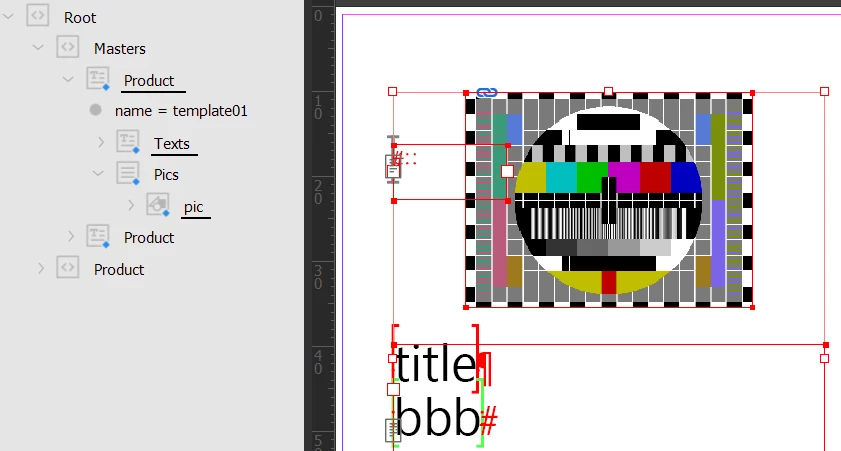
 

  • On the page there is an empty textframe tagged with <product>
  • The textframe is tagged with <texts> and conatins two tags: <title> and <body>.
  • the picture is located in a dummy tag <pics> and is tagged with <pic>.


All items is grouped and located on a master page.

With a script, I then  want to:

  1. Duplicate the group.
  2. Move the items to a page in the document.
  3. Duplicate all tags in the structure, so they are identical, but directly under the Root.


Problem:

I end up with either just duplicating the structure, but then the reference to the items on the page is lost

OR

I end up with duplicating the items on the page, but then the tags does not move along with it, like in this picture, they get stuck in their original location. (Only the <product> tag and the dummy <pics> tag are moved. The rest is still in their original position in the structure.
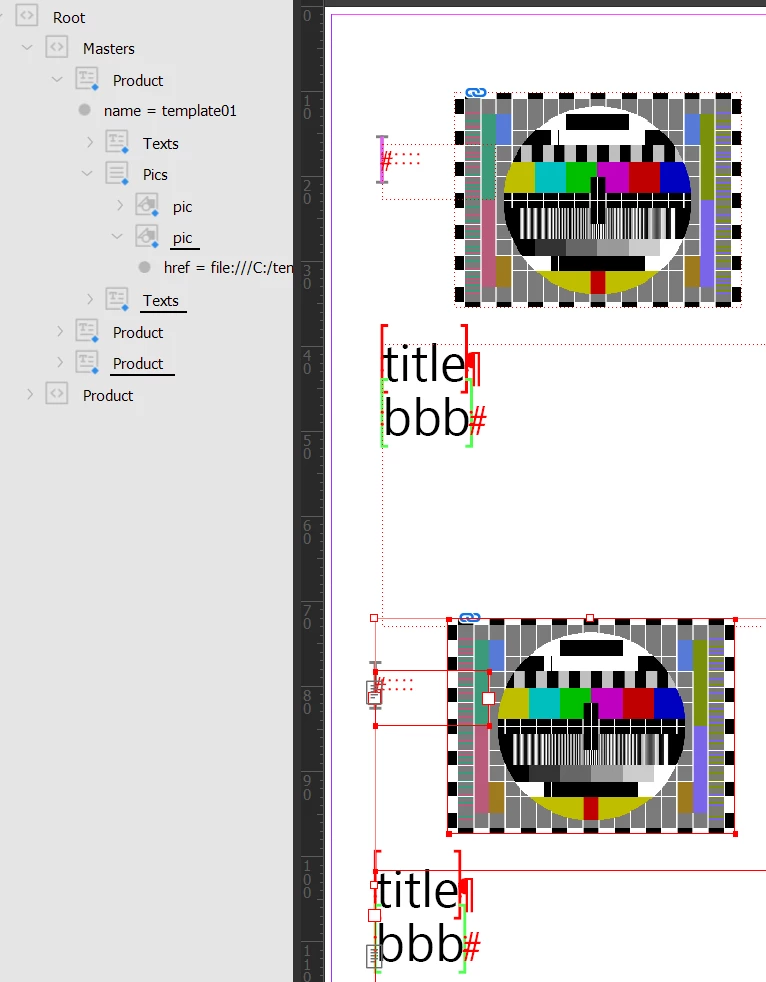
 

If I use app.copy() the items and the structure is copied correctly. But this means I have to select the items with the script and then use copy. I would rather use duplicate.


So... duplicate is different from copy.


Is there a way to duplicate items and the xml structure?


This topic has been closed for replies.
Correct answer Loic.Aigon

Here is a jsx approach. The idea is to export the group as a snippet (idms), then place this one on the destination page. This approach has many advantages:

- Not specifically resource consuming

- xml structure is preserved

- xml product node is found at the root level

- simple to manage


var doc  = app.activeDocument;
var root = doc.xmlElements.item(0);
var product = root.evaluateXPathExpression("./Masters/Product");
if(product.length){
    product = product[0];
    var xc = product.xmlContent;
    if(xc.constructor.name==="Story"){
        var tf = xc.textContainers[0];
        var gp = tf.parent;
        if(gp.constructor.name=="Group"){
            var tmpFile = File(Folder.temp+"/temp.idms");
           gp.exportFile(ExportFormat.INDESIGN_SNIPPET, tmpFile);
           doc.pages.item(0).place(tmpFile);
           tmpFile.remove();
        }
    }
}


2 replies

Robert at ID-Tasker
Legend
February 16, 2023

But in order to duplicate something - you need to have a reference to it - so if you have a reference - what is the problem with copying it? 


Can you show part of your code where you try to duplicate? What is the destination? 


Loic.Aigon
Loic.AigonCorrect answer
Legend
February 11, 2023

Here is a jsx approach. The idea is to export the group as a snippet (idms), then place this one on the destination page. This approach has many advantages:

- Not specifically resource consuming

- xml structure is preserved

- xml product node is found at the root level

- simple to manage


var doc  = app.activeDocument;
var root = doc.xmlElements.item(0);
var product = root.evaluateXPathExpression("./Masters/Product");
if(product.length){
    product = product[0];
    var xc = product.xmlContent;
    if(xc.constructor.name==="Story"){
        var tf = xc.textContainers[0];
        var gp = tf.parent;
        if(gp.constructor.name=="Group"){
            var tmpFile = File(Folder.temp+"/temp.idms");
           gp.exportFile(ExportFormat.INDESIGN_SNIPPET, tmpFile);
           doc.pages.item(0).place(tmpFile);
           tmpFile.remove();
        }
    }
}


Mr Mossa
Mr MossaAuthor
Participating Frequently
February 13, 2023

Hi Loic,


Great solution! I just was not into thinking like that.
You are a great recourse to this community!