
Participant
May 17, 2022
Answered

Copy & Paste a Link & Text Block are Pasting as UN-EDITABLE "Pasted Graphic" in New 17.2.1 Version

  • May 17, 2022
  • 3 replies
  • 753 views

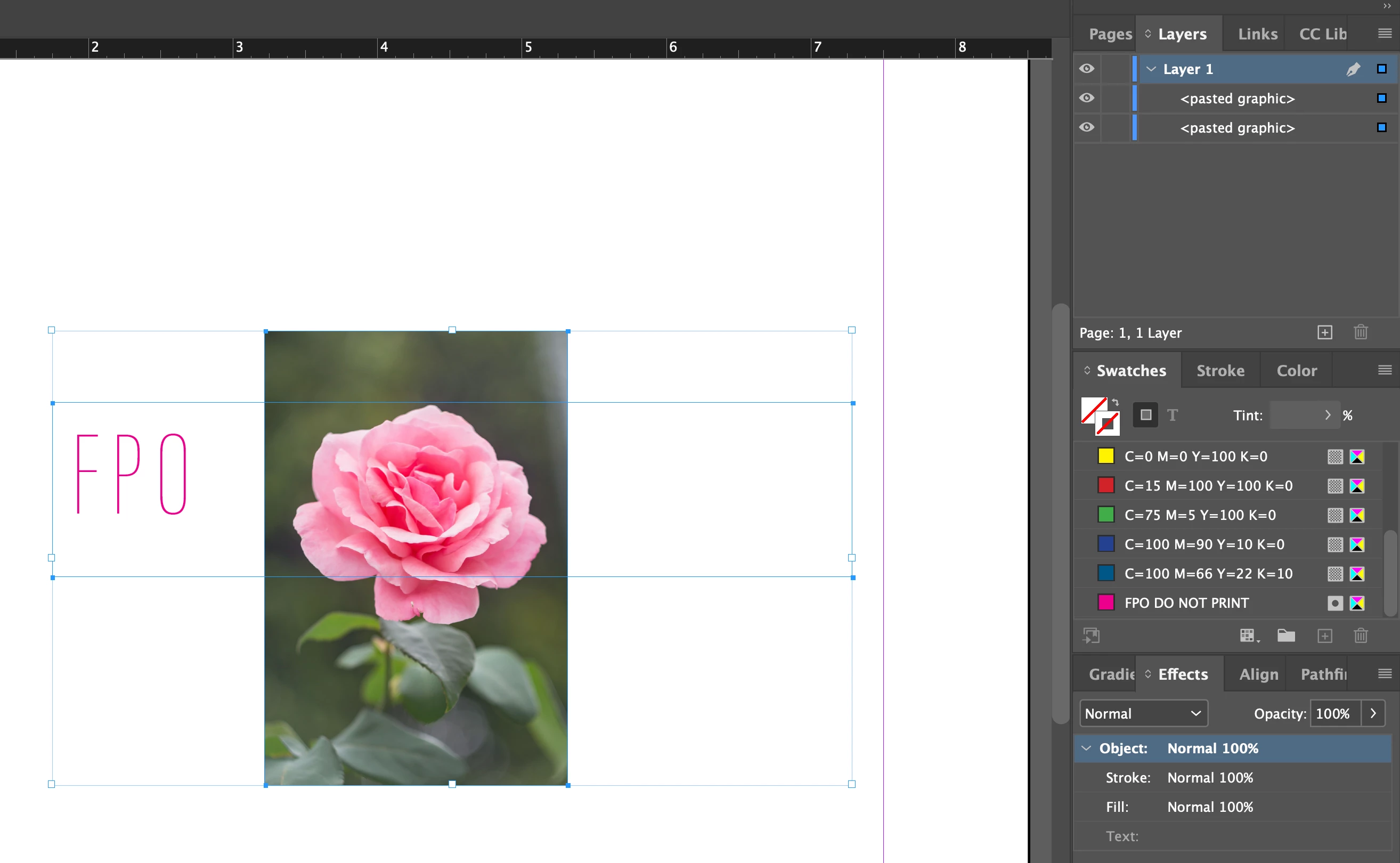
Hello all. I went to download the latest version of InDesign 17.2.1 and basic function of copy and paste and paste in place are not working. Is this a bug because this certainly can't be the new way to copy and paste? I am trying to copy multiple items; a linked image and a block of text from one InDesign document to a different document, and it is "pasting" as an un-editable, unlinked, pasted graphic. I need to be able to edit the copy and move the graphic and can't work with either because they can't be edited. This is not an effective way to design and create and creates room for major production errors as now you can't check the image (link) for print quality/resolution because the image is no longer a link and is now an un-editable "pasted graphic". Anyone have any idea what is going on here and how to fix it? I can't effectively and efficiently work in the latest InDesign when simple, basic functions such as copy and paste are not working as they should. Attached is a screenshot. The flower and text block should be pasting as a link and a block of text that can be edited, NOT uneditable, "pasted graphic". Please help!!!
This topic has been closed for replies.
Correct answer Peter Spier

This doesn't appear to be a new phenomenon. I see it when trying to copy content from CS6 into version 16.4 as well.

The workaround is to open the older file in the new version (it will open as "converted") and do your copy/paste from the converted doc to the new one, then close it without saving to preserve the original.

3 replies

Rick Adams
Inspiring
April 18, 2023

Hello

I have the same problem but in my case, this didn't fix the problem but it did get me thinking.

I use an app called “Copy’Em”. It is a Mac OS add-on that expands the clipboard to allow me to choose what I want to paste from a database of items that have been copied in the past. It has a feature that allows you to ignore specific apps that it may not work well with. Once I told it to ignore InDesign, the C/P works as expected. Problem Solved.

I hope this helps anyone that finds this issue.

Have a great day, Rick.

Peter Spier
Community Expert
Peter SpierCommunity ExpertCorrect answer
Community Expert
May 17, 2022

This doesn't appear to be a new phenomenon. I see it when trying to copy content from CS6 into version 16.4 as well.

The workaround is to open the older file in the new version (it will open as "converted") and do your copy/paste from the converted doc to the new one, then close it without saving to preserve the original.

KatClughAuthor
Participant
May 17, 2022
So in order for this to not happen, both documents; the old (from the older
version) has to be opened and "converted" in the latest version to paste my
links and text blocks as links and text blocks and not as "pasted
graphic(s)" in my new document?

I'll give it a shot. Praying for no corruption or crashing.

Thank you for reaching out.
BobLevine
Community Expert
Community Expert
May 17, 2022

It is not a new thing at all. It's always been this way. There is no reason to open the old file in the old version. Open everything in the same version and you should not have these problems.

BobLevine
Community Expert
Community Expert
May 17, 2022

Are you by chance using two different versions of InDesign? Check your clipboard preferences as well.

KatClughAuthor
Participant
May 17, 2022
Yes. Trying to transition work files created in 16.4 to the latest version
17.2.1 and everything is pasting as "pasted graphic" which I can't edit or
work with. It is very frustrating such a basic task has become
exponentially complicated. This is not efficient for time, word or design
in the least.

Attached is a screenshot of my current clipboard settings which I have not
changed from the old version to the new version.
KatClughAuthor
Participant
May 19, 2022

Thank you. This is working. I have literally never encountered this problem before. It had me so concerned.