Roger Breton
Legend
October 26, 2021
Answered

Copy / paste an image from Word into Indesign on Windows 10

  • October 26, 2021
  • 3 replies
  • 5327 views

I have ran into some strange behaviors from InDesign CC2021, lately, while opening older InDesign documents, such as "Span columns of text", I could not get the Space after option to work? 

But the reason I'm seeking help this morning is with regards to pasting images from Word into InDesign "THROUGH" the Windows clipboard. 

What happens is this.

First, I select the image in Word and choose "Copy" with the right mouse button.

Then, I toggle back to my new blank InDesign document and hit "Paste" (Ctrl +V).

Is there anything more mundane than that?

All I get, at this point, is an empty Text frame, in the middle of the document window, as though InDesign could only parse the Clipboard contents as "characters"? But this is absurd since I copy and paste images all the time from other applications, such as Microsoft Edge and Photoshop...


Analysis...


First of all, I wish I could find some reference to that behavior in Adobe's InDesign documentation... It would be "nice"...

Second of all, if I turn to Photoshop or Illustrator, the image comes across just fine.


In conclusion...

It's possible the state of my InDesign installation is to blame for this? But I tried quitting and restarting InDesign to no avail -- naturally.

It's possible because of OS peculiarities, this works on MacOS and not on Windows? I don't have a Mac here to test this hypothesis.

It's possible Adobe's Engineers have long decided not to bother with importing images from thre Clipboard when they recognize Word signature? As it could be too complicated?


The thing that bugs me is that, I've seen other users, here, reporting that it "works"?


What am I doing wrong?

 

This topic has been closed for replies.
Correct answer Roger Breton

Thank you Bevi. I think I found the "culprit".

Essentially, this comes from an "old" Word document. I don't know the exact version? I ought to look it up at some point... But I have had this document for a few years. 

Here's what I discovered...

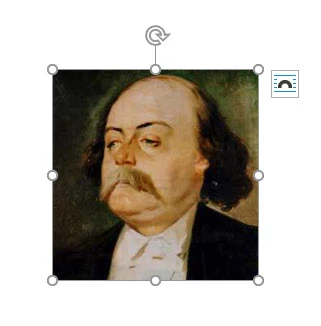
First, here is a screen capture of the image in the Word page :

As you can see, it displays with what appears as a fine dotted frame, with the regular 8 controls points in gray. At first glance, it does not look "suspicious". It pastes just fine, as I said, in Photoshop and Illustator. 

In the course of experimenting, I also pasted in Excel, and it came across just fine.

I copied it, then, from Excel to InDesign and it worked!

Finally, I had an intuition and pasted the image in a NEW Word document.

When I selected the image, this time, I got this interface :

You see the difference? Those handles?

Then I repeated the operation, Copy from this new Word document, switch back to InDesign, and Paste -- perfectly! No issues whatsoever.


So, lesson learned 🙂

I knew I could always Import the Word document with embedded images but it bugged me to no end to see Copying and Pasting plain images from Word to InDesign fail!


3 replies

Community Expert
October 26, 2021

Hi Roger,

could it be that this image from MS Word is treated as a frame that is anchored to text?


Better do the following:

Open the word docx container file with e.g. 7-Zip:


Then all imported image files are listed under media.

You could extract them and place the files on your InDesign pages.


Regards,
Uwe Laubender

( ACP )

Dave Creamer of IDEAS
Community Expert
Community Expert
October 26, 2021

The copy-paste method works on my system.

  • Make sure your cursor is not in a text frame before pasting. That will make the graphic an inline frame and may not fit in the frame. 
  • Make sure you are not selecting the image with any text; click directly on the picture (until you see the resize handles) before you copy. 


Other options:

  • You can Place the text and include graphics. Placing gives you more control over what happens during import. 
  • Make a copy of your Word file at the desktop level; change the file extension from ".docx" to ".zip"; unzip the file; locate the Media folder inside of the Doc folder; your graphics will be extracted there.
David Creamer: Community Expert (ACI and ACE 1995-2023)
Bevi Chagnon - PubCom.com
Legend
October 26, 2021

@Roger Breton, We work on Windows all the time and haven't had this happen.

Just tested it again with:

  • InDesign 2021 ver 16.4.0.55
  • Word 365 ver 2109 build 14430.20306
  • Windows 10 Pro ver 21H1 build 19043.1288


You still have to be careful about resolution, however. Use InDesign's various preflight and Link Info utilities to ensure you have enough resolution for the intended media. Although copy/paste retains the resolution and color space that was in the original graphic, many Word users put any quality of graphic into their documents. We had a 72 ppi GIF in one client file last week. Yikes!


|    Bevi Chagnon   |  Designer, Trainer, & Technologist for Accessible Documents ||    PubCom |    Classes & Books for Accessible InDesign, PDFs & MS Office |
Roger Breton
Roger BretonAuthorCorrect answer
Legend
October 26, 2021

Thank you Bevi. I think I found the "culprit".

Essentially, this comes from an "old" Word document. I don't know the exact version? I ought to look it up at some point... But I have had this document for a few years. 

Here's what I discovered...

First, here is a screen capture of the image in the Word page :

As you can see, it displays with what appears as a fine dotted frame, with the regular 8 controls points in gray. At first glance, it does not look "suspicious". It pastes just fine, as I said, in Photoshop and Illustator. 

In the course of experimenting, I also pasted in Excel, and it came across just fine.

I copied it, then, from Excel to InDesign and it worked!

Finally, I had an intuition and pasted the image in a NEW Word document.

When I selected the image, this time, I got this interface :

You see the difference? Those handles?

Then I repeated the operation, Copy from this new Word document, switch back to InDesign, and Paste -- perfectly! No issues whatsoever.


So, lesson learned 🙂

I knew I could always Import the Word document with embedded images but it bugged me to no end to see Copying and Pasting plain images from Word to InDesign fail!


Dave Creamer of IDEAS
Community Expert
Community Expert
October 26, 2021

When you say "old" are you referring to a ".doc" file? All files should be updated to ".docx" by now--that format came out in 2007--before doing anything with them. (Same is true for Excel and PowerPoint.)

David Creamer: Community Expert (ACI and ACE 1995-2023)