January 17, 2026
Answered

Copy/paste from illustrator to indesign issues

  • January 17, 2026
  • 2 replies
  • 132 views

I got a file at office which got corrupted (.ai file). I had to send its PDF into press printing at 300dpi. I tried setting up an indesign file and tried copy/pasting everything from illustrator to indesign. I wrote all the text but rest all graphics have now been copied/pasted from illustrator to indesign. Sometimes i got the message 'files will be copied as embedded EPS'. The resulting PDF from indesign turned out to be much lesser MB file size. The printer said that it might be a very low resolution file and bad for print. What could have caused this? To get my indesign file into a high resolution file what should i do now to fix it without having to redo all the work? Or should i redraw all images in photoshop and place file to indesign? I need help fast please

Correct answer Joel Cherney

What could have caused this?


I saw your post in that other thread where, back in 2017, they covered most of the possible answers for your question. A simple bit of vector art - one that could be made just as well in InDesign as it could have been made in Illustrator - usually results in a pasted object in InDesign that is identical to the one back in Illustrator.


But if the thing you've copied is too complicated in some way - too many objects? features used in Illy that have no counterpart in Indy? - then the contents of the clipboard get converted into something that will render successfully in InDesign. In your case the content, was converted into EPS format, and embedded. So unfortunately, the thing that caused this is "you trusted the clipboard to paste your selection with high fidelity, and it didn't." At least it told you what it was doing, I guess. 


The printer said that it might be a very low resolution file and bad for print.


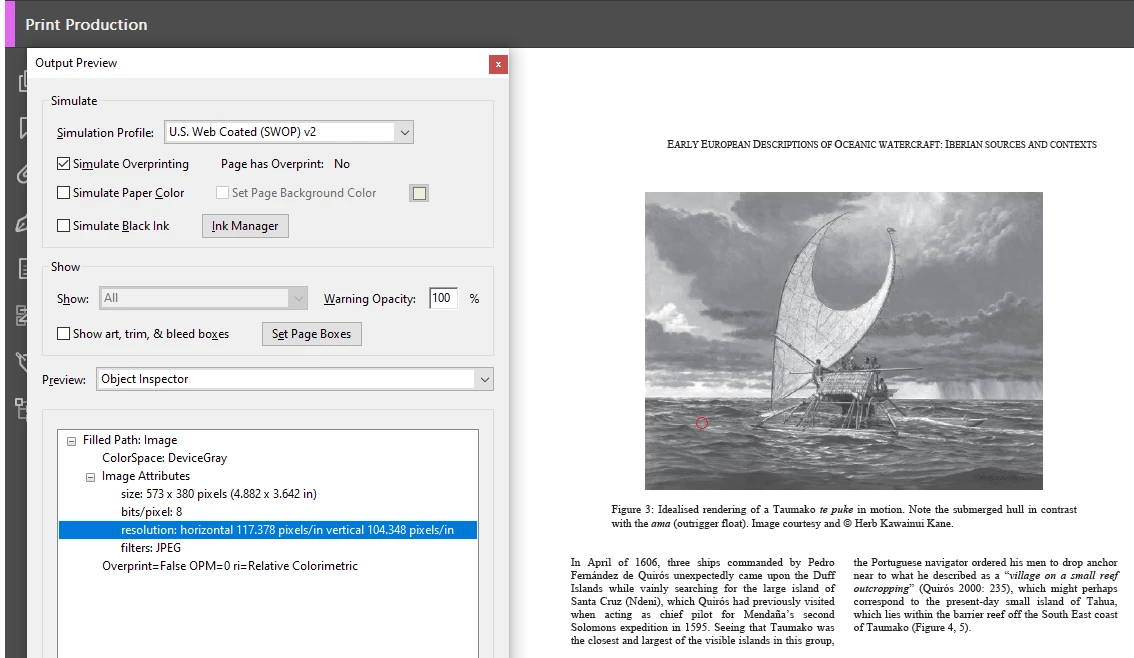
Well, I expect that you could export a PDF from InDesign and pop it open in Acrobat to examine it. If you open the "Print Production" menu, you can select the "Output Preview" tool, and the "Object Inspector" will tell you the resolution of any rasterized image you click on, in pixels per inch. For example, this image of a tepuke is only ~117ppi:
 

grand.png


(Edit: the "Object Inspector" is not the default tool, you have to pick it from the "Preview" dropdown about halfway down the dialog.)


I think that before you move on to this question:


To get my indesign file into a high resolution file what should i do now to fix it without having to redo all the work?


you should probably figure out if what you already have will be of sufficient resolution to go to print. The printer might be right about it being of low resolution and bad for print, but there's no way to know unless you check. 

2 replies

Willi Adelberger
Community Expert
Community Expert
January 17, 2026

Is it. Ot possible to place the file into InDesign?

Joel Cherney
Community Expert
Joel CherneyCommunity ExpertCorrect answer
Community Expert
January 17, 2026

What could have caused this?


I saw your post in that other thread where, back in 2017, they covered most of the possible answers for your question. A simple bit of vector art - one that could be made just as well in InDesign as it could have been made in Illustrator - usually results in a pasted object in InDesign that is identical to the one back in Illustrator.


But if the thing you've copied is too complicated in some way - too many objects? features used in Illy that have no counterpart in Indy? - then the contents of the clipboard get converted into something that will render successfully in InDesign. In your case the content, was converted into EPS format, and embedded. So unfortunately, the thing that caused this is "you trusted the clipboard to paste your selection with high fidelity, and it didn't." At least it told you what it was doing, I guess. 


The printer said that it might be a very low resolution file and bad for print.


Well, I expect that you could export a PDF from InDesign and pop it open in Acrobat to examine it. If you open the "Print Production" menu, you can select the "Output Preview" tool, and the "Object Inspector" will tell you the resolution of any rasterized image you click on, in pixels per inch. For example, this image of a tepuke is only ~117ppi:


grand.png


(Edit: the "Object Inspector" is not the default tool, you have to pick it from the "Preview" dropdown about halfway down the dialog.)


I think that before you move on to this question:


To get my indesign file into a high resolution file what should i do now to fix it without having to redo all the work?


you should probably figure out if what you already have will be of sufficient resolution to go to print. The printer might be right about it being of low resolution and bad for print, but there's no way to know unless you check.

