Participant
October 28, 2020
Answered

Copy/pasted content in InDesign 2021 is importing in un-editable format

  • October 28, 2020
  • 4 replies
  • 1703 views

I am trying to copy and paste content (text frames, tables, objects, etc) from an InDesign file that was created in the 2020 version, into a new file I created from the 2021 update. The pasted content is coming in as a graphic element, so it is not editable like it used to be. This is true even for a simple text frame - it behaves like an image when pasted into the 2021 file. I've looked to see if there's a "paste special" that may solve the issue, but I cannot find anything.


Does anyone know how to mitigate this issue? Is this something that has intentionally been changed in the upgrade to 2021? 
This topic has been closed for replies.
Correct answer Laubender

Third workaround:
Drag the the text frame from your InDesign 2020 or below to the Desktop or any other folder of your file system. That will create an IDMS file on the fly. Drag that IDMS file to your new layout in InDesign 2021.


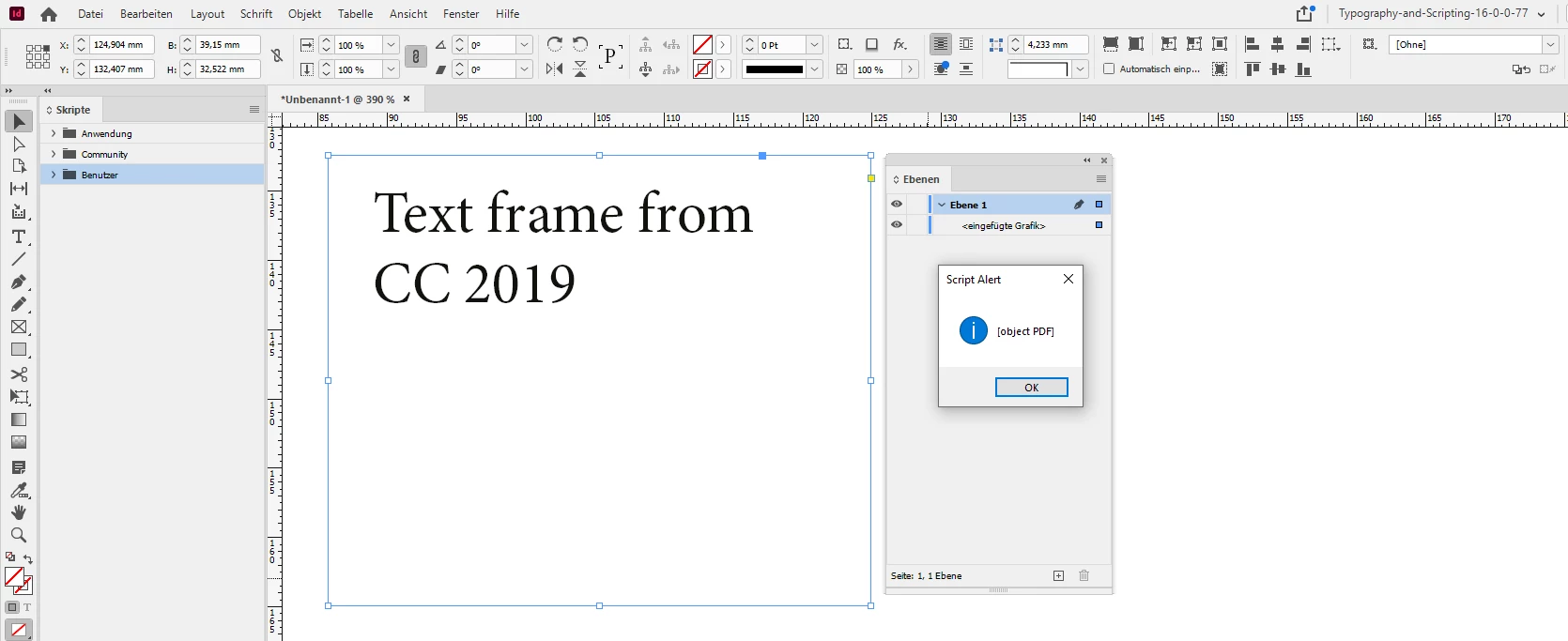
BTW: The result of a copy/paste action with a selected text frame from an older version of InDesign to a newer version is an "inserted graphic". My German InDesign says <eingefügte Grafik> in the Layers panel. This graphic actually is a PDF. Tested this by scripting the selected frame that was inserted with paste from InDesign CC 2019 to InDesign 2021:


alert( app.selection[0].graphics[0].getElements()[0] );


FWIW: Don't think this is a new behavior.


Regards,
Uwe Laubender

( ACP )

4 replies

Randy Hagan
Community Expert
Community Expert
October 29, 2020

Have you tried opening the CC2020 file in your InDesign CC2021 application? Does it work the same way when you try to copy/paste between CC 2021 files?


If it works, I'd suggest the easiest way to do this is to open the legacy file in CC2021, copy/paste the content and then close the source .indd file without saving changes. That way you'll have your CC2020 legacy content and your new CC2021 document.


Good luck,


Randy

Barb Binder
Community Expert
Community Expert
October 29, 2020

FWIW: Don't think this is a new behavior.

Uwe: You are right, again. I haven't gotten around to removing v14 (CC 2019) yet, so made a text box in v14 copied the frame and pasted in v15 (CC 2020)—same result. I guess I have't ever copied/pasted text frames from one verson to another, so it's new to me. 


@Brenton5E90, you now have three ways to accomplish the task-at-hand. Let us know which one you pick! 😊


~Barb 

~Barb at Rocky Mountain Training
LaubenderCommunity ExpertCorrect answer
Community Expert
October 29, 2020

Third workaround:
Drag the the text frame from your InDesign 2020 or below to the Desktop or any other folder of your file system. That will create an IDMS file on the fly. Drag that IDMS file to your new layout in InDesign 2021.


BTW: The result of a copy/paste action with a selected text frame from an older version of InDesign to a newer version is an "inserted graphic". My German InDesign says <eingefügte Grafik> in the Layers panel. This graphic actually is a PDF. Tested this by scripting the selected frame that was inserted with paste from InDesign CC 2019 to InDesign 2021:


alert( app.selection[0].graphics[0].getElements()[0] );


FWIW: Don't think this is a new behavior.


Regards,
Uwe Laubender

( ACP )

Barb Binder
Community Expert
Community Expert
October 29, 2020

Hi @Brenton5E90:


EDIT: It appears to be a feature. You can log a feature request using the link below.

I can confirm this new, unexpected behavior when I copy a text frame from a 2020 doc to a 2021 doc. I find it hard to believe it is a feature, and not a bug. You can log a bug reportfeature request here: https://indesign.uservoice.com/. If you come back here and post the link to your bug reportfeature request, I wll be happy to vote for it. Others will eventually find this thread and will also be able to link over to vote it up.


I found two work-arounds:

  • Either select the text in 2020 with the Type tool, copy and paste into 2021 or
  • Add the text frame to the CC Library, and drag it back out


~Barb

~Barb at Rocky Mountain Training