copycutter script, putting some paragraphs in the wrong place?
Hi, I have been using Jongwares copycutter script for some time now and it's great for speeding things up when doing layouts ----
Anyway something has been bugging me for awhile now. Sometimes it works as it expected. but quite often the second frame gets moved up to a weird new position. I can't figure out why. here is a screenshot to help explain what's happening:
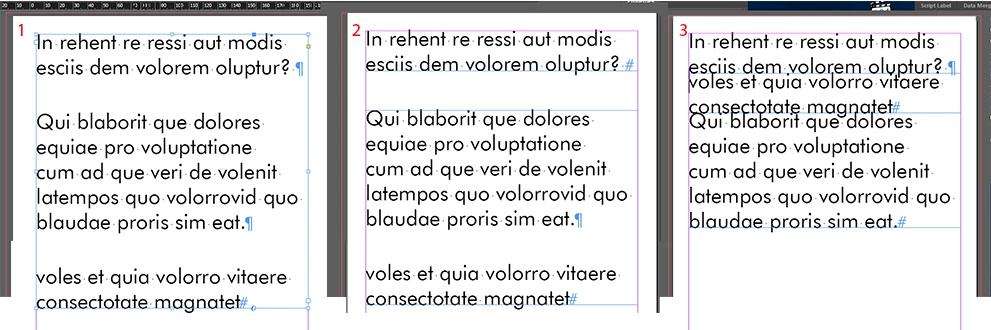
Number 1 is my original text box, number 2 is after I use the script (with insertion point on the second paragraph) and it returns the expected result. number 3 (insertion point on last paragraph) demonstrates the problem I'm having, the new text box just goes up to a seemingly random position inside the other text box. I need it to stay where it is every time.
Here is the script, I think it came from a script called copycutter2.jsx by jongware. I may have modified it a little to work in a single function so I can undo it, and to make the new text boxes fit to frame.
//DESCRIPTION:CopyCutter — Cut your Copy at the Cursor
// Jongware, 24-Mar-2010

if (parseFloat(app.version) < 6)
doCopysplit();
else
app.doScript(doCopysplit, ScriptLanguage.JAVASCRIPT, undefined, UndoModes.ENTIRE_SCRIPT, "split copy at insertion point");


function doCopysplit()
{
if (app.selection.length == 1 && app.selection[0] instanceof InsertionPoint)
{
if (app.selection[0].parentTextFrames[0].previousTextFrame == null &&
app.selection[0].paragraphs.previousItem(app.selection[0].paragraphs[0]) != null)
{
oldframe = app.selection[0].parentTextFrames[0];
topline = app.selection[0].paragraphs[0].baseline;
newframe = oldframe.duplicate();
newframe.characters.itemByRange(app.selection[0].paragraphs[0].index - app.selection[0].parent.paragraphs[0].index-1, newframe.characters.lastItem().index).remove();
oldframe.paragraphs.itemByRange(oldframe.paragraphs[0], app.selection[0].paragraphs.previousItem(app.selection[0].paragraphs[0])).remove();
newframe.fit (FitOptions.FRAME_TO_CONTENT);

vdiff = topline - oldframe.characters[0].baseline;
newheight = oldframe.geometricBounds[2] - oldframe.geometricBounds[0] - vdiff;
oldframe.geometricBounds = [oldframe.geometricBounds[2] - newheight, oldframe.geometricBounds[1], oldframe.geometricBounds[2], oldframe.geometricBounds[3]];
newframe.textFramePreferences.autoSizingReferencePoint = AutoSizingReferenceEnum.TOP_CENTER_POINT;
newframe.textFramePreferences.autoSizingType = AutoSizingTypeEnum.HEIGHT_ONLY;
oldframe.textFramePreferences.autoSizingReferencePoint = AutoSizingReferenceEnum.TOP_CENTER_POINT;
oldframe.textFramePreferences.autoSizingType = AutoSizingTypeEnum.HEIGHT_ONLY;
}
}
}
Does anybody know how to fix it?
Cheers
 AdChoices