Participant
April 7, 2019
Question

Copying animations and keeping the timing intact

  • April 7, 2019
  • 5 replies
  • 1531 views

Hi folks

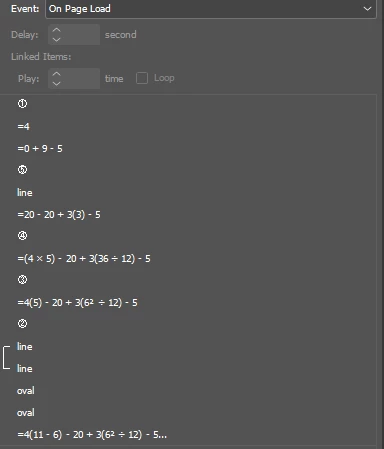
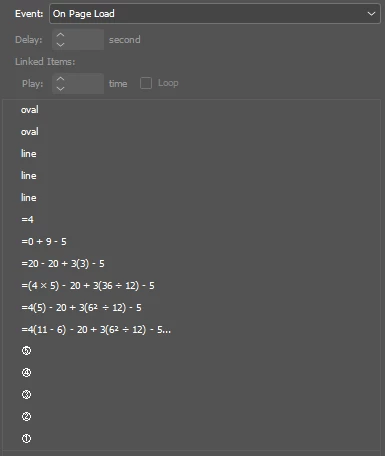
Seemingly simple problem, yet I can't yet find a solution. I need to copy my animations from one page to another, yet the timing completely changes each time. It doesn't matter if I copy, use content collector or anything else, the animation simply does not hold when I copy across. See the attached images, hopefully it will be something deep within the preferences settings.

Before copy
After Copy
    5 replies

    Participant
    April 1, 2022

    Hey Everyone, 


    I might have discovered a partial solution. I added my thoughts over on this post with Keith Gilbert.


    It's not perfect but seems to be working for me.

    Diane Burns
    Inspiring
    April 10, 2019

    Please note this issue is already marked "Under Review" by the Adobe engineering team! If you are reading this, and concerned with this issue, please add your vote to the bug report:

    Copying animations loses timing panel settings – Adobe InDesign Feedback

    Participant
    April 8, 2019

    Hi Folks

    I documented my process, I think it has worked in the sense I can copy animations to other documents. Please note its more of a workflow process when creating animations, it doesn't magically cure your existing animations.

    Copying animations in InDesign

    Diane Burns
    Inspiring
    April 9, 2019

    Thanks for documenting this, Phil.Saldai​. <Sigh>, sadly, it's a problem that would be really nice to have fixed!

    Diane Burns
    Inspiring
    April 8, 2019

    As others have posted, the timing gets all screwed up when you copy/duplicate animations by ANY method!

    Since I have had to work around this and occasionally had no choice but to copy complicated animations, I take a screen grab of the timing panel on the original page, then copy the animation, then paste the screen shot of the timing panel on the new page so I can re-order everything again.

    And yes, it is unfortunate to say the least that this has not been addressed. I could not find that it has been filed as a bug, so I did so. Please vote for this bug report, the more who vote the more Adobe pays attention.

    Copying animations loses timing panel settings – Adobe InDesign Feedback

    Community Expert
    April 8, 2019

    Voted!

    Thank you, Diane, for posting the bug report.

    Regards,
    Uwe

    Community Expert
    April 8, 2019

    Hi Phil,

    no chance. This feature is broken.

    Just from the start when it was introduced in CS5, I believe.

    Once Keith Gilbert and I tried something by scripting, but we had not much luck.

    If you want the long story read here:

    Animation order scrambled after Move method

    Regards,
    Uwe

    BobLevine
    Community Expert
    Community Expert
    April 8, 2019

    Yup...the interactive features have been ignored since they were introduced.

    Frankly, I think it's pathetic.