

hammer0909
Community Expert
Community Expert
July 20, 2022
Answered

Copying form fields in InDesign

  • July 20, 2022
  • 2 replies
  • 783 views

Just discovered a really strange bug when working with form fields in InDesign. If you copy a form field using the Selection tool and paste, it pastes as a form field. However if you copy the form field with the type tool active by holding down cmd/ctrl and then paste, it loses it's form field properties and just pastes as a frame. Anyone else encounter this?
This topic has been closed for replies.
Correct answer Laubender

Hi Chad,

seen into your video. Ahem, that's a typical user error.


You did not select the form field after you switched to the Text tool.

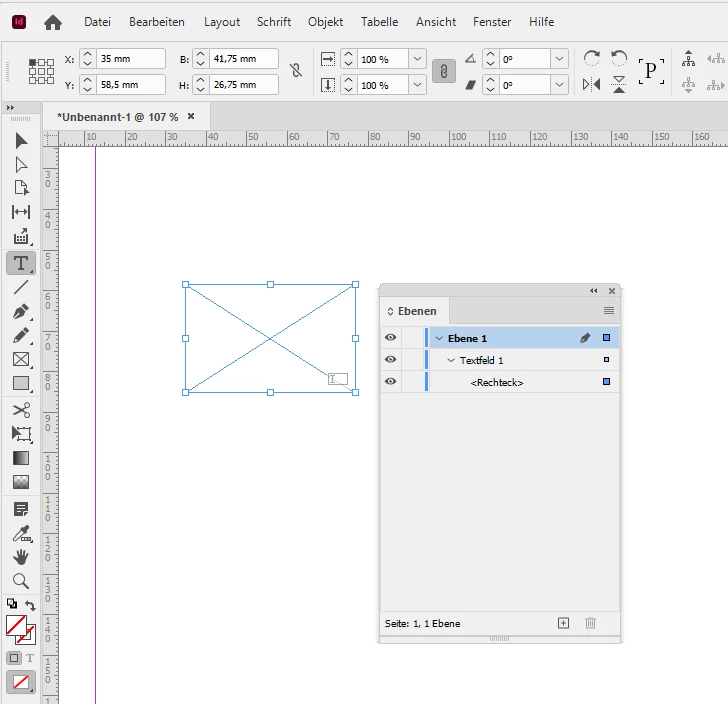
You selected the contents of the form field. The object, a rectangle, within.


From my German InDesign where the selected object has the generic name <Rechteck> (Rectangle) :


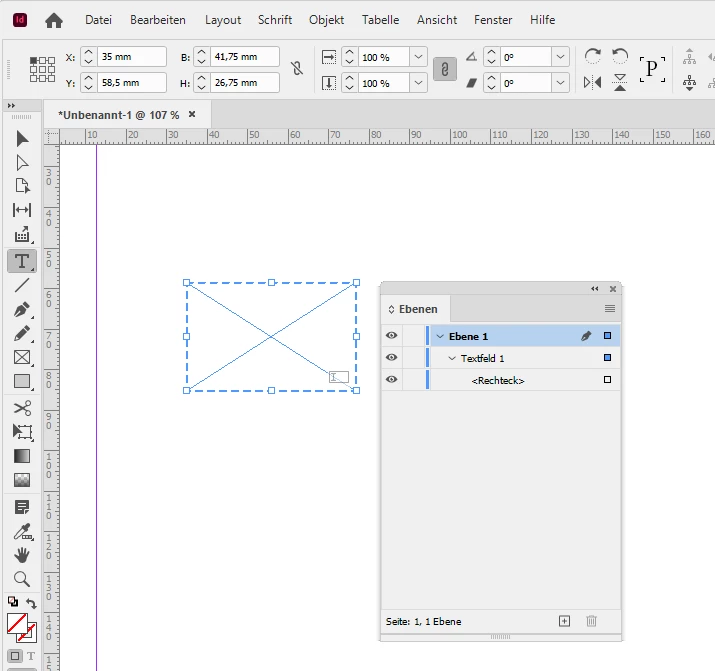
To get this right in the moment you selected the contents, just hit the Esc key to get the selection of the form field.

That's all, I think. Also look into the Layers panel and check what you exactly selected.


Regards,
Uwe Laubender
( Adobe Community Professional )


2 replies

LaubenderCommunity ExpertCorrect answer
Community Expert
July 21, 2022

Hi Chad,

seen into your video. Ahem, that's a typical user error.


You did not select the form field after you switched to the Text tool.

You selected the contents of the form field. The object, a rectangle, within.


From my German InDesign where the selected object has the generic name <Rechteck> (Rectangle) :


To get this right in the moment you selected the contents, just hit the Esc key to get the selection of the form field.

That's all, I think. Also look into the Layers panel and check what you exactly selected.


Regards,
Uwe Laubender
( Adobe Community Professional )


hammer0909
Community Expert
Community Expert
July 21, 2022

Uwe, you just proved that we always have something to learn! You're absolutely correct! The form objects are composed of a shape and then the form field encapsulates that shape. When you use my cmd/ctrl + click method, it only selects the shape and of course your recommendation of hitting the escape key after selecting the object, changes the selection to the form field which includes the shape. Well done my friend! Thanks for clearing this up for me!

Community Expert
July 20, 2022

Hi Chad,

just tested this with a couple of standard form fields.

It did not happen with my German InDesign 17.3.0 on Windows 10.


Could you share a sample form field where this happens?


Regards,
Uwe Laubender
( Adobe Community Professional )

hammer0909
Community Expert
Community Expert
July 20, 2022

Interesting. Thanks for checking Uwe! I'm using 17.3 as well. I've attached a video to just demonstrate what I'm running into.

https://youtu.be/WSOTOoKCkm0