


Question
Correct Bleed Settings for KDP Paperback Cover (6 x 9 in)
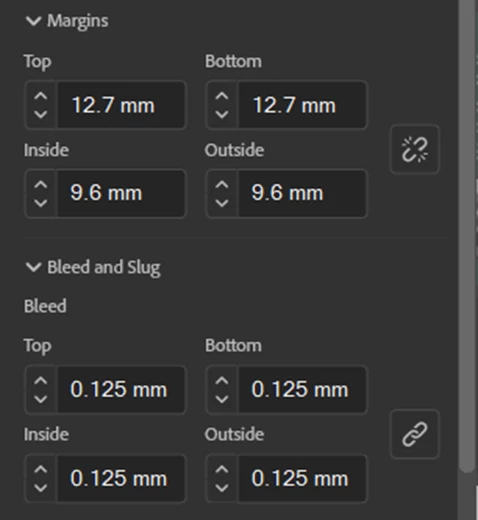
Hi I’m creating a print book cover for Amazon and hoping you can help me please with what I set bleed as in the bleed and slug dialogue box in the screenshot below, when creating the document.
- My book size is 152.4 x 228.6 mm (6 x 9 inch).
- Amazon says the book itself if it has no bleed should have inside (gutter) margins of 0.375" inches (9.6 mm) and outside margins of 0.25 inches (6.4 mm), so I have created the body of the book based on that.
- Amazon says the cover with bleed should have inside (gutter) margins of 0.375" inches (9.6 mm) and outside margin of 0.375 inches (9.6 mm).
- So I’ve entered those margins as you can see in the screenshot below for the cover.
- My question is - do I also have to put numbers in the bleed part of the bleed and slug dialogue boxes? Should it be .125 in all 4 boxes as I have put below? Many thanks.
<Title renamed by MOD>
 AdChoices