

_AWID_
Inspiring
January 6, 2025
Answered

Correctly display umlauts in alerting messages

  • January 6, 2025
  • 2 replies
  • 497 views

Hi.

I have successfully completed a script for InDesign. Now I just want to output a final message with the (dynamic) file name. Some of these files contain German umlauts (Ä, Ü, Ö). These and the spaces (not %20) should be displayed correctly in the warning message. How can I achieve this?
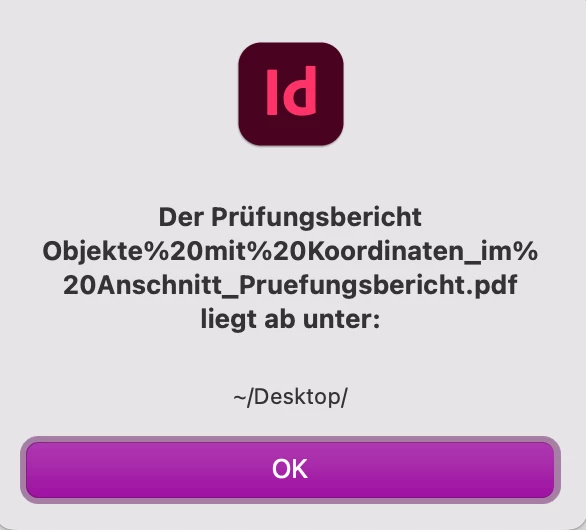


Regards

Correct answer Peter Kahrel

Use  decodeURI(). So instead of myFileName, use decodeURI(myFileName)

2 replies

Peter Kahrel
Community Expert
Peter KahrelCommunity ExpertCorrect answer
Community Expert
January 6, 2025

Use  decodeURI(). So instead of myFileName, use decodeURI(myFileName)

_AWID_
_AWID_Author
Inspiring
January 6, 2025

Thanks Peter. That was what I was looking for 🙂

Willi Adelberger
Community Expert
Community Expert
January 6, 2025

I don't see problems with Umlaute but with the ordinary space.

_AWID_
_AWID_Author
Inspiring
January 6, 2025


Unfortunately there are still problems with umlauts. 😞
But only with the document name.