


Alba Ceide
Participant
July 27, 2024
Answered

Coumpond shape editable?

  • July 27, 2024
  • 2 replies
  • 571 views

Hello!


I'm trying to create a compound shape in InDesign to join two elements, but I need to be able to edit them again and recover the original shapes. They are comic balloons that I need to reshape and change over time as a project advances.


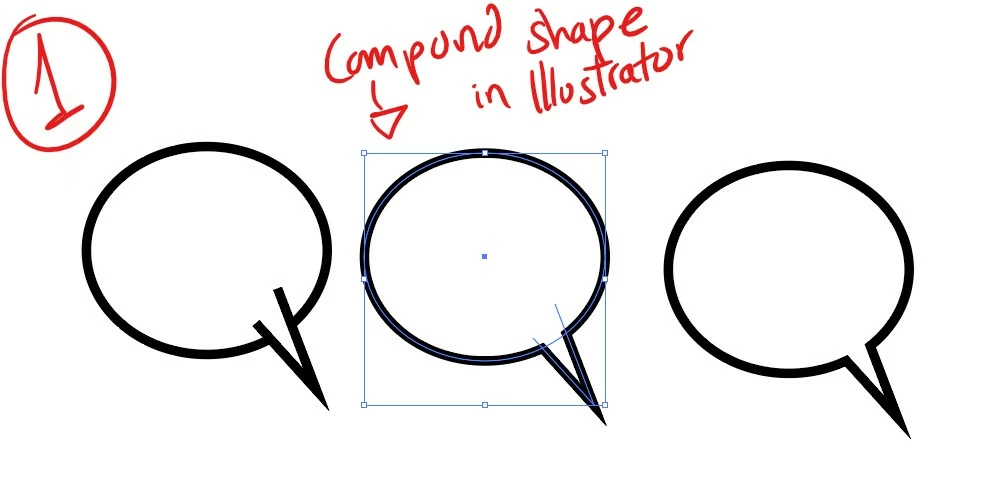
For example: in Illustrator it's possible to select 2 shapes and make a compound shape that looks like a single object. The advantage of this is that if I double-click on the tail of the balloon, I can still access it as an individual object which is very convenient for my projects. See image 1 below:
That's exactly what I'm trying to do in InDesign. I'd like to use the same approach but I don't manage! I can join the circle and the tail so they become a single speech bubble. But if I join them, I can not recover the original shapes. And the compound shape that I can make in inDesign,  looks like the image below:
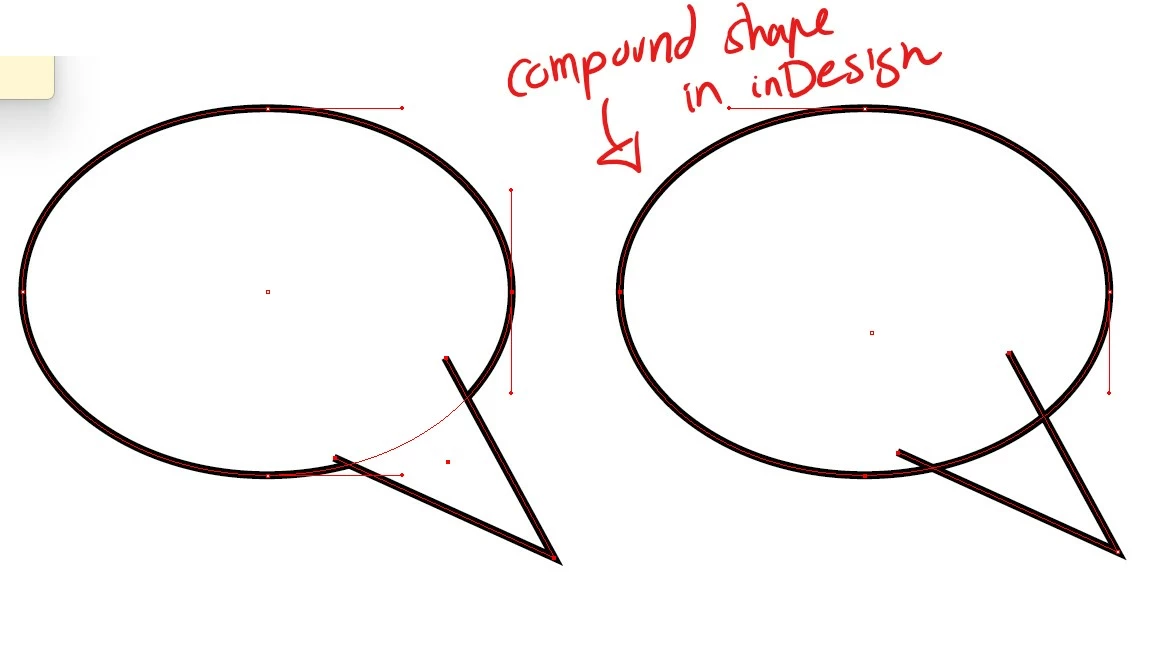
I can't find options to make the speech bubble line look continuous like in Illustrator.  Is it possible to edit these compound shapes in InDesign like it is in Illustrator?

This topic has been closed for replies.
Correct answer Barb Binder

Hi @Alba Ceide:


No. Pathfinder and Compound Paths are available in both apps, but only Illustrator allows you to use them together—Alt/Opt + click Unite in Illustrator to create a compound path the combines the two shapes to appear as one and still edit them individually—InDesign does not have that option. 


~Barb

2 replies

Robert at ID-Tasker
Legend
July 27, 2024

@Alba Ceide 


If you don't close the path - you can have something like this - two separate objects:

For convenience - you can group those two objects together.


Alba Ceide
Participant
July 27, 2024

I'll probably have to use this solution while working on the project in inDesign, and join the shapes at the very end when I know there's nothing else to edit. Thanks very much!

Robert at ID-Tasker
Legend
July 27, 2024
quote

I'll probably have to use this solution while working on the project in inDesign, and join the shapes at the very end when I know there's nothing else to edit. Thanks very much!


By @Alba Ceide


So which version of the "shape" do you need? 


If you need to edit the tail - you can always do this - even after you combine. 


Barb Binder
Community Expert
Barb BinderCommunity ExpertCorrect answer
Community Expert
July 27, 2024

Hi @Alba Ceide:


No. Pathfinder and Compound Paths are available in both apps, but only Illustrator allows you to use them together—Alt/Opt + click Unite in Illustrator to create a compound path the combines the two shapes to appear as one and still edit them individually—InDesign does not have that option. 


~Barb

~Barb at Rocky Mountain Training
Alba Ceide
Participant
July 27, 2024

Thanks very much, at least now I know it's not possible and I stop going around in circles. I appreciate the fast response

Barb Binder
Community Expert
Community Expert
July 27, 2024

Happy to help, Alba. It's confusing because the CC apps share some features but with little variations that aren't obvious. And I like your solution of working with them as two objects until you ready for your final review.


~Barb

~Barb at Rocky Mountain Training