Participant
January 14, 2021
Answered

create a pdf with a video without flash

  • January 14, 2021
  • 3 replies
  • 918 views

I need to create a pdf with InDesign with a video inside. Exporting the pdf and opening the file it asks me for Flash support. How can you fix it without having to download flash?

This topic has been closed for replies.
Correct answer BobLevine

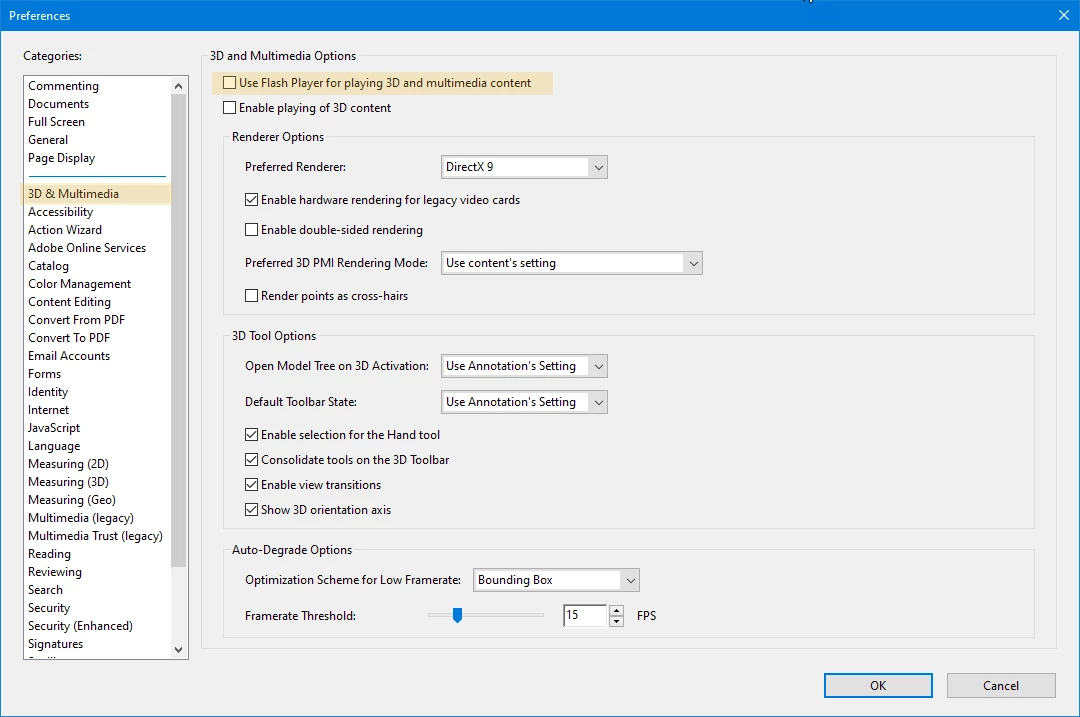
Change your preferences, but note that there's little you can do for other people. I don't recommend trying to use multimedia in a PDF.


3 replies

Derek Cross
Community Expert
Community Expert
January 14, 2021

Try including a hyperlink in your PDF is a Youtube, or similar, video.

BobLevine
Community Expert
Community Expert
January 14, 2021

Note that even with a non-flash format for the video, whether it will work or not is going to be nothing but a crapshoot.

If you can't control the reader app that will be used, forget it. 

Barb Binder
Community Expert
Community Expert
January 14, 2021

Convert the video to a non-Flash format (excluding *.flv and *.swf). Inserting or embedding rich media (non-Flash content) in PDFs will continue to be supported. (i.e., Quicktime, MPEG, 3GPP if if H.264 encoded).

https://helpx.adobe.com/acrobat/kb/flash-format-support-in-pdf.html


~Barb 

~Barb at Rocky Mountain Training
Participant
January 14, 2021

the videos I insert are in mp4, but still asks me to activate the flash

BobLevine
Community Expert
BobLevineCommunity ExpertCorrect answer
Community Expert
January 14, 2021

Change your preferences, but note that there's little you can do for other people. I don't recommend trying to use multimedia in a PDF.