
Participating Frequently
December 30, 2018
Answered

Create bullet paragraphstyle through indesign javascript

  • December 30, 2018
  • 1 reply
  • 1861 views

Hi all,

Anyone please help me to complete my javascript coding. I want to create a paragraph style through script as a bullet character, everything is fine, but the bullet character has a tab separation is too long.

Coding:

var doc = app.activeDocument;

doc.paragraphStyles.add({name:"Bullets", appliedFont:"Arial", fontStyle: "Regular", pointSize:7, leading:10.5, bulletsAndNumberingListType: ListType.BULLET_LIST});

I am getting output like this see the image below
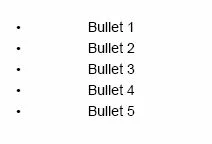
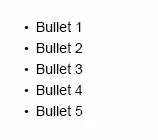
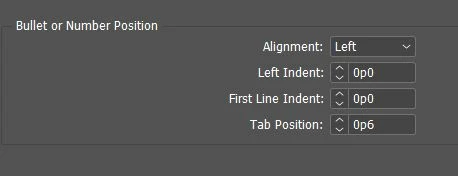
But I want the output something like this, How to set a tab position to 6pt?
Thank you

This topic has been closed for replies.
Correct answer Manan Joshi

The following should do the trick

var doc = app.activeDocument;

var a = doc.paragraphStyles.add({name:"Bullets", appliedFont:"Arial", fontStyle: "Regular", pointSize:7, leading:10.5, bulletsAndNumberingListType: ListType.BULLET_LIST});

a.tabStops.add({position:"0p6"})

-Manan

1 reply

Manan JoshiCommunity ExpertCorrect answer
Community Expert
December 30, 2018

The following should do the trick

var doc = app.activeDocument;

var a = doc.paragraphStyles.add({name:"Bullets", appliedFont:"Arial", fontStyle: "Regular", pointSize:7, leading:10.5, bulletsAndNumberingListType: ListType.BULLET_LIST});

a.tabStops.add({position:"0p6"})

-Manan

-Manan
Participating Frequently
December 30, 2018

Thank you so much for the quick response, now it is working