
Christopher Pickering
Known Participant
December 5, 2015
Answered

create inline anchored text frame

  • December 5, 2015
  • 1 reply
  • 849 views

Hello!

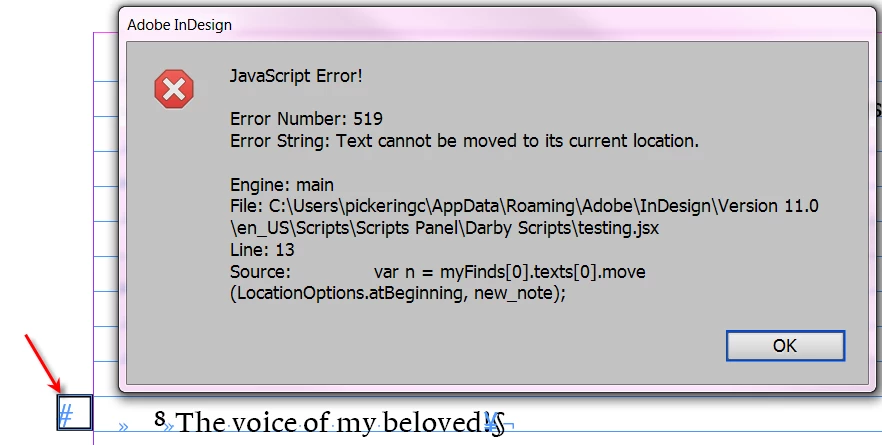
I am trying to create an anchored text frame from the results of a search. If I create the anchored frame from a selection it works no problem, but when I do it from the results of a grep I get the "Text cannot be moved to its current location" error....Do you have any ideas how to resolve that?

As a side question... when I create an object style through script the text frame always has a border.. why is that? (I created the style with another script)

doc = app.activeDocument;

app.findGrepPreferences = app.changeGrepPreferences = null; 

app.findGrepPreferences.findWhat = "~6"; 

var myFinds = doc.findGrep(); 

for (i = myFinds.length; i > 0; i--){

var os = doc.objectStyles.item ("Section");

var new_note = myFinds[0].insertionPoints[0].textFrames.add ({appliedObjectStyle: os, label: 'Section'});

var n = myFinds[0].texts[0].move (LocationOptions.atBeginning, new_note.insertionPoints[0]);

n.applyParagraphStyle (os.appliedParagraphStyle, false)

new_note.fit (FitOptions.frameToContent);

}

Thank you!
Christopher
This topic has been closed for replies.
Correct answer Vamitul

Once you insert the anchored object the pointers to the text shift. So you will need to compensate for that. Sort of like this:

var ip0=myFinds[0].texts[0].insertionPoints[0].index+1,

ip1=myFinds[0].texts[0].insertionPoints[-1].index+1;

...

...

var n = myFinds[0].parentStory.insertionPoints.itemByRange(ip0,ip1).texts[0].move (LocationOptions.atBeginning, new_note.insertionPoints[0]);

//Disclamer, code sinppet written without coffee, will most likely need tweaking.

Second question,

make sure the object style has enableStroke set to true and strokeWeight set to 0

1 reply

Vamitul
VamitulCorrect answer
Legend
December 5, 2015

Once you insert the anchored object the pointers to the text shift. So you will need to compensate for that. Sort of like this:

var ip0=myFinds[0].texts[0].insertionPoints[0].index+1,

ip1=myFinds[0].texts[0].insertionPoints[-1].index+1;

...

...

var n = myFinds[0].parentStory.insertionPoints.itemByRange(ip0,ip1).texts[0].move (LocationOptions.atBeginning, new_note.insertionPoints[0]);

//Disclamer, code sinppet written without coffee, will most likely need tweaking.

Second question,

make sure the object style has enableStroke set to true and strokeWeight set to 0

Christopher Pickering
Known Participant
December 5, 2015

Thank you, you work well with no coffee