Participant
August 13, 2013
Answered

Create paragraph style from selected text?

  • August 13, 2013
  • 4 replies
  • 37646 views

I'm trying to create a paragraph style from selected text in InDesign CS6 (Mac). There has to be a simple command for this.

For example, if I'm formatting text that has no paragraph style and decide I want to save the formatting as a new style to be able to apply it elsewhere, there is no command to "create new paragraph style from selected text." The only option, it seems, is to manually create a new paragraph style, click on that style, which of course annihilates all the desired formatting, redo all of the formitting (assuming one rememebers it), then right-click on the paragraph style and hope the "Redifine Style" option is available (which it often isn't).

Any guidance greatly appreciated.
This topic has been closed for replies.
Correct answer philippanmei

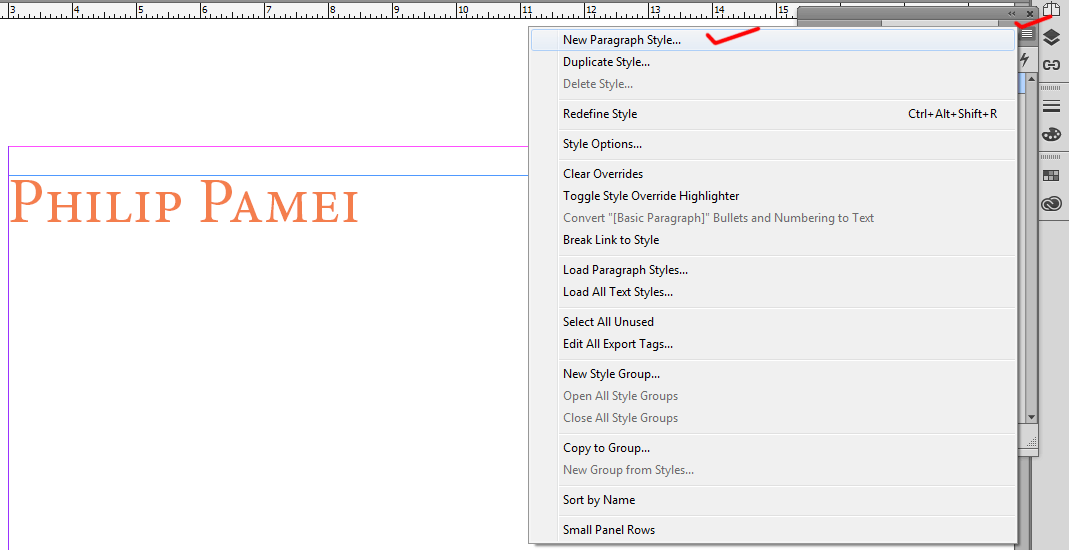
1. Select the text or keep blink your cursor on the text and open Paragraph style (Press F11), on the paragraph style panel click on the menu and choose New Paragraph Style

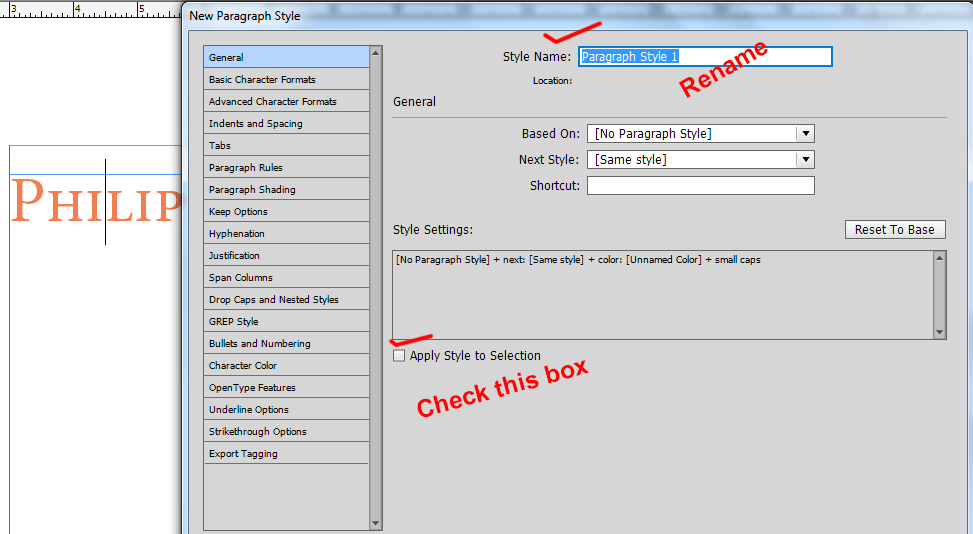
2. In this New Paragraph Style dialog box you can do your desire setting and check the box "Apply Style to Selection"

OR

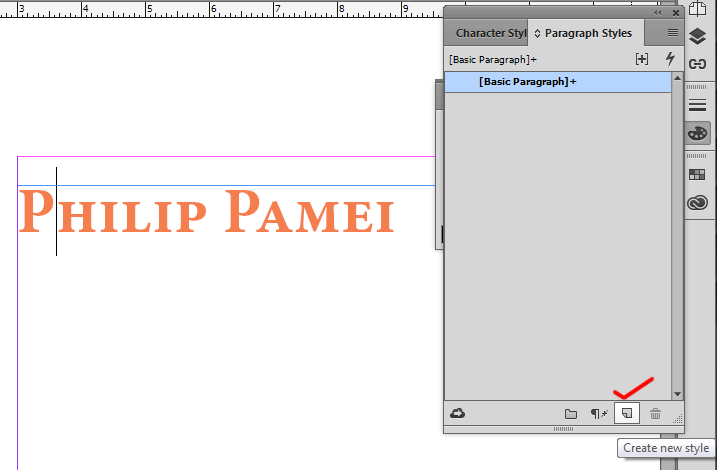
1. Create your desire text and click on that created text (or select the text) and click on create new style button which is shown on the image

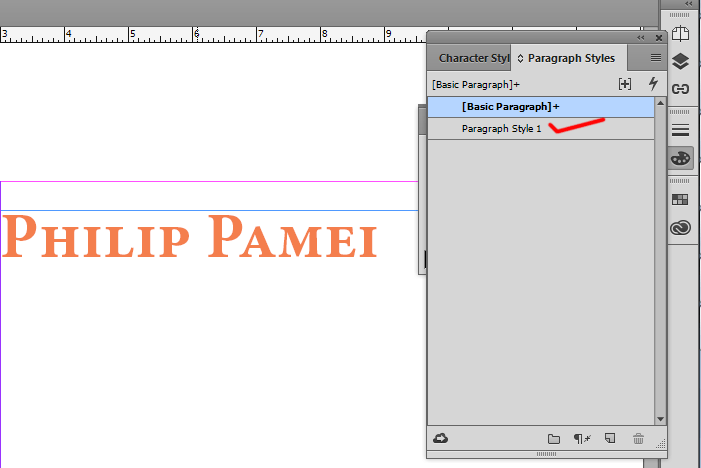
2. When you click on create new style in the paragraph style list a Paragraph style 1 will appear but it will not highlighted, it will highlight on the default style "Basic Paragraph", So you have to just click once on the paragraph style 1 and double click on it to rename it.

It will preserve the style what you have created.

Thanks

4 replies

Participant
August 10, 2020

This does not keep what I have selected! 

Please can you explain a different way


Participating Frequently
August 16, 2016

For this problem: "...redo all the formatting then right-click on the paragraph style and hope the "Redifine Style" option is available (which it often isn't)...."

Do not select whole paragraph, cause frequently you have mixed formatting in the paragraph (last character - EndOfParagraph may have different formatting than rest of paragraph for example) and than InDesign cannot decide what formatting to apply to ParagraphStyle and makes "redefine style" unavailable. Make sure you have only placed cursor in modified text and than right-click on paragraph style to have redefine option available...

philippanmei
philippanmeiCorrect answer
Participating Frequently
August 16, 2016

1. Select the text or keep blink your cursor on the text and open Paragraph style (Press F11), on the paragraph style panel click on the menu and choose New Paragraph Style

2. In this New Paragraph Style dialog box you can do your desire setting and check the box "Apply Style to Selection"

OR

1. Create your desire text and click on that created text (or select the text) and click on create new style button which is shown on the image

2. When you click on create new style in the paragraph style list a Paragraph style 1 will appear but it will not highlighted, it will highlight on the default style "Basic Paragraph", So you have to just click once on the paragraph style 1 and double click on it to rename it.

It will preserve the style what you have created.

Thanks

MW Design
Inspiring
August 13, 2013

Format some text, select some of it, create new style. The attributes will be in the new style. Though you still need to apply the style ton the paragraph.

Legend
August 13, 2013

There is a checkbox within the paragraph style creation dialog to "Apply style to selected text".

MW Design
Inspiring
August 13, 2013

Heh, heh. But I almost never remember to check it...