
Participant
June 6, 2011
Answered

Create Read-only XMP MetadataPreference items?

  • June 6, 2011
  • 3 replies
  • 1168 views

Hi,

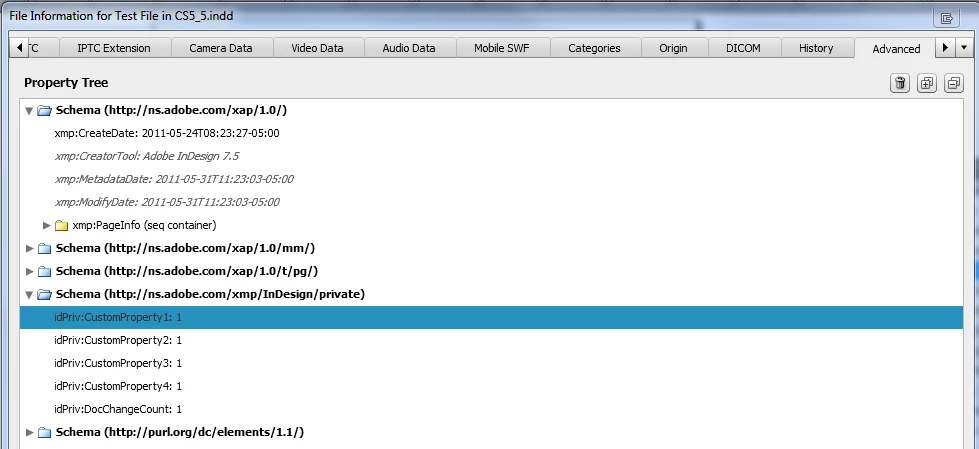
I'm trying to store some information about an InDesign file within the file itself using the XMP blob (MetadataPreferences). I'm able to set/get the values, but I'd like to prevent the user from being able to edit these values (they are controlling a workflow, and ideally we don't want the users messing with them). Currently, I can see the custom values view the File Info > Advanced tab, in the schema I put them. The user can't edit the values, but they can remove them if they thought too. This is what I want to prevent: I see some of the system values are in italics, which means they are locked down. Is there a way to, view script, specify a MetadataPreference object as read-only? I'm currently setting the property along the following lines:

nativeFileObj.metadataPreferences.setProperty(XmpNamespace, key, newValue.toString());
Thanks!

This topic has been closed for replies.
Correct answer Harbs.

In an XMP Schema, elements can be marked as internal or external. Applications which handle XMP metadata use the schema to display internal elements as read-only and external ones as read-write.

If there's no schema for a specific element, it's assumed to be external. Unless you can write a schema in such a way that inDesign can read it (and I don't know if that's possible), it's going to assume your XMP data is read/write...

Harbs

3 replies

Harbs.
Legend
June 7, 2011

If you explain WHY you want to make your metadata read-only, we might have other suggestions to achieve your goal...

Participant
June 7, 2011

Thanks for the responses!

As for the why: I'm working on creating a version control system for InDesign documents. When a document is checked-in, the version control metadata (unique ID, check-in status, etc...) is stored in the document. It seemed like storing this data in the XMP would be a logical choice as it is easy to read/write and possible to extract without InDesign server on a machine w/o InDesign loaded (though I'm not sure we'll actually need to do that). The desire for read-only is to try to prevent a user from accidentally or purposely clearing these tracking values which would corrupt the version control workflow.

So I guess a new question is: is there a better place to store metadata about a document other than in the XMP blob where it is accessible via ExtendScript but not editable (or even viewable) by the user.

Thanks!

John Hawkinson
Inspiring
June 7, 2011

If it's important, give up on it being non-editable, because the user can always write a script.

Ideally you can get the document's UUID out somehow, and use that as an index to a table you store in your VC system...


You can always mirror a not-necessarily-valid copy in your XMP metadata (or cryptographically sign it, as above).

You can use app.activeDocument.insertLabel(), though.

Again, anyone can trivially get to it from the scripting API...

You could also write a plugin...

Harbs.
Harbs.Correct answer
Legend
June 7, 2011

In an XMP Schema, elements can be marked as internal or external. Applications which handle XMP metadata use the schema to display internal elements as read-only and external ones as read-write.

If there's no schema for a specific element, it's assumed to be external. Unless you can write a schema in such a way that inDesign can read it (and I don't know if that's possible), it's going to assume your XMP data is read/write...

Harbs

John Hawkinson
Inspiring
June 7, 2011

This is not acheivable. If you need strict proof that the values have not been tampered with, you'll have to use cryptography (digitally sign your metadata and have your downstream application reject files lacking signed metadata).