
Known Participant
January 23, 2026
Question

Create Text Anchor/s in Id 21.1 x64

  • January 23, 2026
  • 1 reply
  • 24 views

I am using Indesign 21.1 x64 which the CC helps me keep up to date. I don't code.


I am typesetting an ebook and at the end of each chapter, I want to have a hyperlink on the words 'Study Guide' which, when tapped, sends the reader to the back of the book where that chapter's Study Guide is located. So, a hyperlink or endnote or crossref of some sort which links to a particular heading.
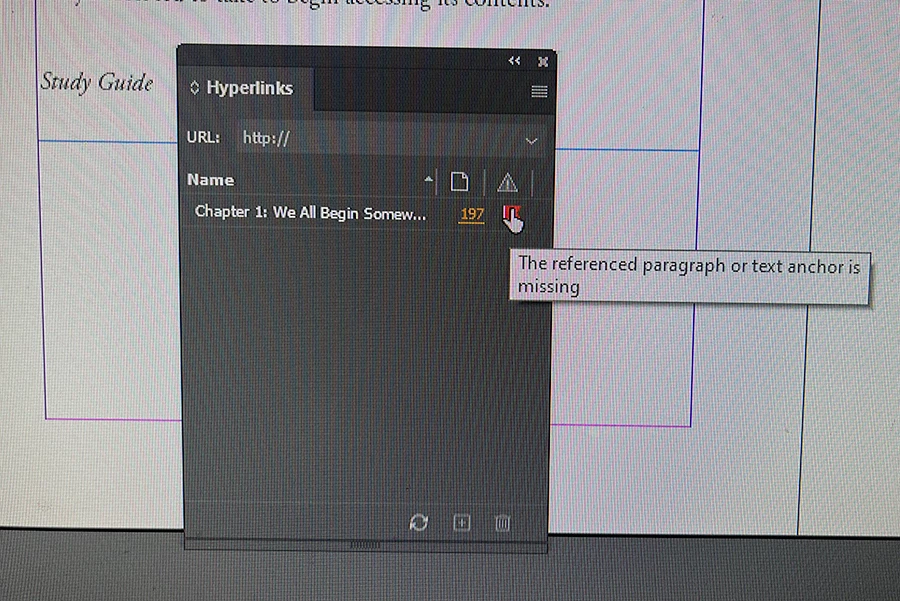
IMG_E8017.JPG

I believe I need a Text Anchor, but when I ask how to create one, all the 'Correct' answer so far in the forum are out of date. They tell me to go to Window-Interactive-Hyperlinks-New Hyperlink Destination, but this menu option does not exist. I improvised and this is the red flag I got.

1 reply

Barb Binder
Community Expert
Community Expert
January 23, 2026

Hi @BeckOzineedhelp:


Two options:


Cross-reference

Create a paragraph style for each of the lesson-specific study guide, and then add an x-ref to the study guide paragraph that directs the reader to that specific paragraph. Repeat for each lesson. This is a one-step process for each link because you select the study guide paragraph and InDesign adds the text, the marker and the links to the text. (Demo below)


Create a named destination

Create a named destination at the beginning of each style guide heading. 

Add text and the add a hypertext link to jump to that named destination. 

Repeat both steps for each lesson. This is a three-step process because you need to add the destination marker, and then you need to link to it.


I'd do the x-ref because I'm not going to take three steps (1. named destination, 2. type text, 3 add link) for something I can do in one. 

2026-01-22_19-34-07 (1).gif


~Barb

~Barb at Rocky Mountain Training