Inspiring
July 19, 2022
Answered

Creating a conditionSet

  • July 19, 2022
  • 2 replies
  • 661 views
Hi,
I'm trying to create a condition set thru scripting but i'm not getting how to define the visibility of a condition.
I want do create a condition set where the condition "hide" must be not visible.
Can anyone help me?
Here's the code.
var myDoc = app.activeDocument;
myDoc.conditions.add({name:"exercicio"});
myDoc.conditionSets.add ({name:"Hidden", setConditions: {condition:"exercicio", visible:false }});
 
Thanks
Paulo
 

This topic has been closed for replies.
Correct answer Laubender

Hi Peter,

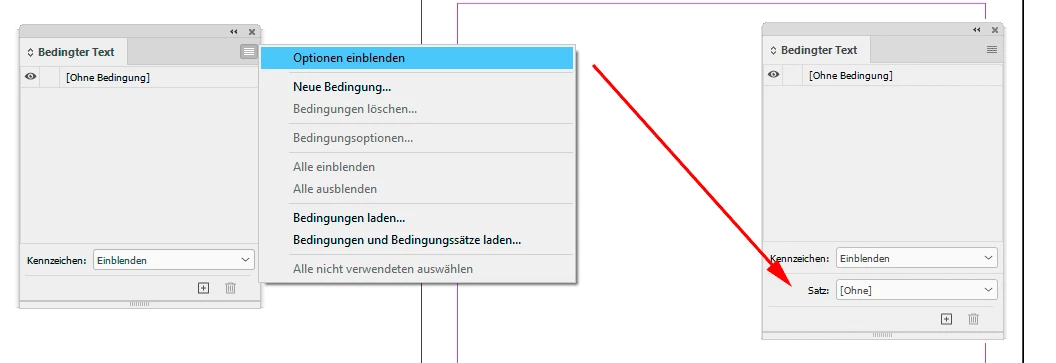
it's rather silly; you only can see the Condition Set feature if you expand the feature set of the Conditional Text panel.


From my German InDesign; Conditional Text panel not expanded vs expanded:


@PauloJC ,

note, that the value for setConditions must be an array of arrays.

See into the DOM documentation for this:

https://www.indesignjs.de/extendscriptAPI/indesign-latest/#ConditionSet.html


The following sample will work:


var doc = app.documents[0];
var firstCond = doc.conditions.add
(
	{
		name : "Condition 1"
	}
);

var secCond = doc.conditions.add
(
	{
		name : "Condition 2"
	}
);

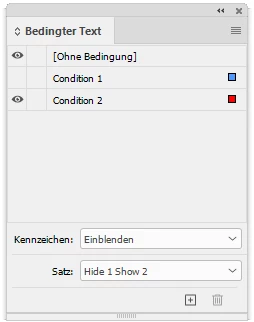
var myCondSet = doc.conditionSets.add
(
	{
		name : "Hide 1 Show 2", 
		setConditions : 
		[
			[ firstCond , false ] ,
			[ secCond , true ]
		]
	}
);

doc.conditionalTextPreferences.activeConditionSet = myCondSet ;


Result:


Regards,
Uwe Laubender
( Adobe Community Professional )


PS: Link to DOM documentation added.

2 replies

LaubenderCommunity ExpertCorrect answer
Community Expert
July 19, 2022

Hi Peter,

it's rather silly; you only can see the Condition Set feature if you expand the feature set of the Conditional Text panel.


From my German InDesign; Conditional Text panel not expanded vs expanded:


@PauloJC ,

note, that the value for setConditions must be an array of arrays.

See into the DOM documentation for this:

https://www.indesignjs.de/extendscriptAPI/indesign-latest/#ConditionSet.html


The following sample will work:


var doc = app.documents[0];
var firstCond = doc.conditions.add
(
	{
		name : "Condition 1"
	}
);

var secCond = doc.conditions.add
(
	{
		name : "Condition 2"
	}
);

var myCondSet = doc.conditionSets.add
(
	{
		name : "Hide 1 Show 2", 
		setConditions : 
		[
			[ firstCond , false ] ,
			[ secCond , true ]
		]
	}
);

doc.conditionalTextPreferences.activeConditionSet = myCondSet ;


Result:


Regards,
Uwe Laubender
( Adobe Community Professional )


PS: Link to DOM documentation added.

Peter Kahrel
Community Expert
Community Expert
July 19, 2022

Well, what do you know. You live and learn.

Thanks, Uwe.

Community Expert
July 19, 2022

Had to look it up in the DOM documentation myself.

And it took some time to re-discover the option on the Conditional Texts panel.

I don't use it that often…


Regards,
Uwe Laubender
( Adobe Community Professional )

Peter Kahrel
Community Expert
Community Expert
July 19, 2022

I've never used conditionSets, didn't even know they existed! What are they for? There's nothing in the interface that shows anything like condition sets.

Anyway, to set a condition's visibility you'll have to do it on the condition itself, not the set:

myDoc.conditions.add({name:"exercicio", visible:false});

P.

PauloJCAuthor
Inspiring
July 19, 2022

Conditions Sets stores the visibility of conditions.
Instead of activating or deactivating the visibility of the conditions one by one, we can store the visibility in a condition set.


Anyway, i've managed following your indications. 

Changed the visibility and then creating the ConditionsSet

myDoc.conditions.add({name:"exercicio", visible:false});
var myConditon = myDoc.conditionSets.add({name:"Professor"});
myDoc.conditions.itemByName("exercicio").visible = true;
var myConditon = myDoc.conditionSets.add({name:"Aluno"});
 
@Peter Kahrel, thanks for the hint.
All the best
Paulo