Participant
Jun 29, 2018 3:24 PM UTC
Answered

Creating a Drop down list in InDesign

I don't see how this is done.  I can find what seems to be a box but there are no parameter for entering list items.

    jane-e
    jane-eCorrect answer
    Community Expert
    Jun 29, 2018 4:40 PM UTC

    wulfie13  wrote

    I can find what seems to be a box but there are no parameter for entering list items.

    You can do this as form field.

    • Draw a frame and select it with the Selection tool.
    • Open the Buttons and Forms panel from Window > Interactive.
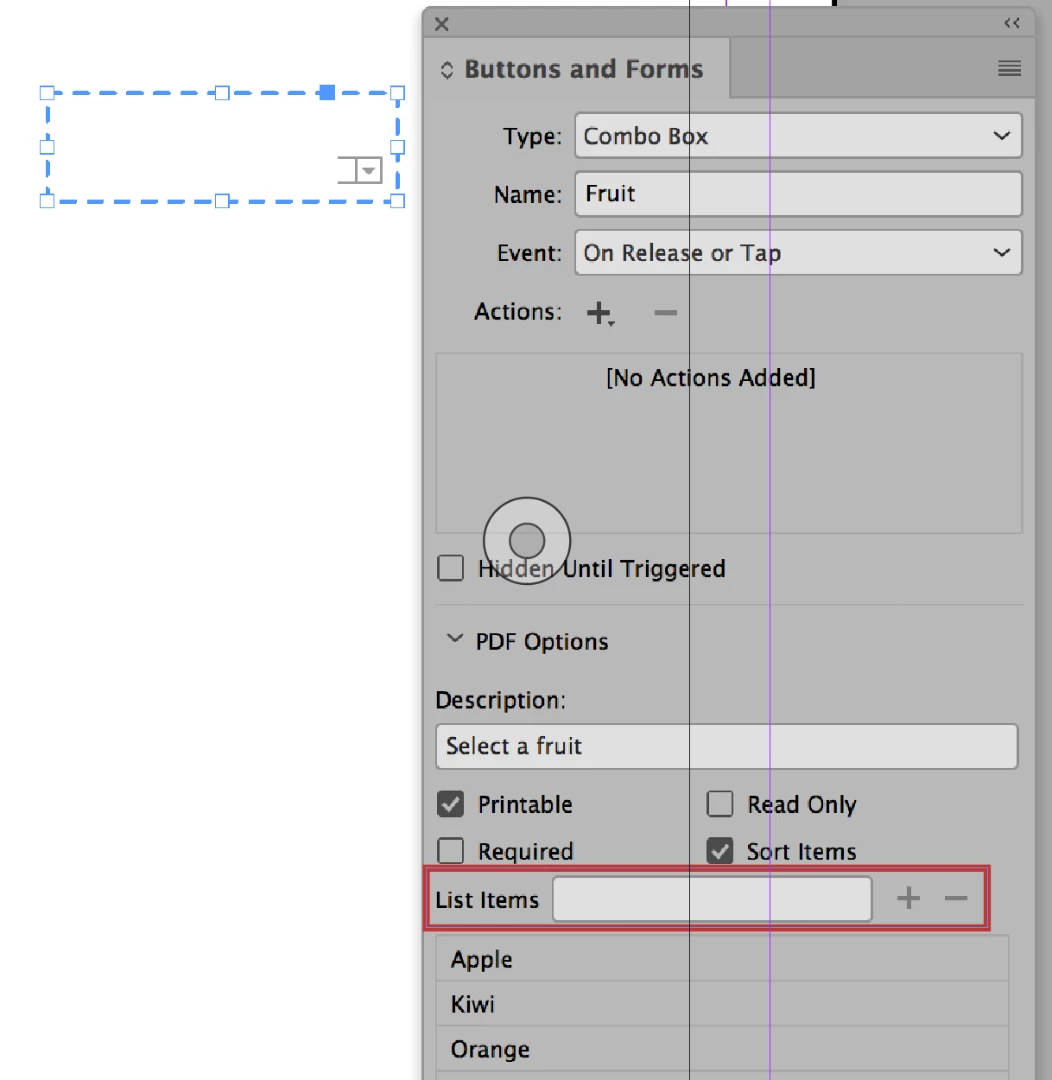
    • For the Type, choose either Combo Box or List.
    • Enter the list in "List Items".

    Export as an Interactive PDF. It won't work inside of InDesign.

    Is this what you are asking?

    9 replies

    Justin Putney
    Known Participant
    Oct 27, 2021 9:24 PM UTC

    If you want to create a functional menu that works in epub, Publish Online, and in5 (HTML5), without coding...there's a technique described in this guide:

    https://ajarproductions.com/iduxpatterns/


    in5 also comes with a Menu Builder wizard that can help with this. Shown in this video:

    https://www.youtube.com/watch?v=bcrB2-wAtWc

    Translate
    jane-e
    Community Expert
    jane-eCommunity ExpertCorrect answer
    Community Expert
    Jun 29, 2018 4:40 PM UTC

    wulfie13  wrote

    I can find what seems to be a box but there are no parameter for entering list items.

    You can do this as form field.

    • Draw a frame and select it with the Selection tool.
    • Open the Buttons and Forms panel from Window > Interactive.
    • For the Type, choose either Combo Box or List.
    • Enter the list in "List Items".

    Export as an Interactive PDF. It won't work inside of InDesign.

    Is this what you are asking?

    Translate
    Community Expert
    Jun 29, 2018 4:32 PM UTC

    For a PDF form, you can add a Combo Box (drop down). If that is what you need, take a look at screen capture.

    To make an element a Combo Box, contextual select frame, Interactive > Convert to Combo Box.

    To add the choices of the Combo Box, from Buttons and Forms panel, add your content to the List Item Field, and then select the + button to add to list.

    Translate
    jane-e
    Community Expert
    Community Expert
    Jun 29, 2018 4:44 PM UTC

    Translate
    Wulfie13Author
    Participant
    Jun 29, 2018 6:46 PM UTC

    Perhaps this is an older version because I'm not seeing what you are . I'm using 2015.3, build 11.3.0.34x64

    I'm seeing:

    Translate
    BobLevine
    Community Expert
    Community Expert
    Jun 29, 2018 4:03 PM UTC

    You're going to have provide a lot more information. What version of InDesign? What are you planning on exporting to? How will it be viewed?

    Translate
    melissapiccone
    Community Expert
    Community Expert
    Jun 29, 2018 3:58 PM UTC

    A drop down list like for a web page? That requires HTML code. It's not a "design" thing.

    Translate
    Melissa Piccone | Adobe Trainer | Online Courses Author | Fine Artist
    Participant
    Sep 29, 2023 7:34 PM UTC

    Really? 
    Of course it's a design thing. I did it in 2015 – three years before your reply – for the Bank of England. Download a copy of the Annual Report I created for them back then: https://www.bankofengland.co.uk/annual-report/2015 

    Dropdowns… 😎

    Translate