
Creating a magazine layout for blurb printing - problem with the design starting on page 1
Hi, I'm a beginner with indesign and quite stuck and confused.
I have created a layout in indesign - where I've put images that go across a double page spread, I want to print using blurb where they require the front and back cover to be uploaded as 2 facing pages on its own, and then the rest of the pages as its own upload.
They require the design to start on page 1 (the singular page at the top - which I have placed my front cover on just for now) but this first page is actually the inside first page so even if I delete it and leave it blank, it breaks my design up by pushing all the pages forward one, if that makes sense?
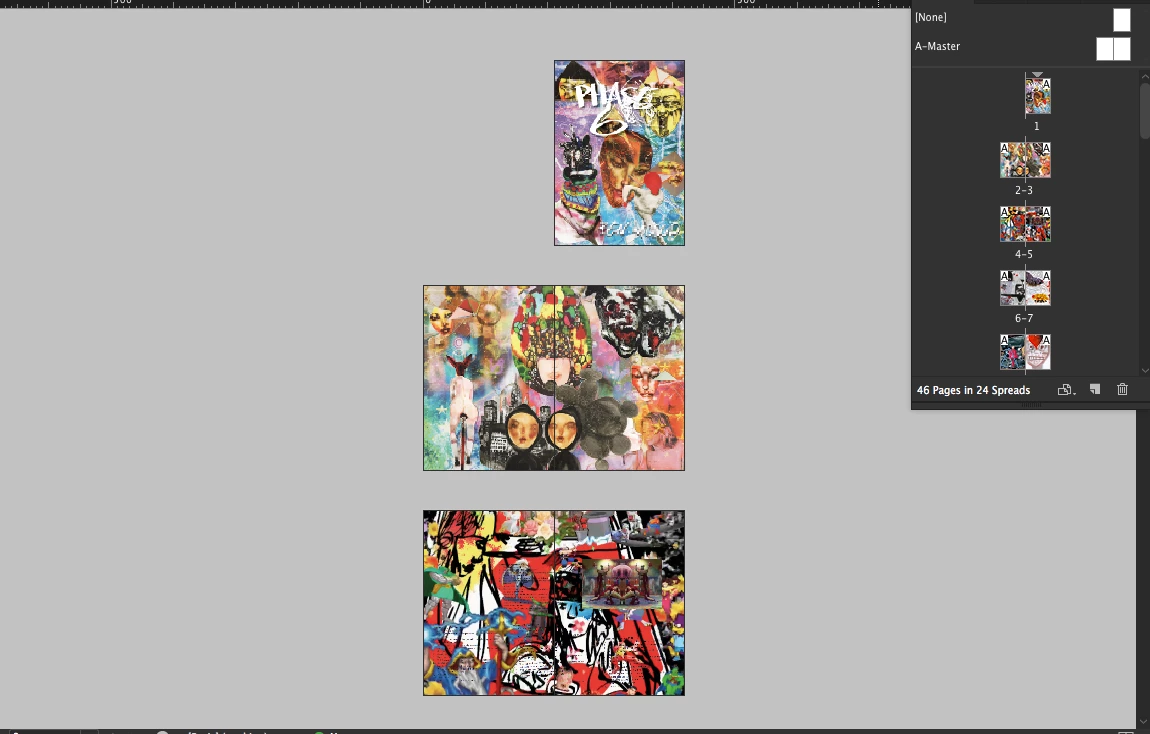
I don't think the blurb printing service allows me to start the design from page 2 - they state that they require the design to have one page at the beginning and end to be placed on the inside of the front and back cover.
I have looked for hours on google and watched many tutorials but can't seem to figure out how to get around this and make my design print as I showed in the above screenshot.
I downloaded the blurb indesign plug in which I want to put my existing design into - but It doesn't make sense to me to have to somehow cut all my double page layout spreads in half and manually put them onto different pages just so it will print properly? Hopefully I've been able to explain this well enough and makes sense to someone?
This screenshot Is how I believe it would print the way I have currently set it up.
 AdChoices