



Das Boomer
Known Participant
February 16, 2020
Answered

Creating circles?

  • February 16, 2020
  • 4 replies
  • 1301 views

Greetings!!!


Thanks to many I've gotten my mixed inks swatchbook generator up and running:

download it here: Let it Shine! 


Currently, I'm struggling with making the swatch a circle.


if(customSwatchShapeNumberOfSides == 0)
{
   polygon = currentPage.ovals.add({geometricBounds:[topLeftCoordinates_Y,  topLeftCoordinates_X, bottomRightCoordinates_Y,  bottomRightCoordinates_X], numberOfSides:customSwatchShapeNumberOfSides, strokeWeight: 0, fillColor: swatchesToUse[k].name, cornerRadius:100} );
}


It's not working. Could anyone shed light on this error of mine please?


Thank you kindly!


Antoine
This topic has been closed for replies.
Correct answer rob day

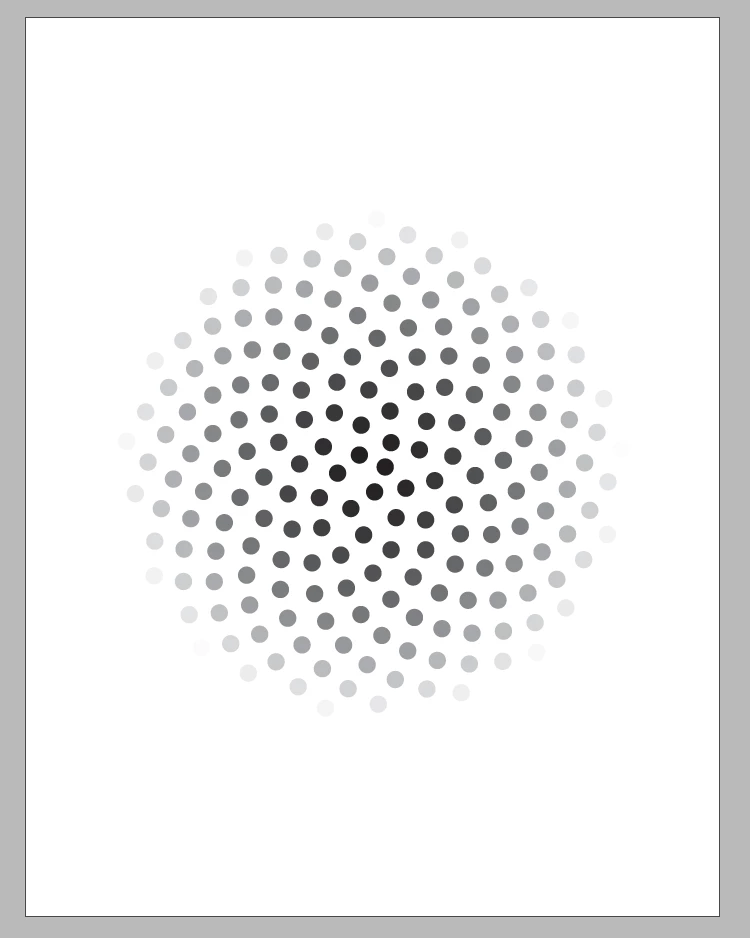
You could also make a spiral grid with circles. This makes a sunflower spiral :


var d = app.activeDocument
var ovp = d.viewPreferences.properties;
d.viewPreferences.properties = {horizontalMeasurementUnits:MeasurementUnits.POINTS, verticalMeasurementUnits:MeasurementUnits.POINTS, rulerOrigin:RulerOrigin.PAGE_ORIGIN};
d.zeroPoint = [d.documentPreferences.pageWidth*.5, d.documentPreferences.pageHeight*.5];

var n = 250
var tp = 100/n
var w = h = 10;
var space = 100;
var phi = 1.61803398874989
var pos, ov; 
var p = app.activeWindow.activePage;

for (var i = 0; i < n; i++) {
        pos=getPos(i);
        pos = [pos[0]-(w*.5), pos[1]-(h*.5)];

        ov = p.ovals.add({geometricBounds:[-(h*.5), -(w*.5), h*.5, w*.5], fillColor:"Black", fillTint:(n-i)*tp});
        
        if (i==0){
            var startingX = getPos(1)
            ov.move([pos[0]-(startingX[0]*Math.sqrt(phi)), pos[1]]);
        }else{
            ov.move(pos);
        }
}

d.viewPreferences.properties = ovp; 


/**
* @param num increment number
* @return an X,Y position as phi 1.61803398874989
*/	

function getPos(num) {
    
    var a=[];
    var angle = phi*2*Math.PI*num;
    var px=Math.cos(angle)*Math.sqrt(num*phi*(space));
	var py=Math.sin(angle)*Math.sqrt(num*phi*(space));
    a.push(px);
	a.push(py);

	return a;
};


4 replies

Das Boomer
Known Participant
February 21, 2020

OMG You are spoiling me haahaha 🙂 Thanks Rob.

Community Expert
February 17, 2020

Hi Antoine,

I don't understand why you are using properties:

numberOfSides and cornerRadius

when using ovals.add().


FWIW: What exactly is not working when executing your code?

Any error message? Is the result not an oval? Anyting else?


Better look up all available properties of object Oval in DOM documentation:

https://www.indesignjs.de/extendscriptAPI/indesign-latest/#Oval.html


Regards,
Uwe Laubender

( ACP )


Das Boomer
Known Participant
February 17, 2020

Hi Uwe,


You and Rob are correct.

I've fixed it now. 


Thank you for your help,


Antoine

rob day
Community Expert
Community Expert
February 17, 2020

In case you haven’t tried it, the modulus % operator is an easy way to make swatch grids. This makes a 5 x 5 grid of 1" circles filled with Black, with a .1" space in between


var ovp = app.activeDocument.viewPreferences.properties;
app.activeDocument.viewPreferences.properties = {horizontalMeasurementUnits:MeasurementUnits.INCHES, verticalMeasurementUnits:MeasurementUnits.INCHES}

var ncols = 5;
var nrows = 5;
var w = 1;
var h = 1;
var gut = .1;
var xs = xoff = 1;
var yoff = 1;

var p = app.activeWindow.activePage;

for (var i = 0; i < ncols*nrows; i++){
    if(i%ncols>0){
        xoff = xoff + w + gut 
        p.ovals.add({geometricBounds:[yoff, xoff, yoff+h, xoff+w], fillColor:"Black"});
    }else{
        xoff = xs 
        yoff = yoff + h + gut
        p.ovals.add({geometricBounds:[yoff, xoff, yoff+h, xoff+w], fillColor:"Black"});
    }
};   

app.activeDocument.viewPreferences.properties = ovp; 


Das Boomer
Known Participant
February 17, 2020

As I wrote I kept thinking 'there gotta be an easier way than this...'  Sigh.

Thanks Rob!

rob day
Community Expert
rob dayCommunity ExpertCorrect answer
Community Expert
February 17, 2020

You could also make a spiral grid with circles. This makes a sunflower spiral :


var d = app.activeDocument
var ovp = d.viewPreferences.properties;
d.viewPreferences.properties = {horizontalMeasurementUnits:MeasurementUnits.POINTS, verticalMeasurementUnits:MeasurementUnits.POINTS, rulerOrigin:RulerOrigin.PAGE_ORIGIN};
d.zeroPoint = [d.documentPreferences.pageWidth*.5, d.documentPreferences.pageHeight*.5];

var n = 250
var tp = 100/n
var w = h = 10;
var space = 100;
var phi = 1.61803398874989
var pos, ov; 
var p = app.activeWindow.activePage;

for (var i = 0; i < n; i++) {
        pos=getPos(i);
        pos = [pos[0]-(w*.5), pos[1]-(h*.5)];

        ov = p.ovals.add({geometricBounds:[-(h*.5), -(w*.5), h*.5, w*.5], fillColor:"Black", fillTint:(n-i)*tp});
        
        if (i==0){
            var startingX = getPos(1)
            ov.move([pos[0]-(startingX[0]*Math.sqrt(phi)), pos[1]]);
        }else{
            ov.move(pos);
        }
}

d.viewPreferences.properties = ovp; 


/**
* @param num increment number
* @return an X,Y position as phi 1.61803398874989
*/	

function getPos(num) {
    
    var a=[];
    var angle = phi*2*Math.PI*num;
    var px=Math.cos(angle)*Math.sqrt(num*phi*(space));
	var py=Math.sin(angle)*Math.sqrt(num*phi*(space));
    a.push(px);
	a.push(py);

	return a;
};


rob day
Community Expert
Community Expert
February 16, 2020

Pages are part of the active window, so I think you’ll need something like this


var p = app.activeWindow.activePage;
p.ovals.add();