I see the same behaviour. However, I wouldn't rely on those two xmp props that you mention. If I look at a pdf on my side, they just don't have those. So I won't presume they are here by default and may depend on the PDF creator application.
Here is a scripted approach. It doesn't use captions per se, but produces the expected outcome:
//Run main
function main(){

    //Check if document exists, exits otherwise
    var doc = app.documents.everyItem().getElements();
    if(doc.length==0){
        alert("You need a document to run this script");
        return;
    }
    doc = doc[0];
    var tempRect;

    //Get all graphics and loop through to process linked PDFs
    var gfx = doc.allGraphics;
    var n = gfx.length;
    var nGfx, lk, nParent, container,
    placePDFOptions = app.pdfPlacePreferences.properties,
    placedBounds, trimWidth, trimHeight, caption, parentPage,
    containerBounds;

    //Setting crop options to trim to get "final size of PDF"
    app.pdfPlacePreferences.pdfCrop = PDFCrop.CROP_TRIM;

    //Create some layer and paragraph style to be used for "captions"
    var hmu = doc.viewPreferences.horizontalMeasurementUnits;
    var vmu = doc.viewPreferences.verticalMeasurementUnits;
    var captionStyle = doc.paragraphStyles.itemByName("caption");
    if(!captionStyle.isValid){
        captionStyle = doc.paragraphStyles.add({
            name:"caption",
            pointSize:"6pt"
        })
    }
    var captionLayer = doc.layers.itemByName("captions");
    if(captionLayer.isValid) captionLayer.remove();
    captionLayer = doc.layers.add({
        name:"captions",
    })

    //Setting unit as mm (not mandatory but convenient for knowing which unit is actually used.
    //Or in other words, let's decide the unit)
    doc.viewPreferences.horizontalMeasurementUnits = doc.viewPreferences.verticalMeasurementUnits = MeasurementUnits.MILLIMETERS;


    //Let's go through all graphics and search for PDF
    while(n--){
        nGfx = gfx[n];

        //Only process PDF links
        if(nGfx.constructor.name=="PDF"){
            lk = nGfx.itemLink;

            //that are in normal state
            //could be extended to embedded with some more work
            if(lk.status==LinkStatus.NORMAL){

                container = nGfx.parent;
                parentPage = container.parentPage;

                //only process pdf which is part of a page
                if(parentPage!=null){

                    //Lazy way, processing only pdf links contained in a regular shape
                    if(/Oval|Rectangle|Polygon/.test(container.constructor.name)){

                        //Creating a dummy rectangle to place PDF using trim
                        //get pdf size and add it to the initial PDF container as frame.
                        tempRect = parentPage.rectangles.add()
                        tempRect.place(lk.filePath);
                        placedBounds = tempRect.graphics[0].geometricBounds;
                        tempRect.visibleBounds = placedBounds;
                        trimWidth = Math.round(Math.abs(placedBounds[3]-placedBounds[1])*1000)/1000;
                        trimHeight = Math.round(Math.abs(placedBounds[2]-placedBounds[0])*1000)/1000;
                        containerBounds = container.visibleBounds;

                        //Adding caption at the bottom of the PDF link
                        //On the specific layer
                        //using the specific paragraph style
                        caption = parentPage.textFrames.add({
                            geometricBounds:[
                                containerBounds[2],
                                containerBounds[1],
                                containerBounds[2]+5,
                                containerBounds[3],
                            ],
                            contents:trimWidth+"x"+trimHeight,
                            appliedParagraphStyle:captionStyle
                        });
                        caption.itemLayer = captionLayer;

                        //Now removing temporary rectangle
                        tempRect.remove();
                    }
                }
            }
        }
    }

    //Restoring default values
    app.pdfPlacePreferences.properties = placePDFOptions;
    doc.viewPreferences.horizontalMeasurementUnits = hmu;
    doc.viewPreferences.verticalMeasurementUnits = vmu;

}

//u is a way to shorten the "undefined"
var u;
//Let's run the script in a cancelable way.
app.doScript("main();", u, u, UndoModes.ENTIRE_SCRIPT, "add dimensions captions");
There you go…
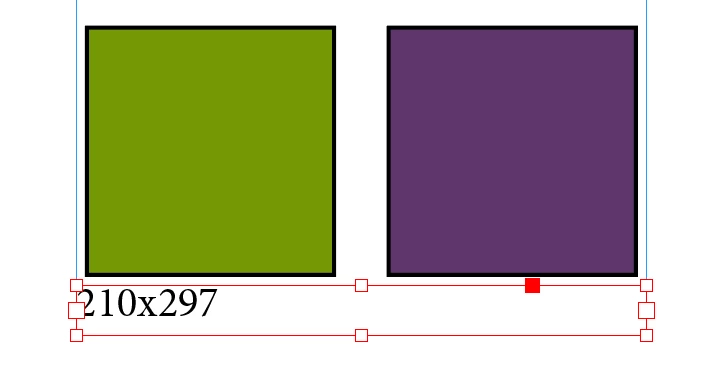
Feel free to edit script to your liking.



 AdChoices