

Answered
Creating Text Frames Script Help
Hi all, im trying to get a text frame placed through a script inDesign (multiple text frames)
However when it places, it cant find the font family, and it wont change pt size, and is always overset... I have used chatgpt to help me but im hitting a wall now and pulling my hair out...
Can anyone tell me what I am doing wrong? (apart from using chatgpt...)
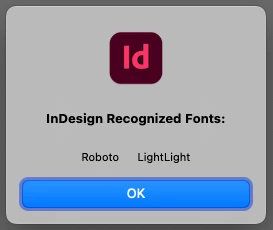
I have run a script to identify the font, but no matter what combination of words, tabs, spaces it just cant locate it.
Thanks in advanced!
// Extract parts of the document name
var docName = app.activeDocument.name.replace(/\.[^\.]+$/, ""); // Remove file extension
var parts = docName.split("_");

// Ensure we have enough parts
var firstPart = parts[0] || "";
var secondPart = parts[1] || "";

// Function to add text frames in InDesign
function addTextFrame(contents, xPos, yPos) {
    var page = app.activeDocument.pages[0]; // Use the first page
    var textFrame = page.textFrames.add();
    textFrame.contents = contents;

    // Set font properties
    var textRange = textFrame.texts[0];
    textRange.appliedFont = app.fonts.item("Roboto Light"); // Use 'Roboto Light' font
    textRange.pointSize = 8; // Font size 8pt

    // Position the text frame
    var frameWidth = 50; // Adjust width as needed
    var frameHeight = 10; // Adjust height as needed
    textFrame.geometricBounds = [yPos + "mm", xPos + "mm", (yPos + 5) + "mm", (xPos + frameWidth) + "mm"];

    return textFrame;
}

// Function to get today's date in MM/DD/YYYY format
function getFormattedDate() {
    var today = new Date();
    var day = today.getDate();
    var month = today.getMonth() + 1;
    var year = today.getFullYear();
    return (month < 10 ? '0' : '') + month + '/' + (day < 10 ? '0' : '') + day + '/' + year;
}

// Define text positions (all in millimeters)
var fileNameX = 86;
var fileNameY = -1.9;

var scodeNumberX = 92.5;
var codeNumberY = -5.3;

var secondPartX = 135;
var secondPartY = -5.33;

var todayDateX = 171;
var todayDateY = -5.33;

// Create the text frames with specified positioning
addTextFrame(docName, fileNameX, fileNameY);
addTextFrame(firstPart, codeNumberX, codeNumberY);
addTextFrame(secondPart, secondPartX, secondPartY);



 AdChoices